

U-Series vs H-Series vs HX-Series CPU Guide
Intel U-Series vs H-Series vs HX-Series explained in simple terms. Learn which Intel Core processor class is best for battery life, gaming, coding, video editing, multitasking, and heavy workloads, plus how power, cooling, and performance differ in real laptops.

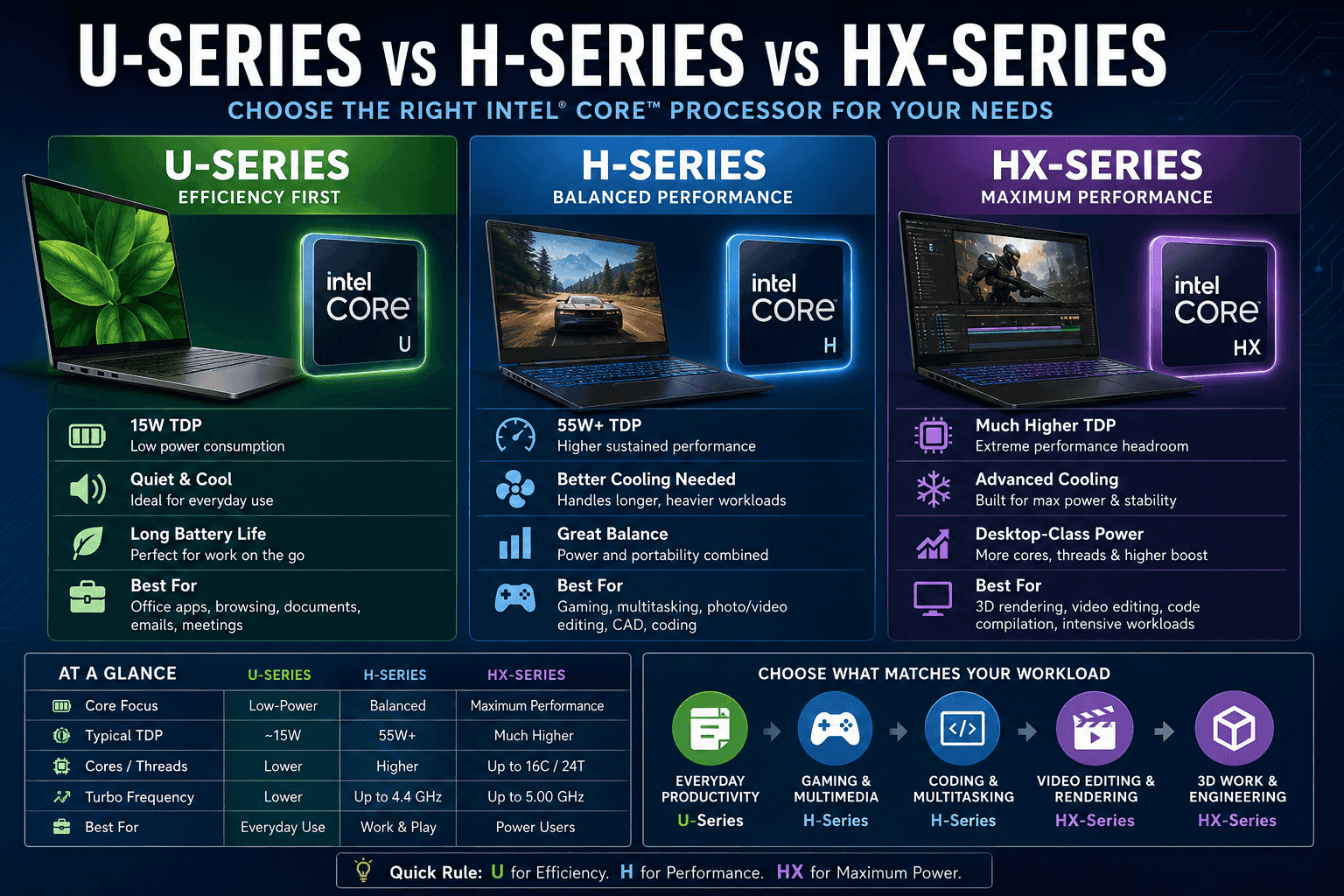
TL;DR U-Series is the best pick for battery life and quiet everyday work, H-Series is the practical middle ground for gaming and heavier apps, and HX-Series is the highest-performance option because it delivers the most cores, threads, and boost headroom.
U-Series vs H-Series vs HX-Series: Which Intel Processor Series Fits Your Needs?
Intel splits this lineup into three clear classes, and the suffix on the chip tells you a lot before you even look at benchmarks. U-Series processors are designed for ultra-low power consumption, with a typical TDP of around 15 watts, so they suit everyday tasks and long days away from a charger. H-Series processors are aimed at gaming laptops and mobile workstations, while HX-Series processors push Intel Core performance to the top of the mobile stack.
That difference matters because the same device can feel completely different depending on the suffix. An H-Series machine is better when you run code compilation, photo work in Photoshop, or video processing in Premiere Pro. HX-Series systems are the ones you buy when the workload is heavy enough to require desktop-class behavior in a laptop shell.
The practical split is easy to remember. U-Series is about quiet operation and battery life, H-Series is about sustained performance, and HX-Series is about maximum output. Intel Core naming can look dense, but the suffixes are doing most of the work here. Once you understand that, the buying decision gets much easier.
What the suffix actually tells you
A suffix is not decoration, it is Intel’s shorthand for the performance class. U-Series means low power, H-Series means higher mobile performance, and HX-Series means the most aggressive mobile configuration. That is why two Intel Core chips with similar model numbers can behave very differently in the same software.
If you live in Excel all day, the U-Series suffix usually gives you the most sensible balance. If you spend time in Adobe Premiere Pro, Blender, or Visual Studio, the H-Series or HX-Series suffix is the one that matches the work. Intel uses the suffix to separate office-friendly processors from ultra processors built for sustained load.
Intel Core Ultra sits in the same broader conversation because it represents a newer, optimized direction for mobile chips. That matters in lightweight laptops, where you want snappy app launches without turning the chassis into a space heater. For most buyers, the important question is not whether the box says Intel Core or Intel Core Ultra. The real question is how the device behaves in your own software stack.
If you mostly use Outlook, Chrome, and Teams, a U-Series Intel Core chip is usually enough. If you edit video, render 3D scenes, or compile large projects, Core Ultra or HX-class parts make more sense.
Key Decision Factors for Choosing U, H, or HX-Series
Battery life should be your first filter because it separates U-Series from the rest more clearly than any marketing label. U-Series processors are ideal for mobile employees prioritizing quiet operation and long days on the move. H-Series and HX-Series can deliver more sustained output, but that extra headroom usually means more heat and more fan noise.
Workload type comes next, and this is where Intel Core naming pays off. Office productivity, browser-heavy work, and document editing fit U-Series well because those tasks rarely require much CPU muscle. Gaming, video editing, and demanding applications change the equation because they keep the processor busy for long stretches and expose weak cooling fast.
Cooling and chassis design matter just as much as the chip itself. A thin laptop with a U-Series configuration can stay slim because the thermal load is modest. An H-Series or HX-Series device often needs a larger cooling system and a thicker shell to hold boost behavior under pressure.
The real-world tradeoffs
If you spend most of your day in Microsoft 365, Slack, and Chrome, U-Series is the sensible class. It keeps fan noise low and makes a lightweight laptop feel genuinely portable. That is the kind of setup you want for airport work, classroom notes, or meeting-heavy office days.
If your routine includes Adobe Premiere Pro exports, AutoCAD sessions, or long Excel models, H-Series is the safer choice. It has more headroom for sustained work, and that matters when a task runs for 20 minutes instead of 20 seconds. HX-Series goes even further for users who regularly push a machine hard.
Decision factors that matter most
- Power limits tell you how hard the chip can run before heat becomes a problem. U-Series stays low, H-Series sits much higher, and HX-Series reaches the top of the mobile class.
- Performance characteristics matter more than model names. U-Series handles daily work, H-Series handles heavier multitasking, and HX-Series is built for the toughest workloads.
- Cooling needs rise with the suffix. U-Series can live in slim designs, while H-Series often needs more thermal space and HX-Series needs the most robust layout.
- Portability drops as output rises. U-Series is the easy pick for lightweight laptops, H-Series is less friendly to thin chassis, and HX-Series usually belongs in desktop-replacement systems.
- Noise levels follow the same pattern. U-Series tends to stay quieter, while H-Series and HX-Series can get loud during gaming or exports.
Performance and Architecture Comparison of U, H, and HX-Series
The technical gap between these Intel processors shows up first in core counts, threads, and boost behavior. U-Series chips sit at the low-power end of the class, which is why they are the least aggressive option here. H-Series chips move higher, and HX-Series chips go highest, with the i5 HX family typically landing at 12 cores and 16 threads, while the i7-13700HX reaches 16 cores and 24 threads.
That jump matters in multithreaded work. More cores and threads help when you compile code, export video, or keep several heavy applications open at once. In a real office post, that can mean a spreadsheet, a browser, and a Teams call all staying responsive without the system bogging down.
Intel Core architecture also changes how the chip behaves under load. H-Series processors typically use a hybrid design with Performance-cores and Efficient-cores, which helps them stay responsive while juggling background tasks. HX-Series processors push that architecture further, and that extra headroom is useful in Blender, Adobe Premiere Pro, and large Visual Studio builds.
The table below shows how the classes compare across the characteristics buyers notice first.
Core counts and threads
The core count is not just a number on a box. It affects how many jobs the processor can juggle before the system starts to feel cramped. A U-Series Intel Core chip is fine for routine work, but H-Series and HX-Series processors are the ones that keep up when your software stack gets busy.
This is where desktop processors and mobile processors start to feel very different in practice. HX-Series parts are the closest thing to desktop processors inside a laptop, which is why they show up in mobile workstations and desktop replacement class machines. If you need a portable machine for code compilation or heavy applications, that extra capacity is not wasted.
Turbo frequencies and clock speeds
Clock speed is the other half of the story, and Intel Core chips vary a lot here. The i5 H-Series can reach up to 4.4 GHz, which gives it enough burst speed for responsive gaming, app launches, and short CPU-heavy bursts. The i5-12600HX can exceed 4.5 GHz, and the i7-13700HX goes up to 5.00 GHz.
That ceiling matters in software you use every day. In Excel, a higher turbo can make recalculation feel snappier on large sheets. In Photoshop, it helps with filters and brush response. In Premiere Pro, it matters when you scrub a timeline or export a sequence, because short bursts of speed still shape the total wait time.
Thermal design power and cooling requirements
The i5 H-Series processors typically sit at 55W+ TDP, while U-Series chips are around 15W. That difference changes laptop design as much as it changes speed. A U-Series machine can stay slim and quiet because the cooling system has less heat to move, while an H-Series laptop often needs more internal space, more fan capacity, and a thicker chassis to avoid throttling.
HX-Series systems go even further because the platform has to support much higher power delivery and cooling overhead. The HX designation also indicates processors that are often unlocked for overclocking and designed for maximum performance.
| Feature | U-Series i5 | H-Series i5 | HX-Series i5 / i7 |
|---|---|---|---|
| Core focus | Low-power everyday use | Balanced high-performance mobile use | Maximum mobile performance |
| Core architecture | Efficiency-first | Hybrid P-cores and E-cores | Hybrid P-cores and E-cores |
| Typical core count | Lower than H and HX | Higher than U | 12 cores on i5 HX, 16 cores on i7-13700HX |
| Threads | Lower than H and HX | Higher than U | 16 threads on i5 HX, 24 threads on i7-13700HX |
| Turbo frequency | Lower boost behavior | Up to 4.4 GHz | Above 4.5 GHz on i5-12600HX, up to 5.00 GHz on i7-13700HX |
| TDP | 15W | 55W+ | Much higher mobile power envelope |
| Memory support | Not emphasized here | DDR4 or DDR5 support | Performance-focused platform |
| Overclocking | Not the focus | Not the focus | Often unlocked for overclocking |
- U-Series keeps the lowest thermal load and the most predictable battery behavior.
- H-Series gives you hybrid architecture, higher turbo speeds, and support for DDR4 or DDR5 memory.
- HX-Series scales highest in cores, threads, and boost clocks, which is why it belongs in larger laptops with serious cooling.
- Overclocking is part of the HX story, not the U-Series story, so it suits buyers who want to tune performance.
Battery Life and Cooling Impact Comparison
Battery life is where U-Series separates itself most clearly from the rest of Intel’s mobile lineup. Intel Core U-Series processors are designed for ultra-low power consumption, and that is exactly why they work so well in lightweight laptops. If you spend your day in Outlook, Word, and Chrome, the lower draw keeps the system calmer and more predictable.
H-Series processors change the equation because they are built for higher output. That extra power is useful in gaming and heavy applications, but it usually costs you more battery life and more fan noise. HX-Series pushes the same idea to the extreme, which is why it belongs in desktop-replacement machines that assume you care more about performance than unplugged runtime.
Cooling follows the same logic. U-Series laptops can stay thinner because the thermal load is modest. H-Series and HX-Series systems need more room for heat pipes, fans, and internal airflow, especially when you are running sustained tasks like code compilation or video exports.
Battery behavior in real use
A U-Series device is the one to pick if you move between meetings and spend hours on battery. It is also the better fit for classrooms, libraries, and travel days where a charger is not always nearby. The lower heat output helps the chassis stay comfortable in your lap too.
H-Series and HX-Series are different. They are optimized for performance characteristics that matter under load, not for all-day unplugged use. If you spend most of your time in gaming sessions, Premiere Pro renders, or 3D work, the tradeoff is acceptable because the extra speed is the point.
Cooling and chassis design
The chassis tells you a lot about the processor class before you even open the lid. Thin-and-light laptops usually pair with U-Series chips because the cooling system can be compact. H-Series machines often look thicker because the internal layout has to support more heat dissipation.
HX-Series takes that further. These are the models that often feel closer to desktop replacements than travel laptops. If you want a quiet, low-profile device, the U-Series class is the safer bet.
Where Intel Arc and integrated graphics fit
Graphics also matter, especially if you are not using a discrete GPU. Many Intel Core chips rely on integrated graphics, and that is enough for office work, video playback, and light creative tasks. That pairing changes how the device handles rendering, exports, and multi-display setups.
- H-Series gives you more sustained output for gaming and multimedia.
- HX-Series is the class for intensive workloads, bigger cooling systems, and desktop-replacement behavior.
- Integrated graphics are fine for office work, but they are not the reason to buy an H-Series or HX-Series machine.
Real-World Use Cases for Intel Core U, H, and HX
The easiest way to choose is to match the Intel Core class to the software you actually use. H-Series starts to make sense when you move into gaming, multimedia, and video processing. HX-Series is the one for creative workloads that do not forgive slow hardware.
If you spend time in Adobe Premiere Pro, Blender, or large Visual Studio projects, the extra cores and higher power limits are not a luxury. They are what keeps the machine from feeling stuck halfway through a render or build. The suffix also helps if you are shopping across mini pcs, lightweight laptops, and desktop-replacement systems.
U-Series belongs in compact, quiet machines. H-Series belongs in faster all-round laptops. HX-Series belongs in the biggest, most powerful mobile systems.
Everyday office and travel work
U-Series is the cleanest fit for typical office use. It is the class that keeps a laptop light enough for commuting and quiet enough for conference rooms. If your day is built around Gmail, Teams, and spreadsheets, Intel Core U-Series is the sensible answer.
That does not mean it is weak. It means the configuration is optimized for the work most people actually do. You are not paying for extra thermal headroom you will never use, and the device stays easier to carry.
Gaming and mixed workloads
H-Series is the stronger choice when you want one laptop for work and play. That is why it often shows up in gaming laptops and mobile workstations. If you open Chrome, Discord, Steam, and a game launcher at the same time, H-Series is much more comfortable than a U-Series chip.
It is also the class that makes sense for users who split their time between office apps and heavier software like Lightroom or Premiere Pro. The extra sustained output helps the laptop stay responsive when several tasks compete for resources.
Creative and engineering work
HX-Series is the class for people who require maximum CPU performance. It is built for 3D projects, intensive video editing, and demanding engineering workflows. If you spend hours in Blender, After Effects, or Visual Studio, the extra headroom pays off in fewer slowdowns during long sessions.
This is also where Intel Core Ultra and Intel Core naming can get confusing, because the branding sounds similar even when the performance class is not. The suffix matters more than the logo. HX is the strongest mobile class here, and that is the one to choose when sustained throughput matters more than portability.
- U-Series suits office work, travel, and quiet use.
- H-Series suits gaming, multimedia, and mixed workloads.
- HX-Series suits creative work, rendering, and intensive builds.
- Mini pcs and desktop-replacement laptops follow the same logic, just in different chassis shapes.
Intel naming is easier once you stop reading the model number first and start reading the suffix. The suffix tells you whether the chip is built for low power, higher mobile performance, or the highest mobile tier. That is why Intel Core U-Series, H-Series, and HX-Series do such different jobs even when they all sit under the same broader Intel umbrella.
The word processors also matters because it reminds you that these are not just laptop parts, they are platform choices. Intel Core processors are tuned for different power limits, graphics behavior, and cooling needs. That is why a thin laptop, a gaming laptop, and a mobile workstation can all be Intel machines while behaving nothing alike.
You should also pay attention to suffixes Intel uses across the lineup, because the naming tells you about design intent. U-Series suffixes point to efficiency. H-Series suffixes point to higher sustained output. HX suffixes point to the most powerful mobile class, often with desktop-like ambitions.
How to read the label quickly
If the suffix is U, think quiet and efficient. If it is HX, think maximum output and a chassis built to handle it. That quick read saves time when you compare models on a store page or in a spec sheet.
You do not need to memorize every benchmark. You only need to know which suffix matches your software and how long you plan to stay unplugged.
What the label does not tell you
The suffix does not tell you everything. Two laptops with the same Intel Core family can still behave differently because of cooling, memory, and power tuning. A well-built H-Series laptop can outperform a poorly cooled HX machine in long sessions if the chassis is better designed.
That is why the class matters, but the device design matters too. The chip sets the ceiling, and the laptop decides how close you get to it. In other words, the suffix is the start of the story, not the whole story.
Frequently Asked Questions
Q. What is the main difference between U-Series vs H-Series vs HX-Series?
U-Series is the low-power Intel Core class for everyday work, H-Series is the higher-performance class for gaming and demanding applications, and HX-Series is the highest-performance mobile class for desktop-replacement laptops and workstations. The article’s comparison shows U-Series around 15W TDP, while H-Series is typically 55W+ and HX-Series goes even higher. That power gap is why the three classes feel so different in battery life, noise, and sustained speed.
Q. Which Intel Core class is best for battery life?
U-Series is the best Intel Core class for battery life because it is designed around ultra-low power consumption and a typical 15W TDP. It is the class that fits long days away from a charger, especially for Outlook, Word, Chrome, and Teams. H-Series and HX-Series can do more work, but they trade away unplugged runtime.
Q. Is H-Series good for gaming laptops?
H-Series is a strong choice for gaming laptops because it offers higher CPU performance and enough sustained power for long sessions. The article also notes that H-Series can reach up to 4.4 GHz, which helps with bursty tasks and responsive gameplay. It is the practical middle ground when you want one laptop for both work and play.
Q. What makes HX-Series different from H-Series?
HX-Series is the more powerful class, and it is built for the highest mobile performance, larger cooling systems, and workloads like 3D projects, intensive video editing, and code compilation. The article cites HX examples like the i5-12600HX exceeding 4.5 GHz and the i7-13700HX reaching 5.00 GHz. It also lists 12 cores and 16 threads for i5 HX, with 16 cores and 24 threads for the i7-13700HX.
Q. Should I buy an HX-Series laptop for office work?
HX-Series is overkill for office work, because Word, Excel, PowerPoint, and browser-based tasks do not need that much CPU headroom. A U-Series chip is the better fit for quiet operation, lighter weight, and a typical 15W power draw. If you only need office apps and travel-friendly battery life, HX does more than you need.
Q. How do I read Intel suffixes quickly when shopping?
If the suffix is U, think quiet and efficient. If it is H, think balanced high performance, and if it is HX, think maximum mobile output. That simple read helps you compare laptops faster without memorizing every benchmark or model number.
Which Intel Core Class Fits Your Workload Best?
Choose U-Series if you want a light Intel Core device for office work, travel, and quiet operation. It is the class that makes the most sense for typical office productivity, long battery life, and thin chassis designs. It is also the safest choice if you do not want to think about fans, heat, or power limits.
Choose H-Series if you want the most practical balance for gaming, multimedia, and heavier apps. It gives you real headroom without forcing you into the bulk and heat of HX-Series. For many buyers, it is the best middle ground because it handles mixed workloads without feeling compromised.
Choose HX-Series if you need the highest-performance Intel Core option in a laptop form factor and you know you will use it. It is the right class for 3D work, intensive video editing, large code compilation jobs, and mobile workstations that stay plugged in often. If your workload is light, the extra power is unnecessary, but if you push a machine hard, HX-Series is the class that keeps up.
Quick Reference for Intel Processor Classes
If you want a fast visual shortcut, think of the lineup as a ladder. U-Series sits at the bottom for efficiency, H-Series sits in the middle for balance, and HX-Series sits at the top for maximum output. That simple mental model is often enough when you are comparing two Intel Core laptops side by side.
The same rule applies whether you are shopping for a compact office notebook, a gaming laptop, or a mobile workstation. The suffix tells you how the processor is meant to behave, while the laptop design tells you how much of that behavior you will actually get. In other words, the suffix gives you the first clue, and the system around it fills in the rest.
Once you understand that, the whole Intel range becomes much easier to read. Instead of treating every model name as a separate puzzle, you can use the class name to quickly narrow down what kind of laptop you are looking at.
U-Series vs H-Series vs HX-Series: What to Buy in Practice
The article’s own data shows why U-Series chips are around 15W TDP, H-Series chips are typically 55W+, and HX-Series parts climb even higher with models like the i7-13700HX reaching 16 cores, 24 threads, and up to 5.00 GHz. That gap explains the real-world difference in heat, noise, and sustained speed. If you want the most practical balance, choose H-Series; if you want the quietest and most efficient option, choose U-Series; and if you need desktop-replacement power in a laptop, choose HX-Series.
U-Series makes the most sense for people who value battery life, portability, and low noise above raw speed. H-Series fits buyers who want one laptop for work, gaming, and heavier creative apps without jumping to the largest chassis. HX-Series is best for users who regularly compile code, render video, or run 3D workloads and are willing to carry a bigger machine.
If you are still deciding, start with your software and your battery expectations. Then match those needs to the suffix instead of the model number. That approach keeps the choice simple and helps you avoid paying for performance you will not use.
Ready to upgrade your tech?
Browse our collection of quality refurbished products at unbeatable prices.






