
Smartphone Camera ISP Explained: The Hidden Chip Behind Better Photos
Learn everything about Android updates in 2026, including the latest Android 17 release, version history, security updates, support timelines, and how to check and install updates. Discover why long-term software support matters before buying your next Android phone.

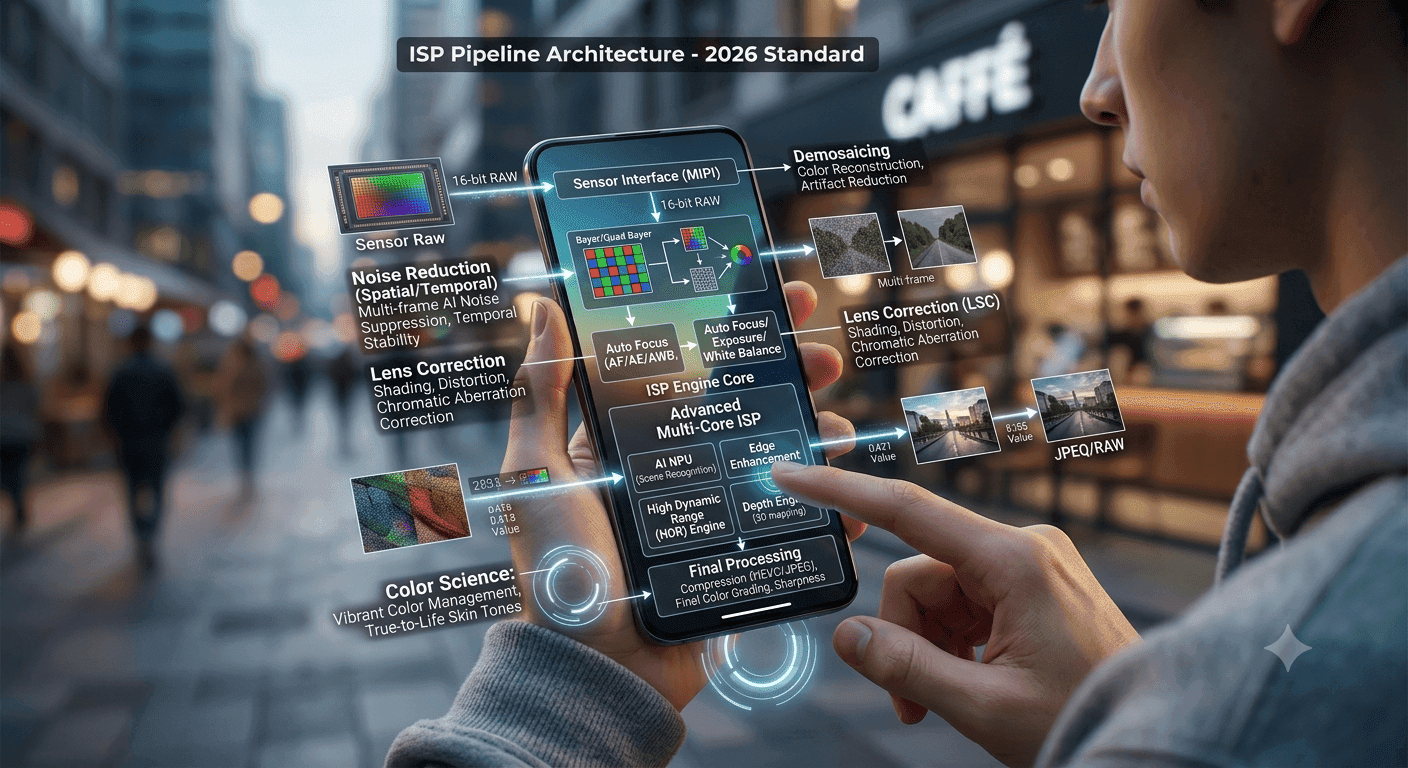
TL;DR Smartphone Camera ISP is the hidden chip that turns RAW sensor data into the RGB images you actually see, and it shapes focus, exposure, white balance, color, and noise reduction. Qualcomm Spectra supports advanced features like 8K HDR video, while Exynos 2200 supports up to 200MP sensors, so the ISP can change how a phone camera performs long before you edit a photo.
Understanding Smartphone Camera ISPs and Their Role
The Image Signal Processor is the part of a smartphone camera that converts RAW sensor image data into RGB images, and that single job explains why it matters so much. A camera sensor captures light as raw data, but the ISP turns that data into something your eyes can read as a finished photo or frame. Without that processing step, you would not get the colour, balance, or detail control that modern mobile photography depends on.
ISPs do more than convert image data. They perform billions of arithmetic operations to tune focus, exposure, white balance, colour, and noise reduction in real time. That matters because the sensor only gives you information, while the processor decides how to interpret it, and that interpretation separates a dull capture from a clean image with accurate white tones and controlled highlights.
If you have ever compared two phones in the same room and one looked warmer, sharper, or cleaner, the ISP was doing much of that work. A practical way to think about it is this: the sensor collects light, and the signal processor shapes it. In a shot from Google Photos, Adobe Lightroom, or even the default camera app, the ISP influences how much detail survives in shadows, how skin tones look, and how aggressively the phone smooths out grain.
That processing layer also affects the content you share later, whether it is a quick message, a work document, or a social post. It is a useful reference point for understanding why two phones can produce different results from similar hardware.
Noise Reduction in Low Light
Low-light photography is where the ISP earns its keep. It analyses patterns in the sensor’s data to reduce graininess, especially when the scene is dark and the camera has less clean information to work with. That process is not magic, and it cannot invent detail that never reached the sensor, but it can suppress ugly noise while preserving enough structure for the image to remain readable.
If you shoot in a dim restaurant or on a night street, the ISP decides whether the photo looks like a clean memory or a muddy mess. This is also where many users misunderstand image quality. They blame the camera sensor when the real problem is often the processing pipeline.
A phone with a decent sensor and weak noise reduction can look worse than a smaller sensor paired with a smarter ISP, especially when the light drops and the exposure has to be pushed harder. That is why the hidden chip matters even on midrange mobile devices. It does not replace the sensor, but it often decides how usable the final image becomes.
It also affects how much access you have to detail in shadows, since heavy smoothing can hide texture along with noise.
HDR and Dynamic Range Features
HDR support is another core ISP task. The processor merges multiple images taken at different exposures so bright skies and darker foregrounds survive in the same frame. Dynamic Range Compression goes a step further by adjusting brightness locally to create a more balanced dynamic range, which helps prevent blown-out windows or crushed shadows in scenes with mixed lighting.
In a backlit portrait, that can mean seeing both the face and the background instead of losing one of them. The evolution here is the real story. ISPs started as basic image processing blocks, but they now enable computational photography features like night mode and portrait mode.
It is clear that the image signal processor can manage raw data, exposure, and noise reduction under pressure. For most people, the right ISP is what makes a phone camera feel smart instead of merely present. That is why the processing layer matters as much as the lens and sensor, and why it remains a useful reference for judging camera performance.
Capabilities of Modern ISPs
Modern smartphone Camera ISP hardware is not just about cleaner photos. It now drives 8K video recording, slow-motion capture, and real-time stabilization, which means the chip has to keep up with far more data than a simple still image pipeline. That is why the same processor that improves a portrait can also decide whether your handheld video looks steady or shaky when you walk through a market or pan across a room.
ISPs also enable AI capabilities such as scene identification, face recognition, and real-time enhancements. In practice, that means the camera can recognize a food shot, a face, or a backlit window scene and apply the right tuning without waiting for manual input. On a Snapdragon 8 Gen 3 device, those changes happen in real time, which is why preview and capture can look closer together than they did on older phones.
This matters in everyday use more than in spec sheets. In WhatsApp video calls, Google Meet, or Instagram-style recording, the phone has to adjust exposure and color while you keep moving. The result is not just prettier footage, because the ISP also helps the camera stay responsive while the scene changes.
That digital processing path is what keeps the camera usable when you need quick access to a reliable view.
8K Video and Slow-Motion
Video is where processing demands rise sharply. ISPs enable 8K recording and slow-motion capture by handling massive streams of image data quickly enough to avoid obvious lag or dropped frames. Real-time stabilization depends on the same core logic, because the camera must correct motion while the scene is still being captured.
If you shoot clips for Final Cut Pro, CapCut, or Adobe Premiere Pro, the quality of the ISP affects how much usable detail survives after cropping and trimming. Qualcomm Spectra takes this a step further with 8K HDR video, multi-frame noise reduction, and AI-based scene detection. That combination matters because video has less tolerance for mistakes than still photography.
A noisy night clip or a badly exposed street scene becomes obvious immediately, and better smartphone ISP hardware gives the phone more room to keep motion smooth while protecting detail. The practical result is steadier footage and fewer processing artifacts when the scene gets difficult. That also helps when a creator needs to address framing problems later in editing, because the source file holds up better.
Samsung Exynos ISP Features
Samsung’s Exynos line takes a different route. Exynos 2200 supports up to 200MP sensors, and Exynos 1280 supports ultra-high resolutions up to 108MP. That makes the Exynos path attractive for phones that lean on large camera sensors and multi-camera arrays, because the ISP has to preserve detail across a very high-resolution input pipeline.
The Exynos 2200 also features an octa-core CPU, and that matters because the imaging pipeline does not work in isolation. Samsung smartphones use this approach to keep multi-camera behaviour more consistent across lenses. The Exynos ISP also uses advanced noise reduction algorithms to reduce diverse color or pattern noise while preserving texture details.
That balance is harder than it sounds. Over-smoothing can erase fabric texture, hair detail, or brick patterns, while under-processing leaves distracting grain in the frame. In practical terms, the enhanced pipeline gives the camera more room to process difficult scenes without flattening everything.
Comparing Leading ISP Specifications and Performance
The most useful way to compare a smartphone Camera ISP is to look at what each chip can actually process, because specifications translate directly into camera behaviour. Qualcomm Spectra supports single cameras up to 32-megapixel and dual ISP handling up to 20-megapixel, while Exynos 2200 supports image sensors up to 200MP. Snapdragon 8 Gen 3 goes beyond stills with real-time 8K video processing, and Snapdragon 720G sits much lower with 4K video recording and playback at up to 30 frames per second.
Those gaps matter when you move from casual snapshots to demanding photo and video work. The Exynos 2200 achieves a total AnTuTu score of 1,073,002, while the Qualcomm Snapdragon 888 scores 825,131. The numbers do not tell the whole story, but they help show how much processing headroom different platforms can bring to imaging tasks.
For readers trying to understand the trade-off, the comparison is less about one universal winner and more about matching the ISP to the camera workload. Some chips prioritize high-resolution sensor support, while others focus on video throughput, AI features, or multi-frame processing. That is why the same phone class can feel very different in real camera use.
For example, an Apple device and another phone may share similar camera hardware on paper, yet deliver different results because the ISP handles the workload differently.
Qualcomm Spectra ISP
Qualcomm Spectra is built for speed and balanced image processing. It captures 4,096 times the amount of data as its predecessor, which tells you how much information the newer pipeline can handle before the final image is formed. That extra headroom is one reason Spectra can support cinema-grade videos and professional-quality photos with ease.
The practical takeaway is simple. If you shoot a lot of video or want a phone that feels responsive when switching between camera modes, the Spectra stack is designed for that kind of load. It also helps when the camera needs to keep exposure, colour, and detail under control at the same time.
That makes Spectra especially relevant for users who care about consistent preview behavior and fast capture. It is not only about raw specs, because the processing pipeline also affects how quickly the phone can react when lighting changes from one frame to the next.
Samsung Exynos ISP
The Exynos 2200 also features an octa-core CPU. Samsung’s advanced noise reduction algorithms are especially relevant here because a high-megapixel sensor can still look bad if the signal processor does not control pattern noise well.
The practical result is a processing stack that can handle demanding sensor setups without losing texture too quickly. That is useful when a phone needs to switch between lenses or maintain consistent output across different camera modules. It also helps the device keep the camera code focused on detail preservation instead of overcorrecting every frame.
For an Apple user comparing devices, that difference can be easy to notice in everyday shooting.
Market Trends and Historical Context of Smartphone ISPs
The smartphone camera ISP did not appear fully formed. The first commercial phone with a colour camera was the Kyocera Visual Phone VP-210, released in Japan in May 1999, and that early milestone shows how far mobile imaging has moved in less than three decades. Back then, the camera was a novelty. Today, the image signal processor is a core part of a phone that competes on quality, detail, and processing speed.
The early camera phone era was limited by small sensors, weak processing, and basic image handling. That shift is why modern mobile devices are judged less by the presence of a camera and more by the behaviour of the entire imaging system. India’s adoption curve makes that point even clearer, because internet users grew from 100 million in 2010 to 400 million by 2015 and were projected to top 600 million in 2020.
India now has approximately 85.5 percent of households with at least one smartphone, which shows how central the device has become. When that many households carry a camera in their pocket, the ISP stops being a niche component and becomes a mainstream requirement. People use it for school events, work documents, QR scans, family photos, and short video clips, so the chip has to work reliably across all of those tasks.
ISP Market Growth Projections
The market keeps expanding because camera expectations keep rising. The projected growth to 3 billion by 2034 shows that imaging hardware will remain a major part of smartphone development. That growth also explains why AI features, better video processing, and stronger low-light handling keep showing up in newer devices.
This trend is not only about more phones in more hands. It is also about more people expecting the camera to do more work automatically, from scene detection to exposure correction. As a result, the ISP has become one of the most important hidden components in the phone.
The historical pattern is clear: as smartphone adoption increased, camera processing moved from a basic support function to a central product feature. That is why ISP performance now influences buying decisions as much as display quality or battery size.
Common Mistakes in Smartphone ISP Usage
The biggest mistake people make with a hardware signal processor ISP is assuming the chip can fix everything. It cannot. Even with strong noise reduction, low-light images can still show grain, smeared detail, or colour shifts when the sensor data is weak.
The ISP can clean up the frame, but it still needs enough usable information from the camera sensor to work with, and that limitation shows up most clearly at night or indoors. Noise reduction works by analysing patterns in the sensor’s data, which helps reduce graininess in dark scenes. The trade-off is that aggressive processing can soften texture, especially on hair, clothing, or fine background detail.
The same logic applies to exposure and white balance. When the camera guesses wrong under mixed lighting, the signal processor ISP has to correct more aggressively, and that can create unnatural colour or a flat look. If you rely on the default camera app in a restaurant, a concert hall, or a room lit by a monitor and a lamp, the processor is doing damage control before you ever open an editor.
Battery Life Considerations
Heavy processing costs power. Every arithmetic operation that improves focus, exposure, white balance, colour, and noise reduction also draws from battery life, especially when you combine camera use with 5G, GPS, and social apps. That is why long recording sessions and repeated photo bursts can drain a phone faster than simple browsing, even if the device has a large battery.
This is also where users misread performance. A phone may feel fast in the camera app but still lose stamina under extended video capture because the ISP, CPU, and display all stay active at once. If you shoot long clips for YouTube Shorts, classroom lectures, or field documentation, battery behaviour matters as much as image quality.
Power use also affects how consistently the camera can maintain quality over time. A strong signal processor ISP helps, but the rest of the phone still has to support the workload. That is why long sessions deserve as much testing as one-off sample shots.
Feature Selection Best Practices
You do not need every advanced ISP feature for every use case. A phone that prioritizes 8K video and AI scene detection may be a poor fit if you mostly scan documents, take family portraits, or record short 1080p clips. The trick is to match the processing stack to the work you actually do, because extra features can become overhead if the hardware or battery cannot sustain them.
For developers and power users, that means paying attention to how the camera behaves in your real workflow, not just on a spec sheet. If you use Google Camera, Lightroom Mobile, or built-in video editors, test whether the phone keeps detail without over-sharpening or colour clipping. The best approach is practical testing in the lighting you actually use.
Low light, mixed indoor light, and moving subjects reveal more about an ISP than a marketing list ever will. That makes real-world camera behaviour the most useful filter when choosing a phone.
Frequently Asked Questions
Q. What does a smartphone camera ISP actually do?
A smartphone camera ISP converts RAW sensor data into RGB images and applies processing that shapes focus, exposure, white balance, color, and noise reduction. It also helps with HDR, stabilization, and computational photography features. In practice, it is one of the main reasons two phones with similar sensors can still produce different results.
Q. Why does low-light performance depend so much on the ISP?
Low light gives the sensor less clean information, so the ISP has to work harder to reduce graininess and preserve usable detail. It analyzes patterns in the data and tries to keep the image readable without over-smoothing everything. That is why a strong ISP can make night photos look cleaner and more controlled.
Q. How does HDR relate to the ISP?
HDR depends on the ISP merging multiple images taken at different exposures. That lets the camera keep detail in bright and dark parts of the same scene. Dynamic Range Compression can also adjust brightness locally to help balance mixed lighting.
Q. What makes Qualcomm Spectra notable in this comparison?
Qualcomm Spectra supports advanced features like 8K HDR video, multi-frame noise reduction, and AI-based scene detection. It also supports single cameras up to 32 megapixels and dual ISP handling up to 20 megapixels. That combination makes it especially relevant for users who care about video and responsive camera behavior.
Q. What makes Samsung Exynos ISP notable in this comparison?
Samsung Exynos ISPs support high-resolution sensors, multi-camera systems, and AI-powered enhancements in Samsung smartphones. Exynos 2200 supports up to 200MP sensors, while Exynos 1280 supports ultra-high resolutions up to 108MP. That makes the Exynos path useful for phones built around dense sensor data and multi-camera setups.
Q. What should I test before trusting a phone camera?
Test low-light shots, mixed indoor lighting, and video stabilization before making a decision. Those situations reveal how well the ISP handles noise reduction, exposure, and color correction under pressure. They also show whether the phone keeps detail without overprocessing the image.
Why Smartphone Camera ISP Performance Matters When Buying a Phone?
A good ISP matters because it shapes the photo before you ever edit it. It affects how the phone handles RAW sensor data, manages low light, and supports features like HDR, 8K video, and AI scene detection. That makes it a core part of the camera experience rather than a background detail.
In practice, it helps determine how the camera performs in the situations people care about most, which is why it can influence buying decisions so directly. If you compare phones with similar sensors, the one with the stronger processing stack often feels more consistent in daily use. That difference shows up in preview behavior, video stability, and how much detail survives after the camera applies its own corrections.
For most buyers, the smartest move is to focus on the scenes they shoot most often. A phone with strong low-light processing, reliable HDR, and stable video handling will usually feel better than one that only looks impressive on a spec sheet. If you are choosing between devices, test those real-world conditions first and let the ISP performance guide the final decision.
What to Remember About Smartphone Camera ISPs?
The hidden chip sits at the center of a phone camera because it turns sensor data into a usable photo or video. It influences focus, exposure, white balance, color, noise reduction, HDR, and even features like 8K HDR video, while chips such as Exynos 2200 support sensors up to 200MP and Qualcomm Spectra supports single cameras up to 32-megapixel.
That means the hidden chip can shape the final result just as much as the lens or sensor, especially when light is poor or the scene is changing quickly. It also explains why two phones with similar hardware can still feel very different in real use. If you are comparing phones, test low-light shots, mixed indoor lighting, and video stabilization so you can see how the ISP behaves in real conditions.
The best choice is usually the one that matches your shooting habits, not the one with the longest feature list. If you care most about video, look closely at stabilization and 8K support. If you care most about still photos, pay attention to low-light cleanup, HDR, and texture preservation.






