
On-Device AI vs Cloud AI: Best Choice Guide
On-Device AI vs Cloud AI compares speed, privacy, cost and scalability to help you choose the right AI approach. Discover the key differences, real-world use cases, hybrid AI trends and which solution best fits personal or business workloads.

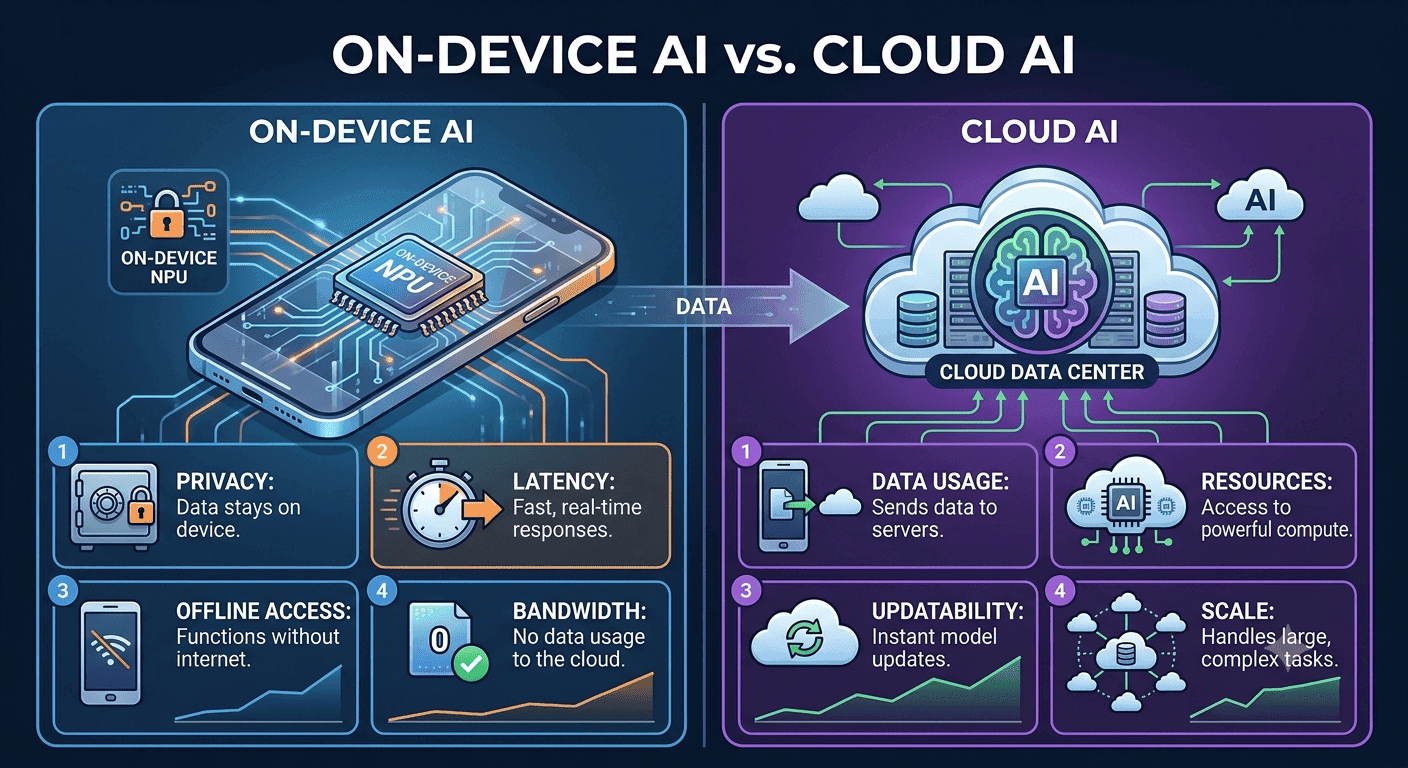
TL;DR On-Device AI is usually the better choice for everyday use because it offers zero marginal cost after download, lower latency, and stronger privacy, while Cloud AI is better for heavy computing and complex reasoning. In India, the cloud often comes with a recurring premium, such as Google AI Pro Plan India 5TB at INR 5,899.
Understanding On-Device AI and Cloud AI
On-Device AI vs Cloud AI starts with a simple architectural split: one processes data locally on the hardware itself, while the other sends data to remote servers for inference. That difference sounds technical, but it shapes the entire user experience because it affects speed, privacy, reliability, and cost. When artificial intelligence runs on the device, the model stays close to the data and the response arrives faster. When artificial intelligence runs in the cloud, the request travels through the internet connection, which adds delay and depends on external infrastructure.
Local vs. Remote Processing
This local-versus-remote distinction matters because it changes what users notice first. On-device systems feel immediate, especially in real-time applications like voice recognition, camera analysis, or emergency alerts. Cloud systems feel broader and more powerful because they can tap into data centers, larger models, and continuously updated services. In practice, the question is not whether one approach is modern and the other is old. It is whether the task needs local responsiveness or cloud scale.
The biggest advantage of On-Device AI is that it can work without constant network access. IBM says it is ideal for applications that require real-time processing and can function offline, and it is particularly useful in environments with limited connectivity. That makes it a strong fit for healthcare, manufacturing, and smart cities, where systems may need to keep running even when the internet is unstable. A phone feature that tags photos locally or a tablet that transcribes notes on the spot shows device models can make everyday tasks smoother without waiting on servers. In a cloud setup, those same tasks depend more on the connection and remote processing.
Security and Scale
Cloud AI, by contrast, is built for heavier workloads and broader coordination. That makes it ideal for cross-city analytics, integrated platforms, and enterprise systems that need access to many data streams at once. Security is another core difference. IBM considers On-Device AI more secure than Cloud AI because sensitive data stays local, and CNET adds that this reduces exposure to cyber threats. That matters for personal photos, health data, private messages, and work documents that users may not want to leave the device.
Cloud AI can still be secure, but it depends on transfer, storage, and server-side handling, which creates more points of exposure. For everyday users, local processing often feels safer because it keeps more control in their hands. The market trend shows that both approaches are growing, not one replacing the other overnight. The future is not a simple winner-takes-all story. It is a shift toward smarter placement of work, where local devices handle fast, private tasks and cloud platforms handle the heavy lifting.
Key Factors to Consider When Choosing AI Solutions
Choosing between On-Device AI vs Cloud AI becomes much easier when you evaluate the system the way real users experience it. The right answer depends on four things that matter every day: cost, security, latency, and connectivity. Cost is often the first practical filter. On-Device AI has zero marginal cost after the model is downloaded to the device, which means each additional inference does not trigger another cloud bill.
IBM also says local processing can significantly reduce operational costs because data is handled on the hardware itself instead of being sent back and forth to remote infrastructure. In India, that matters because startups can begin using AI with a budget of INR 4 lakh to lakh, while more complex and scalable AI systems may cost lakh to INR 4 crore. Cloud AI can still be economical for the right use case, but the cost structure is different. Google AI Pro Plan India 5TB costs INR 5,899, which shows that cloud convenience often comes with a premium recurring price. For users who run many small tasks every day, the long-term math can favor local processing because the device absorbs more of the work. For businesses, the same logic applies when repeated inference, bandwidth, and storage begin to pile up.
Security and privacy are the next major decision points. Astrikos explains that On-Device AI processes data locally on the hardware itself, while Cloud AI processes data on remote servers. IBM says local AI is considered more secure because sensitive data stays on the device, and CNET notes that privacy improves because exposure to cyber threats drops. If your workflow touches medical notes, legal drafts, private photos, or internal documents, that local-first design is often the safer default.
Latency is where the difference becomes obvious to users. On-device inference averages about 80 to 300 milliseconds, while cloud APIs average roughly 400 to 1,200 milliseconds. That gap sounds small on paper, but in real-time applications, it changes how natural the product feels. Voice assistants, live camera features, and instant suggestions work better when the response is local and immediate.
Connectivity is the final filter, and it is often the deal-breaker. IBM says Cloud AI requires continuous internet access and consumes considerable bandwidth, which makes it fragile in weak-network environments. On-Device AI is ideal for offline use and limited connectivity, which is why it is useful in healthcare, manufacturing, and smart cities. If your users move between locations, travel frequently, or work in areas with unstable networks, local processing is usually the safer choice.
Decision Checklist
- Choose On-Device AI if the task must work offline or with weak internet.
- Choose Cloud AI if the task needs large-scale data aggregation or heavy compute.
- Choose On-Device AI if privacy and local data control are top priorities.
- Choose Cloud AI if continuous updates and shared cloud platforms matter more.
The most practical takeaway is that the right AI solution is the one that matches the workload, not the marketing. If a task is repetitive, private, and time-sensitive, local AI is usually the better fit. If a task is large, collaborative, and compute-heavy, cloud AI still has the edge.
Applications and Performance Comparison of AI Types
On-Device AI vs Cloud AI is easiest to judge when you look at actual applications instead of abstract promises. On-Device AI is ideal for applications that require real-time processing and can function offline, which is why IBM highlights healthcare, manufacturing, and smart cities as strong fits. These are environments where delay can hurt usability and where connectivity may not always be reliable. Cloud AI, meanwhile, is designed for workloads that need more computing power, more storage, and more shared intelligence than a single device can provide.
On-device use cases tend to be the ones users feel every day. CNET notes that local models can perform tasks like voice recognition and image tagging without internet access, and they can improve user experience by providing real-time feedback and reducing latency. Cloud AI is stronger when the task is too complex or too broad for local hardware. MindStudio also notes that Cloud AI can handle complex reasoning tasks that On-Device AI currently cannot. That is why cloud platforms remain important for enterprise search, citywide planning, large recommendation systems, and other workloads that depend on pooled data and bigger models.
Latency is one of the clearest performance differences between the two approaches. In practice, that means local AI feels closer to the user and more responsive in interactive apps. Cloud AI can still be powerful, but the network trip adds waiting time that becomes noticeable in real-time workflows. That delay is not just a technical footnote. In applications like emergency alert systems, autonomous vehicles, or live assistance tools, a few hundred milliseconds can affect trust and usability. Astrikos specifically points out that ultra-low latency is critical for such tasks, which is why local processing is often preferred when timing matters. If the app must answer instantly, the device has a clear advantage.
Cloud AI wins when scale matters more than immediate response. It can aggregate data from many sources, update centrally, and support large multi-user systems without relying on the limits of one phone or laptop. That makes cloud platforms better for integrated business systems and analytics engines that need broad visibility across regions or departments. In those cases, the cloud is not just faster to deploy; it is structurally better at coordination.
On-Device AI, however, is not trying to replace that role completely. Its strength is to handle the local, frequent, and privacy-sensitive tasks that do not need a data center behind them. That is why hybrid systems are becoming more common: the device handles the first layer of work, and the cloud takes over when the job becomes complex. This split gives users the best of both worlds without forcing every request through the same path.
Practical Comparison Table
| Factor | On-Device AI | Cloud AI |
|---|---|---|
| Processing location | Local hardware | Remote servers |
| Typical latency | 80 to 300ms | 400 to 1,200ms |
| Internet requirement | Can run offline | Requires continuous access |
| Best use case | Real-time local tasks | Heavy compute and aggregation |
| Privacy | Stronger local control | More transfer exposure |
| Scaling | Limited by device resources | Almost infinite scale |
- On-device AI is strongest in real-time, offline, and privacy-sensitive use cases.
- Cloud AI is strongest in large-scale analytics, heavy compute, and complex reasoning.
- Latency favours the device, while scale favours the cloud.
Cost Analysis and Pricing Comparison of AI Solutions
Cost is one of the strongest arguments in the On-Device AI vs Cloud AI debate, especially in India where budgets vary widely. The pricing split makes the difference clear: startups can begin using AI with a budget of INR 4 lakh to lakh, while more complex and scalable AI systems may cost lakh to ₹4 crore. At the consumer level, Google AI Pro Plan India 5TB costs INR 5,899, which places it firmly in the premium cloud category. That means the cheapest path is not always the cloud path; often, it is the one that moves more computation onto the device.
On-Device AI has zero marginal cost after the model is installed, so each additional request does not create another inference bill. IBM also says local processing can significantly reduce operational costs because data is handled on the hardware itself. For repetitive everyday tasks like transcription, tagging, or quick summaries, that can add up to meaningful savings over time.
Cloud AI pricing usually looks simple at first, but the total cost grows with usage. Subscriptions, API calls, storage, bandwidth, and server-side hosting all contribute to the bill. That is why cloud-based tools can be affordable for light use but expensive for high-volume workflows. If a startup is processing thousands of small requests per day, the recurring cloud charge may end up costing more than the up-front device-based approach.
The difference becomes easier to see when you compare the India pricing benchmarks side by side. Cloud AI costs can rise quickly as usage increases, while the most affordable startup range remains INR 4 lakh to lakh.
India Pricing Benchmarks
| Option | India Price | What It Suggests |
|---|---|---|
| AI with a budget of lakh | IN4 lakh to lakh | Cheapest entry range for startups |
| Google AI Pro Plan India 5TB | INR 5,899 | Premium-priced cloud subscription |
| Complex scalable AI systems | lakh to INR 4 crore | Higher-cost enterprise deployments |
- On-device AI is cheaper for repeated tasks because the marginal cost drops to zero after download.
- Cloud AI subscriptions and usage charges can add up quickly for high-volume workloads.
- In India, the most affordable startup range is INR 4 lakh to lakh, while enterprise systems can rise to lakh to INR 4 crore.
Mistakes to Avoid When Adopting AI
The most common mistakes happen when teams choose an architecture before understanding the workload. Many users assume cloud is always more capable, while others assume local AI can replace everything. Both assumptions cause problems. The better approach is to match the system to the task, then test it under real conditions like weak connectivity, repeated usage, and privacy-sensitive data.
One frequent mistake is underestimating connectivity requirements for Cloud AI. IBM says cloud systems require continuous internet access and consume considerable bandwidth, so a cloud-first app can fail in exactly the places where users expect it to work. That is especially risky for field work, travel, and rural environments. Another mistake is ignoring latency in real-time applications. That difference may look modest in a spreadsheet, but users feel it immediately in voice assistants, camera apps, and live suggestions.
Connectivity and reliability mistakes are usually the first place teams get caught. Cloud AI is often chosen for convenience, but convenience can disappear when the network is unstable. If users are in a train, a factory, a hospital corridor, or a remote site, a cloud-only workflow may stall or fail. On-Device AI avoids that because it can run offline and handle real-time tasks locally.
Security and privacy mistakes create a different kind of risk. IBM considers On-Device AI more secure because it keeps sensitive data local, and CNET says privacy is improved because exposure to cyber threats drops. If your workflow involves medical notes, private images, or internal records, sending everything to a server creates unnecessary exposure. Security should be built into the architecture, not added as an afterthought.
Capability and expectation mistakes are the reverse problem. If teams try to force a small model to do a big job, they end up with poor accuracy or frustrating limitations. The smarter pattern is to keep simple work local and route complex work to the cloud. The best implementation strategy is to define the task first, then choose the architecture that fits. If the work is private, fast, and repetitive, local AI is usually the right tool. If the work is broad, heavy, and collaborative, cloud AI remains the better fit.
Common Adoption Pitfalls
- Do not use Cloud AI when the app must function offline.
- Do not expect On-Device AI to handle every complex reasoning task.
- Do not ignore latency when building real-time applications.
- Do not treat local processing as a replacement for all cloud scale.
Why Hybrid AI Models Are Gaining Ground?
Hybrid AI models are becoming the most interesting part of the build conversation because they combine the strengths of both approaches. MindStudio says hybrid models that combine On-Device AI and Cloud AI are gaining traction, and the capability gap between them is narrowing as technology advances. Instead, systems can decide which work should stay local and which should go to the cloud.
On-device AI has zero marginal cost after download and can significantly reduce operational costs by processing data locally. Cloud AI adds broader computing power, continuous updates, and the ability to handle complex reasoning tasks that local models currently cannot. A hybrid design lets the device handle the fast, private, routine work while the cloud handles the heavier requests. That structure matters because it avoids forcing every request through the same path.
It also gives teams a practical way to balance privacy, latency, and scale without treating the decision as all or nothing. In many real products, hybrid architecture is the most realistic long-term direction. The future of AI is not about choosing one side forever. It is about assigning the right job to the right layer. That is why the most durable systems will use edge computing, edge AI, and cloud infrastructure together, instead of relying on a single layer for every task.
Frequently Asked Questions
Q. What is the main difference between on-device and cloud AI?
On-device systems process data on the hardware itself, while cloud systems send data to remote servers. That difference affects latency, privacy, and connectivity needs. It also changes how much infrastructure the system depends on for everyday computing and decision-making. The article notes that on-device inference averages 80 to 300 milliseconds, while cloud APIs average roughly 400 to 1,200 milliseconds.
Q. Why is on-device AI considered more secure?
It keeps sensitive data on the device instead of sending it across the network. That reduces exposure during transfer and limits how much information reaches cloud infrastructure. IBM considers local AI more secure for that reason. It is especially useful for medical, legal, and personal AI applications.
Q. When does cloud AI make more sense?
Cloud AI works better when the task needs heavy computing, large datasets, or shared intelligence across many devices. It also fits workflows that rely on continuous updates and centralized machine learning models. MindStudio notes that cloud AI can handle complex reasoning tasks that local models currently cannot. If the job is broad and collaborative, the cloud usually has the edge.
Q. Can on-device AI work without the internet?
Yes, and that is one of its biggest strengths. It can keep running offline after the model is downloaded, which helps in travel, factory floors, and weak-network areas. IBM says it is ideal for applications that require real-time processing and can function offline. That also helps reduce recurring data transfer needs.
Q. Is hybrid AI better than choosing only one approach?
For many products, yes. A hybrid setup lets the device handle fast, private tasks while the cloud handles larger workloads and more complex intelligence. MindStudio says hybrid models are gaining traction as the capability gap narrows. It is a practical way to use edge AI and cloud AI together without forcing every request through the same path.
Q. What should Indian buyers compare first?
Start with cost, latency, and connectivity, then check privacy requirements. Google AI Pro Plan India 5TB at INR 5,899 is a premium cloud option, while startup AI budgets begin at INR 4 lakh to lakh. That price gap matters when you are comparing deployment windows, device models, and long-term computing costs. The article also shows that enterprise systems can rise to lakh to INR 4 crore.
Which AI Approach Fits Your Workload Best?
The right choice comes down to the job you need done, the data you handle, and the network you can rely on. On-device systems are the better fit when you need low latency, offline running, and stronger privacy for local devices. They also help control energy use and reduce recurring costs after the model is downloaded. Cloud systems make more sense when the workload depends on larger models, shared infrastructure, and complex machine learning pipelines.
They can support broader AI applications, but they need continuous internet access and more bandwidth. That trade-off matters for teams that care about scale, central updates, and cross-device coordination. The best long-term choice is not always one side or the other. Many products will use edge computing for immediate responses and cloud infrastructure for heavier tasks.
If you want broader computing power and centralized intelligence, the cloud still has an important role. The most practical systems will combine both, then route each request to the layer that can handle it best. For everyday users, that usually means local processing for speed and privacy, plus cloud support when the task becomes too large for one device. For businesses, it means matching architecture to workload instead of paying for cloud capacity that does not add value.
If you are deciding today, start with the tasks that must stay fast, private, and offline. Then compare them with the tasks that truly need scale, shared data, or heavy compute. That approach keeps the decision grounded in real usage, not feature lists. It also gives you a clearer path to a hybrid setup if your needs grow later.
Ready to upgrade your tech?
Browse our collection of quality refurbished products at unbeatable prices.






