
IPS Glow vs Backlight Bleed: Key Differences
Learn the difference between IPS glow and backlight bleed, how to identify each with a black-screen test, what causes them, and when a monitor issue is normal or severe enough to justify a return or warranty claim.

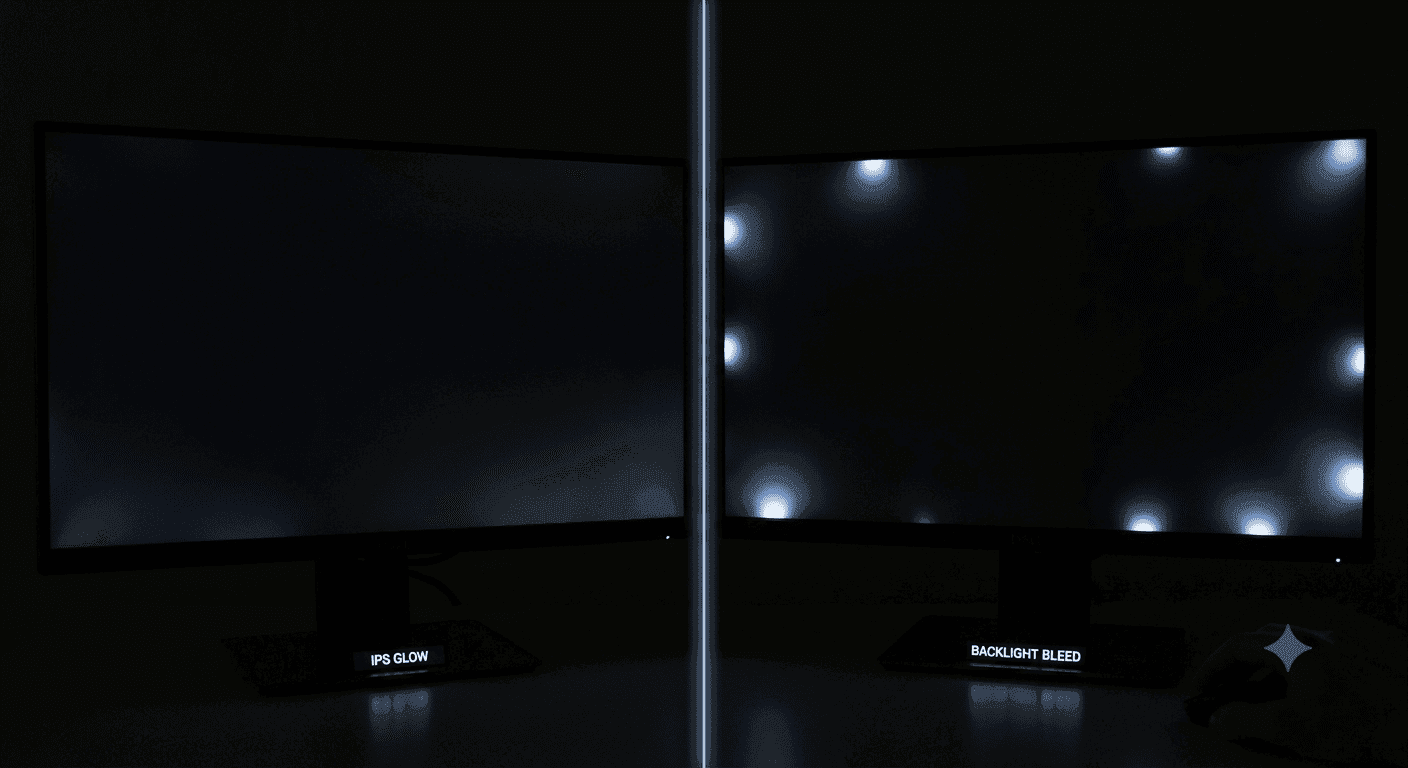
TL;DR IPS glow vs backlight bleed comes down to movement and cause: glow is a normal IPS trait that shifts with viewing angle, while backlight bleed is a fixed defect that shows as bright patches on dark screens.
How to Tell IPS Glow From Backlight Bleed?
When you are comparing IPS glow vs backlight bleed, the first question is whether you are seeing normal IPS behavior or a panel defect. IPS glow is part of how an IPS monitor handles light, while backlight bleed usually comes from uneven pressure or light escaping at the edges. Glow often looks like a soft haze near the corners on a dark screen. Bleed usually looks like bright blotches, streaks, or flashlight patches.
The easiest way to judge the difference is to use a black image in a dark room. IPS glow changes as you move your head, because the effect depends on viewing angle. Backlight bleed stays fixed in the same spot on the panel. If the bright area shifts, you are seeing glow. If it stays put, you are likely dealing with bleed.
| Feature | IPS Glow | Backlight Bleed |
|---|---|---|
| Appearance | Soft haze, often silvery or yellowish | Bright blotches, streaks, or flashlight patches |
| Location | Usually near corners | Usually along edges or corners |
| Behavior | Moves with viewing angle | Stays fixed on the panel |
| Cause | Normal IPS panel behavior | Uneven pressure or LCD stack leakage |
| Severity | Usually mild and below concern | Can be a defect and may justify warranty |
| Dark Scene Impact | Often visible in pitch black scenes | More distracting on a full black background |
| Typical Response | Lower brightness and adjust angles | Consider a return or warranty if severe |
What Does the Difference Look Like in Practice?
A five-minute black-screen check is usually enough to separate the two. Start with a dark test image and look for bright spots, corners, or uneven lighting. If the issue only shows up at one angle, that is typical IPS glow. If the same blotch remains visible no matter where you sit, the panel may have backlight bleed.
This matters because a little glow is normal on IPS panel displays. A small amount is often invisible during gaming or watching movies. Backlight bleed is different because it is tied to manufacturing tolerances and uneven pressure, not normal viewing behavior. Severe bleeding can be obvious enough to justify a return or warranty claim.
Where You Will Notice It Most?
You will notice the difference fastest in apps that use dark interfaces. Lightroom, Photoshop, and CAD tools make the corners of the display easy to inspect, especially when the canvas is black or near black. In games with dark menus, a little glow may disappear once the action starts, while bleed can stay visible and pull your eye to one side.
The practical rule is simple. If the effect moves, it is a glow. If it stays fixed, it is bled. If it only appears when the monitor is at a sharp angle, that is still a glow, not a defect.
Why does IPS Glow happen?
IPS glow is a normal characteristic of IPS panels, not a defect. The way the panel controls light allows some light to pass through at wider viewing angles, which is why the haze often appears near the corners. When the display is set too bright in a dark room, the glow becomes easier to see.
How Brightness and Angle Affect Glow?
Lowering brightness usually helps more than people expect. Adjusting the angle can also reduce the haze, because the effect is tied to how the display is being viewed. In practice, that means a small change in seating position can make the corners look cleaner without touching any settings.
IPS monitors remain popular for gaming and productivity because they usually offer stable color, crisp text, and strong viewing consistency. That matters in Windows, macOS, and Linux work because text stays readable from the side, and color does not shift badly when you lean back. The downside is that dark-room contrast rarely feels as deep as OLED or a strong VA panel.
Why Glow Feels Worse at Night?
The effect becomes more obvious on big screens, because the corners are farther from the center of your viewing position. It also shows up more in dim lighting, where the backlight has less competition from ambient light. That is why a monitor can look clean in a bright office and hazy at night.
The screen itself has not changed, but the lighting around it changes how your eye reads the image. A small amount of IPS glow is often invisible during gameplay or while watching movies, unless the scene is truly black. The issue becomes a real problem only when the haze is strong enough to distract you from the image.
Why Backlight Bleed Happens?
Backlight bleed happens when light escapes unevenly through the LCD stack or around the edges instead of being blocked cleanly. It is usually a manufacturing defect, and it can occur in any type of LCD panel, not just IPS. The result is bright patches, streaks, or clouding on dark backgrounds.
Unlike glow, backlight bleed does not depend on your angle. It can appear anywhere along the edges or corners of the screen. The most common case is a bright corner that stays visible no matter where you sit. In some cases, the patch is small and easy to ignore. In the worst cases, it spreads enough to ruin a movie scene or make a game menu look uneven.
Pressure, Tolerance, and Time
Uneven pressure on the panel is the usual cause, and that is why bleed is often treated as a quality control issue. A small amount can be normal because manufacturing tolerances are never perfect. Sometimes the bleed improves slightly over time as pressure settles, but it does not always go away.
If it is severe, a return or warranty claim is reasonable, especially when the bright area is obvious in a black-screen test. You can lower brightness to reduce backlight visibility, but you usually cannot fix the root cause yourself. Unlike IPS glow, which changes with viewing angle, bleed is stubborn.
What the Black-Screen Test Reveals?
A black-screen test is the fastest way to separate a normal IPS trait from a defect. Use a black image, full-screen it, and look for bright spots, corners, or uneven lighting. If the issue only shows up at one angle, that is typical IPS glow. If the same blotch remains visible no matter where you sit, the panel may have backlight bleed.
This test is most useful in a dark room, because both issues are easier to spot when the display is showing black. A monitor can look clean in a bright office and hazy at night, which points to a glow rather than a defect. A small amount of glow is often invisible during gaming or watching movies, but a severe bleed can be obvious enough to justify a return or warranty claim.
How to Judge the Result Fairly?
Move your head side to side and watch what happens to the bright area. IPS glow changes as you move, because the effect depends on the angle at which you are looking at the screen. Backlight bleed stays fixed on the panel, which is why the bright area seems glued to one spot.
If the patch shifts, the monitor is showing a glow. If it does not move, you are dealing with a bleed. The viewing angles tell you more than the label on the box.
When to Keep the Monitor and When to Return It
A monitor with mild IPS glow is usually worth keeping if the image looks normal during everyday use. Glow is common on IPS panel displays, and it often fades into the background once you stop staring at a black screen. Lower brightness and a small seating adjustment can make the corners look cleaner.
Backlight bleed deserves a closer look when the bright area stays fixed and stands out in dark scenes. If the patch is small, some users choose to live with it. If it is large or obvious during movies and games, a return or warranty claim makes more sense.
The practical decision comes down to how much the issue affects your use. If you work in dark interfaces, edit photos, or play games with black menus, you will notice the difference more quickly. If your monitor looks fine in normal content, a little glow is usually not a reason to panic.
Frequently Asked Questions
Q. Is IPS glow normal on an IPS monitor?
Yes, IPS glow is a normal IPS panel trait, not a defect. It usually appears as a soft haze near the corners on a dark screen, and it changes when you move your head. A small amount is often invisible during gaming or watching movies, especially once the scene is no longer black.
Q. How can I tell if I have backlight bleed instead of glow?
Backlight bleed stays fixed in the same place, while IPS glow shifts with viewing angle. A black-screen test in a dark room makes the difference easier to see. If the bright patch remains in one corner no matter where you sit, that points to bleed rather than glow.
Q. Does lowering brightness help with IPS glow?
Yes, lowering brightness usually helps more than people expect. The effect also changes with angle, so a small seating adjustment can reduce the haze further. This is why a monitor can look cleaner without any hardware changes.
Q. Can backlight bleed go away over time?
Sometimes it improves slightly as pressure settles, but it does not always disappear. Because bleed comes from uneven pressure or light escaping around the edges, it is harder to fix than glow. If it is severe and obvious in a black-screen test, a return or warranty claim is reasonable.
Q. Where will I notice IPS glow most often?
You will notice it most in dark interfaces, black menus, and pitch-black scenes. Lightroom, Photoshop, and CAD tools make it easier to inspect because the corners stand out on dark canvases. In normal gameplay or movies, a small amount often fades into the background.
Q. What is the fastest way to test for both issues?
Use a full-screen black image in a dim room and move your head side to side. If the bright area shifts, it is IPS glow. If it stays fixed in one spot, it is more likely to be backlight bleed.
Which Display Issue Matters More for Your Use Case?
For most people, IPS glow vs backlight bleed is less about the label and more about how the screen behaves in real use. Glow is a normal trade-off with IPS panels, and it often stays mild enough to ignore during gaming, movies, and everyday work. Backlight bleed is the one that raises more concern because it points to uneven light leakage and can stay visible in the same spot.
If you want stable color, crisp text, and strong viewing consistency, an IPS monitor still makes sense. If you spend a lot of time in dark rooms or on black backgrounds, you should expect some glow and test the panel carefully before deciding to keep it. If the bright area moves with your angle, you are probably seeing a normal IPS trait.
The best next step is simple. Run a black-screen test, compare what you see against the table above, and judge the panel by how it behaves in your own room. If the issue is fixed and distracting, consider a return or warranty claim. If it shifts with your position and stays mild, it is usually safe to live with it.
Ready to upgrade your tech?
Browse our collection of quality refurbished products at unbeatable prices.






