
Huawei MateBook Fold Ultimate Design Review: An 18-inch Foldable Laptop-Phone Hybrid
The Huawei MateBook Fold Ultimate Design combines an 18-inch foldable OLED display with a lightweight 13-inch folded form. Here is what its design, display, battery, software, and practicality mean for buyers.

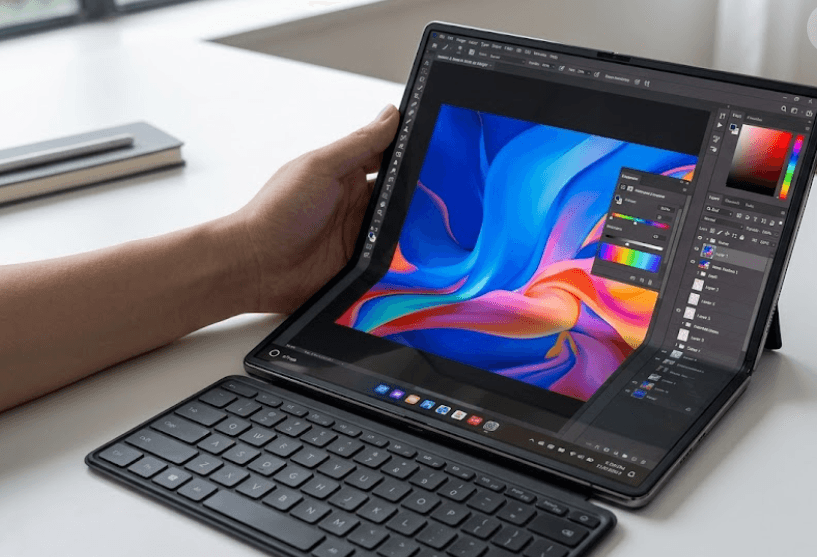
TL;DR The Huawei MateBook Fold Ultimate Design is one of the most unusual laptops available today, combining an 18-inch foldable OLED display with a 13-inch folded form factor and a detachable keyboard. At 1.16kg, it is remarkably light for a device that can open into such a large workspace, while its 74.69Wh battery, 140W charging, 32GB RAM, and up to 2TB storage give it premium hardware credentials. However, it is important to understand what it is not. Despite its phone-like folded size, it is not a laptop-phone hybrid and does not replace a smartphone. It is a foldable PC designed around portability, a large screen, and flexible working positions. Its biggest strengths are the display, weight, design, and productivity potential, while its biggest concerns are the premium price, foldable-screen care, software ecosystem, and limited official availability outside China.
Huawei MateBook Fold Design And Build
The Huawei MateBook Fold Ultimate Design takes a very different approach to the traditional laptop. Instead of using a conventional lid and keyboard base, it uses one large flexible display that folds in the middle. When completely unfolded, the device gives you an 18-inch screen with a 3296 x 2472 resolution and a 4:3 aspect ratio. Fold it in half and it becomes a more compact 13-inch-style device with a 2472 x 1648 resolution on the active half. This gives the MateBook Fold two very different identities. It can work as a large desktop-style workspace when open, or as a smaller portable computer when folded.
The hardware is also unusually light for the amount of screen space it provides. Huawei lists the device at 1.16kg and 14.9mm thick when folded, while the unfolded panel is only 7.3mm thick according to its current product information. That is important because the entire idea behind the MateBook Fold depends on carrying a large display without carrying the weight normally associated with an 18-inch laptop. The integrated stand adds another useful dimension, allowing the unfolded display to sit upright without requiring a separate monitor stand. The detachable keyboard can then be positioned in front of the screen, creating a more familiar desktop setup.
The design does introduce compromises that you would not face with a conventional laptop. There is no permanently attached keyboard deck, so the keyboard becomes a separate accessory when you want a traditional typing experience. The foldable display also requires more care than a standard laptop panel. Huawei's support guidance specifically warns users against applying excessive pressure, placing hard objects against the screen, or mishandling the flexible display. That does not mean the device is unusable or inherently fragile, but it does mean buyers should treat it more like premium foldable technology than an ordinary office laptop.
Folded Size And Everyday Portability
The folded format is one of the most compelling parts of the MateBook Fold. Instead of carrying an enormous 18-inch laptop, you can close the display and carry something that has a much smaller footprint. This makes the device particularly interesting for people who move between offices, hotels, meeting rooms, classrooms, and temporary workspaces. The value is not that it becomes a phone, but that it gives you a large-screen computer without forcing you to carry a conventional large laptop.
Huawei MateBook Fold Display Experience
The display is clearly the star of the Huawei MateBook Fold Ultimate Design. Huawei uses an 18-inch dual-layer flexible LTPO OLED panel when the device is fully opened. The display supports a 3296 x 2472 resolution, a 4:3 aspect ratio, HDR10+, and a peak brightness of up to 1600 nits for HDR content. Huawei also lists a typical brightness level of 700 nits and a wide P3 color gamut. For a laptop, these specifications make the panel particularly suited to photo viewing, creative work, presentations, research, and media consumption where a large, high-quality canvas is useful.
The 4:3 aspect ratio is also worth discussing because it changes how you use the laptop. A conventional 16:9 laptop is naturally suited to movies and wide timelines, while the MateBook Fold's taller display gives you considerably more vertical space. That can be useful when reading documents, reviewing long web pages, working with spreadsheets, or keeping multiple windows visible. When folded, the 3:2 format becomes more conventional for laptop-style work. The result is a display that changes character depending on how you position the device rather than simply becoming smaller.
Huawei has also built several eye-comfort technologies into the panel, including high-frequency PWM dimming and TÜV Rheinland Eye Comfort certification. The company uses a dual-layer OLED structure with ultra-thin glass protection in the current product information. However, buyers should not interpret premium display technology as meaning zero maintenance. Flexible OLED panels still need sensible handling, and Huawei's own support information emphasizes avoiding pressure, sharp objects, and unnecessary stress on the screen. That is an important part of evaluating the display because long-term ownership is about more than brightness and resolution.
Why The 18-Inch Screen Matters?
The 18-inch display becomes genuinely useful when you stop thinking of the MateBook Fold as a conventional laptop. With the integrated stand and detachable keyboard, it can function more like a portable workstation. A writer can keep research and a document visible together, a student can work with notes and reference material, and a professional can use a large dashboard without carrying a separate monitor.
Performance, Memory, And Storage
The MateBook Fold was introduced as Huawei's first PC running HarmonyOS, making its software platform almost as important as its hardware. The original launch configuration included 32GB of RAM and storage options up to 2TB, giving the device enough memory and storage for demanding productivity workloads. Huawei did not initially disclose the exact processor specifications at launch, so buyers should be cautious about listings that confidently assign a conventional Intel or AMD processor to the device. Current third-party listings identify the platform differently, but the safest fact-checked description is that the MateBook Fold uses Huawei's own computing platform rather than treating it like a standard Windows laptop.
For everyday productivity, 32GB of RAM is a substantial amount. It gives the device plenty of headroom for browser tabs, documents, presentations, communication apps, and multitasking. The 1TB and 2TB storage configurations are similarly practical for users who keep large media libraries or work with sizeable files. However, raw specifications do not tell the entire story. The software ecosystem determines which applications you can actually run and how smoothly your normal workflow transfers to HarmonyOS.
That is where the MateBook Fold becomes more complicated than a premium Windows laptop. If your work depends on specific Windows-only applications, enterprise tools, specialist software, or workflows built around Microsoft's ecosystem, compatibility needs to be checked before buying. Huawei has been developing HarmonyOS as a PC platform, but it does not automatically provide the same application environment as Windows. This makes the MateBook Fold easier to recommend to users who already understand Huawei's ecosystem and harder to recommend as a universal laptop replacement.
Productivity In Real Use
The MateBook Fold makes the most sense for workloads that benefit from screen space rather than maximum conventional laptop performance. Writing, document editing, research, presentations, web browsing, communication, note-taking, and media consumption all suit the design. Users who need specialized desktop software should investigate application support before spending flagship-level money on the device.
Battery Life And Connectivity
The Huawei MateBook Fold uses a 74.69Wh battery, which is a respectable capacity considering how thin and light the device is. It also supports 140W wired charging through USB-C. That combination is important because a foldable PC with an 18-inch OLED display needs enough battery capacity to remain practical away from a desk. The 140W charging capability also means the device is designed around fast top-ups rather than making users wait through long charging sessions.
However, battery capacity should not be confused with guaranteed battery life. Huawei's battery figure tells you the size of the battery, but actual runtime depends on screen brightness, workload, software optimization, refresh behavior, connectivity, and how frequently the OLED panel is driven at higher power levels. Because of that, it would be inaccurate to promise a specific number of hours without a standardized independent battery test.
Connectivity is relatively streamlined. The device uses USB-C ports and supports modern wireless connectivity, with current listings reporting Wi-Fi 7 and Bluetooth 5.2. The limited physical-port approach is consistent with the device's thin design, but it also means users with multiple USB-A accessories, HDMI displays, or wired peripherals may need adapters or a hub. That is not unusual for premium thin laptops, but it becomes more relevant when the device is intended to serve as a complete portable workstation.
Charging And Travel Convenience
The combination of a 74.69Wh battery and 140W charging makes the MateBook Fold better suited to mobile work than its unusual form might initially suggest. The bigger question is whether you are comfortable carrying the detachable keyboard and charging equipment alongside the computer. For frequent travelers, the large display can eliminate the need for a separate portable monitor, but the foldable screen still needs careful packing.
Camera, Audio, And Everyday Features
Huawei equips the MateBook Fold with an 8MP front-facing camera, which is useful for video calls and online meetings. The camera is not the headline feature of the device, but its placement and the large screen give the Fold an interesting advantage for conferencing. When the display is positioned upright on its integrated stand, the device can function naturally as a large video-call screen while leaving the keyboard separate on the desk.
Audio is another area where Huawei has paid attention to the overall experience. The MateBook Fold includes a six-speaker system and a quad-microphone setup. This combination is intended to make the device useful not just for productivity but also for meetings, presentations, music, and video. A large foldable display paired with a strong speaker system makes the device feel closer to a portable workstation than a simple laptop replacement.
The device also includes a fingerprint reader integrated into the power button, giving users a conventional biometric authentication option. The combination of a fingerprint reader, detachable keyboard, integrated stand, touchscreen, and large OLED panel makes the Fold flexible enough to move between several working styles. These details matter because the product's value comes from how all of these features work together rather than from any single specification.
A Different Kind Of Laptop Experience
The MateBook Fold is designed around flexibility rather than familiarity. You can use the screen as a large touch display, prop it up with the built-in stand, attach the keyboard separately, or fold the device into its smaller configuration. That makes it more adaptable than a standard laptop, although users who prefer a fixed keyboard and trackpad may find the experience less straightforward.
Price, Availability, And Value
The price is one of the biggest barriers to the Huawei MateBook Fold Ultimate Design. Huawei launched the product in China at a starting price of ¥24,999, with higher configurations costing more. Current Huawei China product information continues to position the device as an ultra-premium product. That puts it well above mainstream laptop pricing and means buyers are paying not only for computing hardware but also for the foldable OLED engineering and unusual form factor.
Indian buyers should be particularly careful when looking at online prices. Current listings may show an estimated Indian price, but that does not mean Huawei has officially launched the MateBook Fold in India. Current product databases continue to identify it as not officially launched in India. Import pricing can also differ significantly because of taxes, seller margins, warranty coverage, and regional software differences.
This makes value difficult to judge using conventional laptop comparisons. A premium Windows laptop can provide more conventional performance and broader software compatibility for substantially less money. The MateBook Fold earns its premium through its unique combination of an 18-inch foldable OLED display, 1.16kg weight, integrated stand, detachable keyboard, and flexible form factor. If you do not need those features, the price is difficult to justify. If you specifically want this form factor, there are very few direct alternatives.
Who Should Buy It?
The MateBook Fold is best suited to early adopters, professionals who travel frequently, researchers, writers, presenters, and users who genuinely benefit from having a large portable workspace. It is less suitable for buyers who simply want the fastest laptop for the money or who depend heavily on Windows-specific applications. The unusual design is the reason to buy it, not an accidental bonus.
Pros And Cons Of The MateBook Fold
| Category | What Works Well | What To Consider |
|---|---|---|
| Display | 18-inch flexible OLED, 3296 x 2472 resolution, HDR support | Foldable OLED requires careful handling |
| Portability | 1.16kg weight and compact folded design | Detachable keyboard adds to the carrying setup |
| Productivity | Large 18-inch workspace and integrated stand | Software compatibility needs checking |
| Memory | 32GB RAM | Hardware is premium-priced |
| Storage | Up to 2TB SSD | Configuration availability varies by market |
| Battery | 74.69Wh capacity | Actual runtime depends on workload |
| Charging | 140W wired charging | Requires compatible high-power charging setup |
| Audio | Six speakers and four microphones | Not a replacement for dedicated external audio |
| Availability | Available in Huawei's China market | No official India launch confirmed |
| Design | Extremely thin and distinctive | Requires more care than a conventional laptop |
Is The Huawei MateBook Fold Worth Buying?
The Huawei MateBook Fold Ultimate Design is impressive because its unusual design solves a real problem. Instead of asking users to choose between portability and screen space, it attempts to provide both. The 1.16kg weight makes the 18-inch display particularly impressive, while the integrated stand and detachable keyboard turn the device into a much larger workspace when you have a desk available. This is where the Fold feels most convincing, because it is not simply a technical demonstration of a flexible OLED panel.
At the same time, the device is not a universal replacement for every laptop. Its premium price puts it in a luxury category, and HarmonyOS means software compatibility deserves serious attention before purchase. Buyers who rely on Windows-only professional applications should not assume that a premium price guarantees the same software experience. The foldable display also needs more careful handling than a conventional laptop panel, which is an important consideration for students or users who frequently throw their laptops into crowded bags.
The biggest question is therefore not whether Huawei can make a foldable laptop work. It clearly can. The better question is whether you personally benefit enough from the 18-inch foldable format to justify the price and compromises. For the right user, the answer can be yes. For everyone else, a conventional premium laptop remains the simpler and safer purchase.
Frequently Asked Questions
Q. Is the Huawei MateBook Fold Ultimate Design a laptop-phone hybrid?
No. Despite folding into a compact form that can look phone-like in photographs, the MateBook Fold is a foldable PC rather than a laptop-phone hybrid. It does not replace a smartphone and is designed primarily as a portable computer with an 18-inch unfolded display.
Q. How large is the Huawei MateBook Fold when unfolded?
The device has an 18-inch flexible OLED display when fully unfolded. It uses a 3296 x 2472 resolution and a 4:3 aspect ratio in this configuration.
Q. How large is the screen when the MateBook Fold is closed?
When folded, the device provides a roughly 13-inch working format with a 2472 x 1648 resolution. This makes it considerably more portable than a conventional 18-inch laptop.
Q. How much does the Huawei MateBook Fold weigh?
Huawei lists the MateBook Fold at approximately 1.16kg. That low weight is one of its biggest advantages because it combines an unusually large unfolded display with a lightweight chassis.
Q. How much RAM does the Huawei MateBook Fold have?
The MateBook Fold comes with 32GB of RAM in the configurations announced by Huawei. Storage options go up to 2TB, although exact configurations can vary by market.
Q. What is the battery capacity of the Huawei MateBook Fold?
The MateBook Fold uses a 74.69Wh battery. It also supports up to 140W wired charging through USB-C.
Q. Does the Huawei MateBook Fold run Windows?
No. The device was introduced as Huawei's first PC running HarmonyOS, with the original launch version using HarmonyOS 5. Huawei's current China product page lists the newer software experience as HarmonyOS 6.1. Buyers should therefore check software compatibility before treating it as a direct Windows laptop replacement.
Q. Is the Huawei MateBook Fold available in India?
The MateBook Fold was launched in China, and current product listings indicate that it has not been officially launched in India. Any Indian listings should therefore be checked carefully for seller reputation, warranty coverage, regional software, and import costs.
Q. Does the Huawei MateBook Fold have a physical keyboard?
It supports a detachable physical keyboard rather than using a permanently attached keyboard base. The folded display can also provide a virtual keyboard experience, while the detachable keyboard creates a more conventional typing setup.
Q. Who should buy the Huawei MateBook Fold Ultimate Design?
It is best suited to buyers who value its 18-inch foldable display, low weight, flexible desk setup, and premium design enough to accept the price and software limitations. Frequent travelers, writers, researchers, presenters, and early adopters are more likely to benefit from its unusual format than buyers simply looking for maximum performance per rupee.
Final Recommendation
The Huawei MateBook Fold Ultimate Design is a remarkable piece of laptop engineering, but it should be purchased for what makes it different rather than for the specifications alone. Its 18-inch flexible OLED display, 1.16kg weight, 74.69Wh battery, 140W charging, 32GB RAM, integrated stand, and detachable keyboard create a genuinely unusual mobile workstation. The design has a practical purpose, especially for users who regularly work with documents, presentations, research, spreadsheets, and multiple windows.
However, the Fold is still a niche premium product. The high price, foldable-screen care requirements, HarmonyOS software ecosystem, and limited official availability in India make it harder to recommend as a mainstream laptop. Buyers who need broad Windows application compatibility or simply want the best conventional laptop value should look elsewhere.
For early adopters and professionals who specifically want a large portable workspace, however, the Huawei MateBook Fold Ultimate Design is one of the most interesting foldable PCs available. It does not make the traditional laptop obsolete, but it shows what laptops can become when manufacturers stop treating the screen, keyboard, and chassis as fixed parts of the same design.






