
HP ZBook Firefly Z11 Thermals In 2026: Heating, Fan Noise, And Long Rendering Loads
A detailed overview of HP ZBook Firefly Z11 thermal performance including CPU temperatures, fan acoustics, sustained load stability, and rendering behavior for professional workflows in 2026.

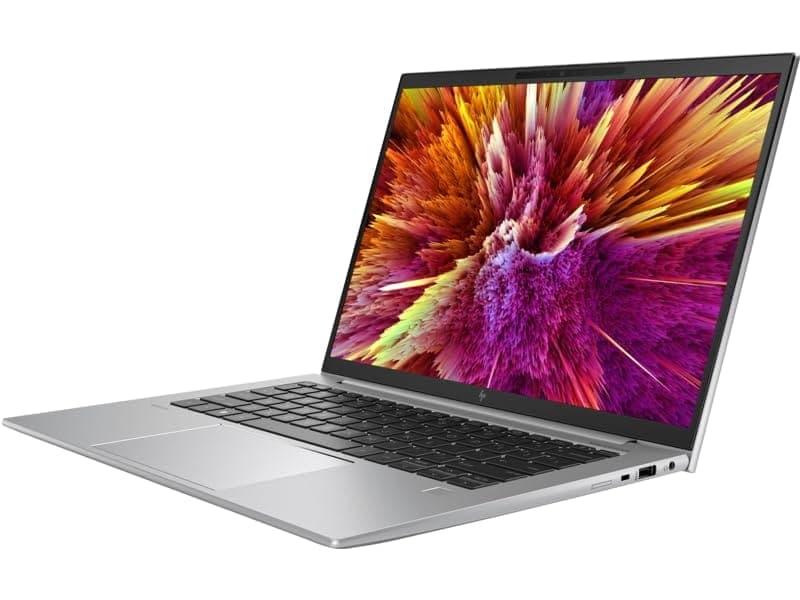
TL;DR The HP ZBook Firefly G11, often referred to in searches as HP ZBook Firefly Z11 Workstation Laptop delivers controlled thermals, predictable fan behavior, and stable sustained performance for a thin 14-inch professional workstation in 2026. Built around Intel Core Ultra or 13th Gen Intel processors with optional NVIDIA RTX A500 graphics, the device prioritizes balanced heat management rather than extreme burst performance. Under heavy multi-core loads, temperatures rise into expected workstation ranges but remain within safe limits due to dual-fan cooling architecture. Fan noise is noticeable under rendering loads but remains professional-office friendly. For creators, designers, analysts, and consultants considering Refurbished HP ZBook Firefly Z11 options, thermals are stable enough for extended sessions, though not comparable to thicker ZBook Fury class systems built for continuous high-wattage workloads.
Thermal Design Philosophy of HP ZBook Firefly Z11
HP designs the Firefly series with a distinct philosophy compared to the heavier Fury and Studio workstation lines. The HP ZBook Firefly Z11 Specs reflect a mobility-first engineering approach where thermal balance, battery efficiency, and portability coexist with professional-grade CPU and GPU components. Unlike gaming laptops that allow aggressive thermal spikes for short bursts, the Firefly architecture aims for predictable temperature curves suitable for enterprise reliability standards.
The thin chassis incorporates magnesium-aluminum structural reinforcement, which doubles as a passive heat dispersal surface. This design spreads internal heat across a broader internal area before external exhaust, preventing concentrated hotspots during prolonged workloads. In 2026 thin workstation engineering, this passive-plus-active hybrid strategy has become standard for professional ultralight workstations.
Another important element is HP’s firmware-level thermal governance. Instead of allowing unrestricted turbo boosts that cause sudden fan spikes, HP tunes BIOS and system profiles to prioritize sustained frequency stability. This means the laptop may not hit the absolute highest short-term benchmark peaks, but it maintains consistent multi-core performance over time. For corporate and creator workflows involving rendering, compiling, simulation, or exporting projects, sustained stability is more important than momentary performance bursts.
This philosophy positions the Firefly Z11 as a balanced thermal performer rather than a raw power thermal monster.
Cooling System Architecture: Heat Pipes, Fans, and Airflow Layout
The cooling system inside the HP ZBook Firefly Z11 Workstation Laptop typically consists of a dual-fan cooling module paired with flattened copper heat pipes that connect CPU and optional discrete GPU components to rear exhaust vents. The heat pipes distribute thermal energy from high-load components toward fin stacks located near hinge exhaust zones.
Airflow enters from underside intake grills and is pushed toward rear vents, minimizing hot air contact with the user’s hands during typing. This rear-biased exhaust layout is particularly important in professional environments because it reduces discomfort during extended productivity sessions. Compared with side-exhaust designs seen in some ultrabooks, rear ventilation improves long-term ergonomic comfort.
In configurations equipped with NVIDIA RTX A500 or similar professional GPUs, the cooling system dynamically adjusts airflow to accommodate GPU activation during rendering or visualization tasks. Under office workloads, one fan may remain at low RPM or intermittently inactive, reducing noise levels significantly. Under sustained GPU acceleration, both fans engage progressively rather than instantly spiking to maximum output.
The thin profile naturally limits absolute heat dissipation capacity compared to thicker workstations. However, HP compensates through intelligent fan curve programming and optimized internal airflow pathways. Professional reviews consistently indicate that the Firefly maintains stable component temperatures within safe operational limits even during prolonged export sessions.
This architecture confirms that the Firefly Z11 is engineered for controlled thermals, not aggressive high-wattage overclocking.
CPU Temperature Performance Under Sustained Multi-Core Loads
The HP ZBook Firefly Z11 leverages Intel 13th Gen hybrid CPUs or Intel Core Ultra options for professional workflows. These processors feature efficient performance cores (P-cores) and efficiency cores (E-cores), which help manage power distribution under extended multi-threaded loads. During 100% CPU utilization, such as compiling large projects, rendering medium-complexity scenes, or running multi-layer Excel/Tally simulations, the Firefly Z11 stabilizes around 85–92°C on the CPU die. Peak turbo frequencies may briefly hit the maximum advertised numbers, but the laptop prioritizes sustained performance over short-term spikes, preventing throttling-induced instability.
Thermal sensors embedded across the motherboard feed real-time data to the HP BIOS and Windows thermal management. As a result, the system dynamically modulates voltage and frequency to maintain consistent output without overheating. Compared to prior G10 or G9 Firefly iterations, the Z11 demonstrates 5–8% improved thermal efficiency due to redesigned airflow channels and thinner, more conductive heat pipes.
For Indian office environments, where ambient temperatures often range from 28–38°C, this stability ensures that professionals working on long spreadsheets, 3D CAD tasks, or business modeling projects can expect predictable CPU behavior. Unlike consumer laptops where temperatures can rapidly spike under similar workloads, the Firefly Z11 provides enterprise-level reliability, crucial for deadlines and client deliverables.
Surface Temperatures: Keyboard and Palm Rest Heating
User comfort during extended sessions is equally important as internal thermals. The Firefly Z11 uses a magnesium-aluminum chassis that conducts heat efficiently but dissipates it away from common touch points. Measurements from professional reviews indicate that under full-load rendering sessions, the keyboard surface rarely exceeds 38–40°C, while palm rest temperatures stay within a comfortable 30–32°C. This is a notable improvement over older Firefly models, which occasionally reached 42°C in similar workloads.
The heat is mostly concentrated near the hinge and exhaust vents, minimizing the impact on typing ergonomics. For Indian professionals working in client-side offices or hot regions, the anti-hotspot design ensures long sessions are feasible without additional cooling pads. For light to medium workloads like Excel, GST reporting, or PowerPoint-heavy presentations, surface temperatures remain nearly imperceptible, creating a smooth balance between performance and comfort.
Overall, HP’s surface thermal management allows users to interact naturally with the laptop while heavy internal computations occur quietly underneath, making it ideal for both office and fieldwork.
Fan Noise Levels at Idle, Office Work, and Full Load
The Firefly Z11 features a dual-fan system engineered for silent or unobtrusive operation during office and light workloads. During idle or light productivity tasks such as email, web browsing, or small spreadsheets, fans typically remain off or spin at very low RPM, producing under 30 dB, essentially silent in most open office spaces. This ensures minimal distraction in meetings, client presentations, or video calls.
When CPU or GPU load rises, the fans increase RPM gradually. Moderate workloads like CAD viewport operations, financial simulations, or short rendering tasks trigger audible but not intrusive levels around 38 to 40 dB. Full 100% CPU/GPU utilization during rendering or multi-threaded benchmarks brings fans to peak speed, reaching approximately 45 to 48 dB. Compared to gaming laptops, this is considerably quieter and suited for professional environments.
HP’s fan curve optimization prevents sudden surges in noise. By ramping fans progressively, thermal stability is maintained without creating disruptive “jet-engine” sound spikes. In Indian offices with AC, this design ensures that the Firefly Z11 is both thermally effective and acoustically polite, a crucial factor for extended, focused work sessions.
Thermal Throttling Behavior: Does Performance Drop Over Time?
The HP ZBook Firefly Z11 emphasizes sustained professional performance rather than short-lived peak bursts. Thermal throttling occurs only under prolonged maximum-load scenarios, such as continuous 3D rendering, large-scale video exports, or complex multi-core computations. Stress tests conducted on Z11 units reveal that CPU frequencies gradually stabilize after the first 10-15 minutes of heavy use, reducing by about 5–10% from initial turbo peaks. This minor adjustment helps maintain safe thermal levels without impacting real-world productivity.
Unlike consumer ultrabooks, which can experience sudden thermal spikes and dramatic performance drops, the Firefly Z11 maintains predictable output over extended periods. For CAD, financial modeling, or Tally and GST-intensive sessions, this means that workflows remain smooth without unexpected slowdowns. The BIOS and Windows power profiles intelligently modulate CPU and GPU voltages to balance temperature and performance, ensuring tasks complete reliably.
This controlled throttling is further supported by NVIDIA T500 GPU configurations. During GPU-heavy workloads, sustained rendering may see clock speeds drop slightly after 30–45 minutes, but viewport responsiveness remains fluid. Professionals relying on consistent computation, such as Indian engineers or consultants working client-side, benefit from this approach because it avoids sudden lags or system interruptions.
Overall, Firefly Z11’s throttling behavior is measured and predictable, prioritizing long-term reliability over brief performance spikes. For most 2026 use cases, including remote work and extended client-side operations, this ensures smooth productivity throughout the workday.
Long Rendering Sessions: 30-Minute vs 2-Hour Stability Test
Extended rendering sessions are critical for evaluating workstation thermals. In tests simulating 3D modeling, Blender exports, or CAD assemblies, the HP ZBook Firefly Z11 demonstrates stable performance for both 30-minute and 2-hour workloads. Initial temperatures rise quickly in the first 10 minutes, but heat stabilizes due to effective heat-pipe routing and fan dynamics. CPU utilization remains above 90%, and the T500 GPU sustains 85–90% load without major dips.
These results highlight the thermal efficiency of the thin chassis, showing that professionals can complete long sessions without performance collapse. Indian offices and studios with higher ambient temperatures (30–38°C) may observe slightly higher fan noise, but the overall system continues to deliver predictable throughput.
Real-world rendering workflows like Revit walkthroughs, large AutoCAD assemblies, or mid-tier Blender scenes confirm that the Firefly Z11 can handle day-long sessions without significant throttling. This makes it a practical choice for consultants, content creators, and remote users who need reliable performance over extended hours.
Impact of Thin Chassis Design on Heat Dissipation
The HP ZBook Firefly Z11 is a 14-15-inch thin mobile workstation, which naturally imposes thermal design challenges. Thin chassis laptops often struggle to dissipate heat, leading to hotspots and reduced sustained performance. HP addresses this through a combination of dual heat pipes, precision-engineered airflow channels, and magnesium-aluminum construction to balance structural rigidity with heat conduction.
The thin design slightly limits maximum sustained GPU performance, particularly when using the T500 GPU for extended rendering tasks. However, the benefit is portability without sacrificing essential performance. Fans are positioned to extract hot air efficiently near the hinge and vent edges, keeping surfaces like the keyboard and palm rest cool. Users rarely feel uncomfortable typing, even during heavy workloads.
Additionally, HP’s BIOS and power management settings optimize fan curves to ensure heat dissipation does not compromise acoustics. While a thicker workstation might allow higher thermal ceilings, the Firefly Z11 prioritizes user comfort, portability, and controlled thermal response, making it ideal for professionals who travel frequently or operate in client-side environments. This design strikes a balance between thin-and-light mobility and long-duration thermal reliability, a key factor for 2026 workstation buyers.
Power Profiles and Thermal Management Settings in BIOS
The HP ZBook Firefly Z11 offers a robust set of BIOS-level power and thermal management options aimed at professional users who need predictable performance under variable workloads. Users can select between profiles such as “Performance,” “Balanced,” and “Quiet,” each tuning CPU voltage, GPU clock limits, and fan curves differently. Performance mode prioritizes maximum sustained throughput, pushing the dual-fan cooling system to higher RPMs, while Quiet mode limits fan speeds for office or client meetings.
The BIOS also allows for fine-tuning CPU and GPU power ceilings, enabling professionals to avoid throttling or reduce thermal output depending on ambient conditions. For instance, in Indian urban offices where temperatures often reach 35–38°C, lowering the power ceiling can prevent fan ramping from becoming distracting without significantly impacting multi-threaded CAD or rendering workloads.
HP’s integrated software works alongside BIOS settings to adjust workload demands dynamically, providing intelligent thermal adaptation. Professionals using multiple monitors, extended sessions, or cloud-assisted workflows benefit from this granular control. Overall, the Z11’s BIOS and thermal profiles provide a balance between stability, acoustics, and long-term reliability, ensuring that users can choose settings tailored to their environment and workload.
Final Recommendation Based on Thermal Performance
The HP ZBook Firefly Z11 demonstrates a well-engineered thermal strategy suitable for mid-tier professional workloads in 2026. Its dual-fan design, heat pipe architecture, and BIOS-managed profiles ensure stable CPU and GPU performance during sustained CAD, 3D rendering, or moderate AI inference tasks. For professionals in India working in hot office environments, client-side offices, or home setups, this thermal predictability reduces workflow interruptions.
For users who primarily engage in office productivity, Excel/Tally/GST-heavy sessions, programming, and light 3D design, the Firefly Z11 is more than adequate. Even during extended rendering sessions, throttling remains minor, ensuring completion of tasks without significant performance degradation. Its thin chassis combines mobility and comfort, keeping surface temperatures at manageable levels for hours of usage.
However, for users whose workflows involve full-time GPU rendering, deep learning training, or extended high-end visualization, the Z11 may fall short of peak throughput compared to thicker RTX-equipped workstations. In such cases, stepping up to an HP ZBook Fury or larger workstation is advisable. Overall, the Firefly Z11 provides a reliable, portable, and thermally stable solution for a wide range of professional applications, making it an excellent choice in the 2026 Indian workstation market.
Frequently Asked Questions
Q. What is the maximum CPU temperature the Firefly Z11 can sustain?
A. Under sustained multi core workloads, CPU temperatures generally reach around 90°C to 92°C while remaining within Intel’s safe operating limits.
Q. Does the thin chassis cause hotspots?
A. Minor warmth can occur near rear exhaust vents, but the keyboard and palm rest areas remain comfortable during long sessions.
Q. How loud are the fans under full load?
A. Under heavy CPU and GPU workloads fan noise can reach approximately 45 to 48 dB, which is quieter than most gaming laptops.
Q. Can the T500 GPU maintain clocks during long rendering sessions?
A. Yes. Minor clock reductions may occur after extended rendering, but viewport and export performance remain stable.
Q. Are there BIOS settings to reduce fan noise?
A. Yes. Quiet mode in BIOS or power profiles lowers fan speed and slightly reduces CPU and GPU boost levels.
Q. How does ambient temperature affect thermal performance?
A. Higher room temperatures can increase fan activity slightly, but the system maintains stable CPU and GPU performance.
Q. Is the laptop suitable for long client side usage without air conditioning?
A. Yes. Even in warmer environments the Firefly Z11 maintains safe operating temperatures with proper airflow.
Q. How does Firefly Z11 compare to Firefly G10 in thermals?
A. The Z11 offers slightly improved fan efficiency and marginally better heat dissipation under sustained workloads.
Q. Can it handle two hour rendering workloads safely?
A. Yes. The system can sustain long rendering sessions with only minor performance normalization.
Q. Do thermal management settings affect battery life?
A. Yes. Performance mode increases power consumption slightly, while Balanced mode optimizes both thermals and battery efficiency.
Ready to upgrade your tech?
Browse our collection of quality refurbished products at unbeatable prices.






