
Best Memory Cards to Buy for the Sony A6400 and A7 Series
Find the right memory card for Sony A6400 and A7 cameras, from affordable UHS-I V30 cards to faster UHS-II and V90 options for demanding video.

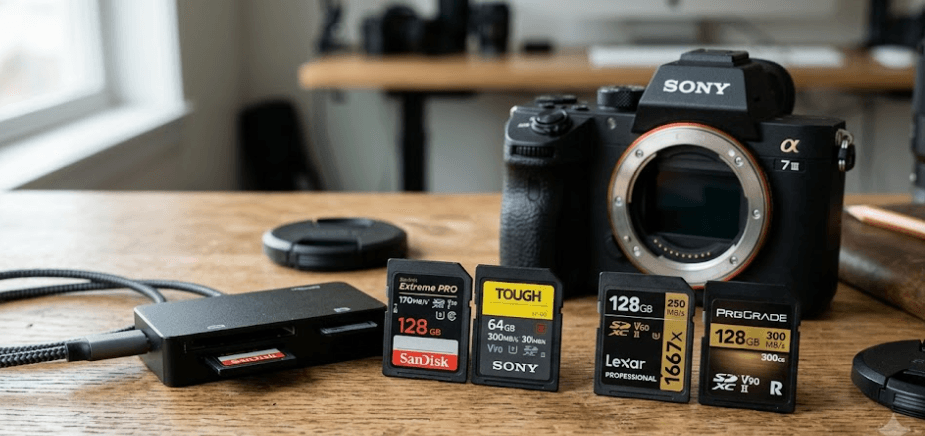
TL;DR The best memory card for a Sony camera depends on the exact model and the way you shoot. For the Sony α6400, a reliable SDXC UHS-I U3 or V30 card is sufficient even for its 4K 100 Mbps recording, so there is little reason to pay extra for UHS-II purely for camera recording. Sony's α7 models are more varied. The α7 IV, for example, accepts SD cards up to UHS-II and also supports CFexpress Type A in Slot 1, while its 600 Mbps XAVC S-I 4K mode requires an SDXC V90 card or a suitable CFexpress Type A card. For photographers, a fast UHS-II card can also reduce transfer and buffer-clearing times on compatible A7 bodies. The key is to match the card's sustained speed, capacity, and interface to the camera instead of choosing a card based only on its advertised maximum read speed.
Understanding Memory Card Compatibility
Memory cards can look interchangeable because many cameras use the same physical SD card shape, but the standards printed on the card tell you much more about compatibility and performance. UHS-I and UHS-II describe the card's bus interface, while U1, U3, V30, V60, and V90 describe minimum sustained write-speed classes. These are not simply different names for the same thing. A UHS-II card can work in a UHS-I camera in many cases, but it will normally operate at the slower interface supported by that camera. That distinction is particularly important with the Sony α6400, because Sony specifies UHS-I-compatible SD media and requires U3 for 100 Mbps XAVC S recording.
The Sony α6400 therefore does not need an expensive UHS-II card just to record its supported 4K modes. Sony lists SDHC and SDXC cards for still photography, while 4K recording at 100 Mbps requires a U3 card. A V30 card is also a practical way to identify an SD card with a 30 MB/s minimum sustained write-speed rating, although the camera's official requirement is expressed as U3 rather than V30. This means a good UHS-I U3 or V30 card from a reputable manufacturer is generally a sensible choice for an α6400 owner who wants dependable everyday photography and 4K recording.
The A7 family requires more careful checking because different generations and models have different recording capabilities. The α7 IV, for example, has two card slots. Slot 1 supports SD UHS-I/UHS-II and CFexpress Type A, while Slot 2 supports SD UHS-I/UHS-II. Sony specifies U3/V30 or higher for its 200 Mbps XAVC HS 4K and XAVC S 4K modes, but its 600 Mbps XAVC S-I 4K mode requires SDXC V90 or CFexpress Type A with VPG200 or higher. That is why saying that one card is simply “the best for every Sony A7” can be misleading.
UHS-I, UHS-II, V30, V60, and V90 Explained
The easiest way to read a memory card is to separate interface speed from sustained-write certification. UHS-I and UHS-II describe the card interface, with UHS-II cards having an additional row of contacts that allows compatible cameras and readers to communicate at higher speeds. V30, V60, and V90 refer to Video Speed Class ratings, indicating minimum sustained write-speed levels of 30 MB/s, 60 MB/s, and 90 MB/s respectively. The higher rating does not automatically make every camera record better, because the camera itself remains the limiting factor.
| Card Rating | Minimum Sustained Write Speed | Typical Use |
|---|---|---|
| U3 | 30 MB/s | Higher-bitrate recording |
| V30 | 30 MB/s | 4K recording and everyday photography |
| V60 | 60 MB/s | Faster video workloads and compatible cameras |
| V90 | 90 MB/s | High-bitrate video and demanding recording modes |
| UHS-II | Higher-speed interface | Faster compatible cameras and transfers |
The important point is that the highest number is not always the right choice. A V90 UHS-II card can be considerably more expensive than a UHS-I V30 card, but an α6400 cannot take advantage of the UHS-II interface because its SD interface is UHS-I. For that camera, spending extra on UHS-II makes more sense only if you are buying the card for use with another compatible camera or you want a faster workflow through a compatible card reader. For an A7 IV, however, UHS-II becomes more useful because the camera supports that interface and can also use V90 SD media for its highest-bitrate SD recording mode.
Best Memory Cards for the Sony α6400
The Sony α6400 is comparatively straightforward when it comes to memory cards. Its specifications list SD, SDHC, and SDXC media with UHS-I support, while Sony's help guide specifies U3 cards for XAVC S recording at 4K 100 Mbps. That makes a reputable UHS-I U3 or V30 SDXC card the practical target. A 64GB card can work for shorter shoots, but 128GB provides more breathing room for photography and video without becoming unnecessarily large for routine use. Sony's own recording-time figures show that a 64GB card provides about 1 hour 15 minutes of 4K 100 Mbps recording under its stated test conditions, while 256GB provides about 5 hours 15 minutes.
For everyday α6400 photography, the SanDisk Extreme Pro UHS-I SDXC range is one example of the type of card to consider, provided the exact capacity and version carries the required U3/V30 specification. The important factor is not the brand name alone but the actual speed class printed on the card and packaging. A 128GB UHS-I U3/V30 card is a sensible middle ground for travel photography, portraits, street photography, and regular 4K recording. The camera can also use SDXC cards, which gives buyers plenty of capacity choices without requiring a specialized professional card format.
There is also a practical reason to avoid buying the cheapest card available. Sony notes that not all memory cards are guaranteed to operate correctly and recommends formatting a card in the camera before use for more stable operation. Sony also recommends backing up important data and warns that removing a card or disconnecting power during read or write operations can result in data corruption. A reliable card from an established manufacturer is therefore a better long-term purchase than choosing solely by the lowest price.
α6400 Card Recommendations
| Card Type | Recommended Capacity | Best For | Why |
|---|---|---|---|
| UHS-I U3/V30 | 128GB | Everyday shooting | Matches the camera's requirements |
| UHS-I U3/V30 | 256GB | Long 4K sessions | More recording space |
| UHS-II V60/V90 | 128GB | Future camera upgrade | Extra interface speed is not used by α6400 |
| UHS-I U3/V30 | 64GB | Casual photography | Lower cost and adequate for shorter shoots |
Best Memory Cards for Sony A7 Cameras
Choosing a card for an A7 camera starts with identifying the exact model. This matters because the A7 family spans cameras with different recording formats, bit rates, and slot configurations. The α7 IV is a useful example of the newer generation. It has two slots, supports SD UHS-I and UHS-II cards, and allows a CFexpress Type A card in Slot 1. For many still-photo and standard 4K recording situations, a UHS-II SD card is more than sufficient. For the camera's 600 Mbps XAVC S-I 4K mode, however, Sony specifies either SDXC V90 or CFexpress Type A VPG200-or-higher media.
A Sony SF-G Tough Series UHS-II SDXC card is one example of the high-speed SD category suitable for compatible A7 workflows. Other professional UHS-II V60 and V90 cards from brands such as Lexar, ProGrade Digital, Kingston, Angelbird, and SanDisk can also be considered when their exact specifications meet the requirements of the camera and recording mode. For an A7 IV owner who mainly photographs RAW images and records standard 4K rather than XAVC S-I, buying V90 may be unnecessary. A good UHS-II V60 card can offer a useful balance, but the camera's manual should always take priority for the specific recording setting.
Capacity is equally important. A 128GB card is a practical starting point for many photographers, while 256GB becomes more useful for long events, extensive RAW shooting, or frequent video recording. Sony's A7 IV specifications show that the camera can record RAW, JPEG, and HEIF files and supports demanding video formats, so storage can disappear quickly during professional work. Two smaller cards can also be more practical than relying on one very large card when you need redundancy, especially because the α7 IV supports simultaneous recording and other two-card recording modes.
A7 Series Card Options
| Shooting Requirement | Suitable Card Type | Suggested Capacity |
|---|---|---|
| RAW photography | UHS-II SDXC | 128GB |
| Photography plus regular 4K | UHS-II V60/V30 depending on mode | 128GB–256GB |
| A7 IV 600 Mbps XAVC S-I 4K | SDXC V90 or CFexpress Type A VPG200+ | 128GB–256GB |
| Long professional shoots | Fast SDXC or CFexpress Type A, model dependent | 256GB+ |
UHS-I vs UHS-II for Sony Cameras
UHS-II is not automatically better for every Sony camera. Its biggest advantage appears when the camera itself supports the faster interface and when your workflow involves large numbers of RAW files or high-bitrate video. The α6400 uses a UHS-I-compatible SD interface, so putting a UHS-II card into it does not turn the camera into a UHS-II camera. For that body, paying a large premium for UHS-II is difficult to justify if the card will only be used in the α6400.
The situation changes with compatible A7 bodies. The α7 IV supports UHS-II SD cards in both slots, so a faster card can make more sense for photographers who regularly clear large bursts or transfer substantial amounts of data. However, the printed maximum read speed on a card is not the same as the sustained write speed the camera needs during recording. This is why Video Speed Class and the camera's own compatibility requirements matter more than simply buying whichever card has the biggest read-speed number.
The reader you use also matters when transferring images. A fast UHS-II card connected through a slow card reader will not deliver the full benefit of its interface. This becomes particularly noticeable with hundreds of RAW photographs or large video files. For an A7 IV user who frequently moves files to a desktop or laptop, investing in a compatible UHS-II card reader alongside the card can make the overall workflow much faster than upgrading the card alone.
How Much Storage Should You Buy?
Capacity should be based on the type of work you do rather than the idea that bigger is always better. For casual photography, 64GB can be enough, but 128GB is a more comfortable starting point for most users because RAW files and 4K footage consume storage quickly. Sony's α6400 recording estimates demonstrate the difference clearly: under Sony's test conditions, 64GB provides about 1 hour 15 minutes of 4K 100 Mbps recording, while 256GB provides approximately 5 hours 15 minutes. Actual recording time varies with settings and conditions.
For an A7 IV or another advanced A7 body, 128GB is generally more practical when photography is the main priority, while 256GB makes more sense for people combining RAW photography with regular video. Professional event photographers may prefer multiple cards rather than one enormous card because spreading a shoot across cards can limit the amount of footage or photographs exposed to a single card failure. The right capacity therefore depends on your shooting schedule, backup routine, and access to a computer or external storage.
It is also worth remembering that capacity does not compensate for an inadequate speed rating. A 512GB card that does not meet the camera's required sustained write specification is not a better choice than a 128GB card that does. For example, the α6400's 4K 100 Mbps mode requires U3 media, while the α7 IV's 600 Mbps XAVC S-I 4K mode requires V90 SDXC or CFexpress Type A VPG200-or-higher media. Always match capacity after you have established the minimum speed requirement.
Capacity Guide
| Capacity | Best Suited To |
|---|---|
| 64GB | Casual photography and shorter shoots |
| 128GB | Everyday photography and regular 4K |
| 256GB | Events, travel and mixed photo/video work |
| 512GB+ | Extended professional video workflows, where supported |
Common Memory Card Buying Mistakes
One common mistake is buying a card based only on its maximum read speed. Read speed mainly affects how quickly files can move from the card to a computer, while sustained write performance is crucial when the camera is recording continuously. This distinction is particularly important for video. A card can advertise a very high read speed while still being the wrong choice for a specific camera mode if it does not meet the required sustained write class.
Another mistake is assuming that UHS-II automatically means better camera performance. On the α6400, Sony specifies UHS-I-compatible SD media, so the camera cannot take advantage of the UHS-II interface. A UHS-II card can still be useful if you plan to move it between cameras, but buying one solely for the α6400 does not provide the same benefit as it would on a compatible A7 body. This is a good example of why camera compatibility should come before shopping for the fastest card on the shelf.
The third mistake is ignoring backups and card handling. Memory cards are storage devices, not permanent archives. Sony recommends backing up important data and warns against removing the card or disconnecting power while data is being written. Formatting should also be done carefully because it permanently deletes the data on the card. For important assignments, weddings, travel shoots, or commercial work, carrying a second compatible card and maintaining a proper backup workflow is more useful than spending the entire budget on one extremely high-speed card.
Final Recommendation
For the Sony α6400, a reputable UHS-I U3/V30 SDXC card in 128GB or 256GB is the practical choice. The camera's official specifications support UHS-I SD media, and Sony requires U3 for 100 Mbps 4K recording, so there is no need to spend extra on UHS-II simply to unlock better recording performance.
For compatible Sony A7 cameras, particularly the α7 IV, a UHS-II SDXC card makes more sense when you shoot large RAW bursts, transfer large files frequently, or record demanding video. If you specifically use the α7 IV's 600 Mbps XAVC S-I 4K mode, choose an SDXC V90 card or a compatible CFexpress Type A VPG200-or-higher card, because Sony specifies those media for that recording mode.
The most sensible buying strategy is therefore not to search for one universally “best” memory card. Match the card to the camera, recording mode, capacity requirement, and transfer workflow. For an α6400, put your money into a reliable UHS-I U3/V30 card and adequate capacity. For a compatible A7 body, consider UHS-II when the camera and workload can actually use it, and move to V90 or CFexpress Type A when your specific recording mode requires the higher sustained write performance. This approach gives you the performance you need without paying for specifications your camera cannot use.
Frequently Asked Questions
Q. What memory card does the Sony α6400 use?
The Sony α6400 supports SD, SDHC and SDXC memory cards and uses a UHS-I-compatible interface. For XAVC S recording at 4K 100 Mbps, Sony specifies a U3 card. A reputable UHS-I U3 or V30 SDXC card is therefore a suitable choice for this camera.
Q. Does the Sony α6400 support UHS-II memory cards?
The α6400's SD interface is UHS-I compatible, so it does not take advantage of the faster UHS-II interface. A UHS-II card may still function as SD media, but it will not make the α6400 operate as a UHS-II camera.
Q. Is V30 enough for the Sony α6400?
A V30 card provides a minimum sustained write-speed rating of 30 MB/s and is a practical choice for the α6400's 4K 100 Mbps recording when the card also meets the camera's U3 requirement. Sony's official requirement for that mode is U3.
Q. What memory card does the Sony A7 IV use?
The A7 IV supports SDHC and SDXC cards with UHS-I or UHS-II compatibility, and Slot 1 additionally supports CFexpress Type A. Slot 2 supports SD cards.
Q. Does the Sony A7 IV need a V90 card?
Not for every recording mode. Sony specifies U3/V30 or higher for its 200 Mbps XAVC HS 4K and XAVC S 4K modes, while the 600 Mbps XAVC S-I 4K mode requires SDXC V90 or CFexpress Type A VPG200 or higher.
Q. Is UHS-II better than UHS-I for Sony cameras?
UHS-II can be beneficial when the camera supports the interface and your workflow involves fast sustained writing or large file transfers. It does not provide the same benefit on a UHS-I-only camera such as the α6400.
Q. Should I buy a 128GB or 256GB memory card?
128GB is a practical starting point for everyday photography and regular video. A 256GB card is more useful for long events, travel, frequent RAW shooting, and heavier video workloads. The correct capacity ultimately depends on your shooting volume and backup workflow.
Q. Can I use a microSD card in a Sony α6400 or A7 camera?
Sony states that microSD cards can be used with appropriate adapters on supported cameras. However, a full-size SDXC card from a reputable manufacturer is generally the simpler choice for regular camera use.
Q. Should I format my memory card in the Sony camera?
Sony recommends formatting a memory card in the camera before use for more stable operation. Formatting permanently deletes the data on the card, so important files should always be backed up first.
Q. Which memory card should I buy for professional Sony photography?
The answer depends on the camera and recording mode. For an α6400, a reliable UHS-I U3/V30 card is appropriate. For compatible A7 cameras such as the A7 IV, UHS-II SD cards are useful for demanding workflows, while V90 SD or CFexpress Type A becomes necessary for recording modes with higher sustained write requirements. Always check the exact camera's recording specifications before purchasing.






