
Best External GPU Enclosures in 2026: Are eGPUs Making a Comeback?
Learn how external GPU enclosures can transform a laptop into a powerful gaming or creative workstation in 2026. Compare Thunderbolt 5 eGPU docks, pricing, compatibility, power delivery, and the best options for creators, professionals, and gamers.

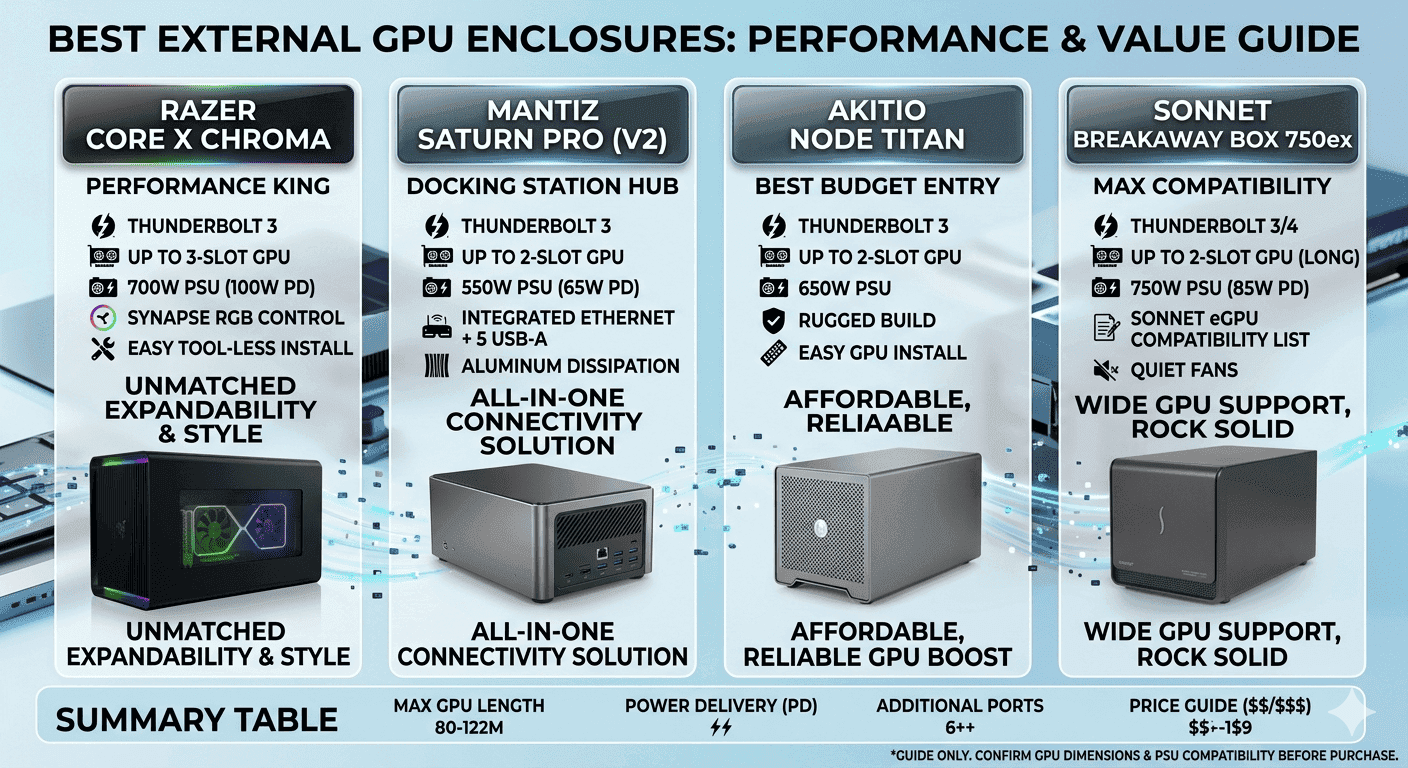
TL;DR External GPU enclosures in 2026 are practical upgrade systems for laptops because they add desktop-class graphics, power, and docking through one cable. Premium options like the Sonnet Breakaway Box 850 T5 offer up to 600W GPU power and Thunderbolt 5 bandwidth headroom.
Why External GPU Enclosures Matter in 2026?
External GPU enclosures now sit at the intersection of mobile productivity, creator workflows, and desktop-grade gaming, which is why the market keeps expanding across premium and mid-range products. That spread matters because it shows external graphics card enclosures are becoming a practical upgrade path, not just a workaround. At a basic level, an eGPU enclosure is a chassis that houses a desktop graphics card and connects it to a laptop or compact computer over Thunderbolt.
The enclosure supplies power to the GPU, manages cooling, and in many cases adds extra USB, Ethernet, or charging support so the device can function like a desk dock. This is especially important for users who need external GPU requirements to be simple: a compatible laptop, a supported port, and enough bandwidth to avoid bottlenecks. For many people, the appeal is not only raw frame rates but also the ability to move from a thin-and-light machine to a workstation-like setup with one cable.
What makes the category especially relevant in 2026 is the growing range of performance tiers. The Sonnet Breakaway Box 850 T5 is a strong example because it is a Thunderbolt 5 eGPU expansion system with a built-in Thunderbolt dock for Windows 11 computers, and it supports up to 600W of GPU power. That kind of headroom matters for users running demanding cards and high-load applications, and it signals premium Thunderbolt eGPU enclosures are evolving into full desktop hubs.
Pricing, Portability, and Use Cases
By contrast, the AOOSTAR AG02 GTBOX G-DOCK is a lightweight option at just 1.50 lbs, with support for GPUs up to 35.35 cm and 100W power delivery. That makes it more appealing for users who value portability and lower cost over maximum output. Pricing is one of the biggest reasons people ask why external GPU enclosures are so expensive.
The answer usually comes down to the cost of the enclosure hardware itself, the integrated power supply, the Thunderbolt controller, cooling design, and the engineering required to keep everything stable under sustained load. The Sonnet eGPU Breakaway Box 750ex is priced at INR 52,990 and includes a built-in 750W power supply with a PCIe 3.0 x16 slot, which places it firmly in the premium tier. Meanwhile, the Acasis 40Gbps eGPU Dock is priced at INR 26,999, making it a much more affordable entry point, and the Min eGPU Enclosure with Inter JHL7540 sits in the middle at INR 34,309.
That spread shows how much pricing can vary depending on power, features, and target user. The practical value becomes clearer when you look at real workflows. A video editor working in DaVinci Resolve on a Windows 11 laptop can keep a lightweight machine on the move, then dock into an external GPU setup at the office to accelerate effects, colour grading, and timeline playback.
A SolidWorks user can do the same for viewport performance and complex model manipulation, while a Photoshop user benefits from faster rendering and more responsive filter previews. In these cases, external GPU enclosures solve a very specific problem: they let one laptop handle travel, meetings, and everyday tasks, then transform into a capable workstation when connected at the desk.
Compatibility and Long-Term Value
Compatibility is another reason the category matters, especially as Thunderbolt 5 becomes more common. Thunderbolt 5 itself offers 80 Gbps bandwidth, with Bandwidth Boost mode reaching 120 Gbps, giving these systems more room to move data efficiently. Thermals, power, and compatibility also shape buying decisions in a very real way.
The Razer Core X Chroma is often praised for strong external GPU performance thanks to its 700W PSU, strong cooling, and wide compatibility, which makes it attractive to users who want a dependable long-term dock. On the other hand, the Sonnet Breakaway Box 850 T5 has a maximum power delivery of 100W, which means it can also charge a connected laptop while handling the GPU workload. That combination of charging, expansion, and graphics makes the hardware increasingly relevant for minimal-desk setups where users want fewer cables and fewer separate devices.
Ultimately, the importance of the build in 2026 is that it gives users a flexible upgrade path without forcing a full system replacement. A laptop can stay portable, a desktop-class GPU can be added only when needed, and the enclosure can double as a dock for work, creative projects, and gaming. For buyers comparing the parts, the decision often comes down to whether they want the cheapest workable solution, a balanced mid-range unit, or a premium external GPU enclosure with power supply and modern connectivity.
That flexibility is exactly why the category continues to gain traction across Windows 11 and Mac-focused workflows alike.
How to Choose the Right Enclosure?
When choosing an eGPU enclosure, the Thunderbolt version is the first thing you should check, because it defines how much headroom the enclosure has. The Sonnet Breakaway Box 850 T5 supports Thunderbolt 5, and Thunderbolt 5 offers 80 Gbps bandwidth with Bandwidth Boost mode reaching 120 Gbps. That matters when you are trying to keep performance losses under control while running a demanding app like Premiere Pro, Blender, or a large Photoshop project with multiple layers and filters.
An eGPU enclosure on an older link can still work, but you are leaving performance on the table, especially with newer cards from AMD and NVIDIA. A GPU enclosure with a weak power supply is not a bargain, it is a compatibility problem waiting to happen.
Power Supply and GPU Compatibility
You should treat the power supply as part of the product, not as a hidden accessory. The Sonnet Breakaway Box 850 T5 has a maximum power delivery of 100W, which is enough to charge many laptops while the enclosure is in use. The Razer Core X V2 goes further with up to 140W USB-C power delivery, which helps if you are using a higher-draw notebook that would otherwise need its own charger on the desk.
- 100W USB-C PD is enough for many thin-and-light laptops used with an external GPU.
- 600W to 700W PSU capacity gives you more room for high-end NVIDIA and AMD cards.
- Underpowered enclosures can create instability long before you hit the GPU’s raw performance ceiling.
Physical Size and Weight Considerations
GPU size is another trap. The AOOSTAR AG02 GTBOX supports a GPU maximum length of 35.35 cm, which gives you a clear limit before you buy a large triple-fan card. The AOOSTAR AG02 GTBOX G-DOCK weighs 1.50 lbs, while the Sonnet Breakaway Box 850 T5 weighs 12.71 lbs, so portability and desktop permanence are very different here.
If you move your setup between home and office, weight becomes a real factor, not a spec-sheet footnote. A lighter enclosure is easier to carry, but a heavier one usually signals a more substantial cooling and power platform.
Power Delivery to Host Devices
The charging side matters because it affects how clean your desk stays. A 100W enclosure can replace the laptop charger for many workflows in Chrome, Excel, and VS Code, but not every machine. If you want to run a single-cable setup with an external GPU enclosure with a power supply, check the wattage first, then check the GPU length, then check the operating system support.
- Windows 11 users should prioritize modern Thunderbolt support and broad GPU compatibility.
- macOS users should verify support before assuming the enclosure will behave like a standard dock.
- If you need a compact desk setup, favour lighter enclosures with built-in ports.
- If you need top-end performance, favour the higher-wattage designs even if they weigh more.
Comparing Leading External GPU Enclosures: Specs and Trade-offs
The price spread in your build is wide, and the table below shows why. You are not only paying for a shell around a card, but you are also paying for the power supply, controller hardware, ports, cooling, and, in some cases, a built-in Thunderbolt dock. That is why an external graphics card enclosure can look overpriced until you compare the actual hardware inside it.
These eGPU enclosures add real hardware value, not just a case.
Affordability versus power capacity
The AOOSTAR AG02 GTBOX G-DOCK sits in a more restrained position at ₹26,999, with 100W power delivery and a 1.50 lb chassis. That makes it easier to live with on a small desk or in a mixed home-office setup. The Min eGPU Enclosure with Inter JHL7540 at INR 34,309 pushes higher than the Acasis option, but it still lands below the Sonnet premium tier, which makes it a middle-ground choice for buyers who want more than basic dock behaviour without jumping to the top end.
Premium users and bigger power budgets
The 750ex is built around a 750W supply, while the Core X Chroma reaches 700W, and that is exactly the kind of margin that matters for heavy NVIDIA or AMD cards. If you run After Effects, DaVinci Resolve, or a GPU-heavy CAD scene, you want the enclosure to be the least interesting part of the system.
- Acasis is the lowest-cost entry point among the priced options here.
- Min sits in the middle and makes sense if you want to spend more without jumping into premium territory.
- Sonnet 750ex is the premium choice when power and slot support matter most.
- AOOSTAR G-DOCK is the lightweight option for buyers who care about portability and price discipline.
The practical takeaway is blunt: do not buy the cheapest box just because it is cheapest. Buy the enclosure that matches your card, your charging needs, and your desk space, because the wrong match costs more in frustration than the price difference ever saves.
Recommendations by price tier
The clearest way to read the hardware in 2026 is by price tier, because price lines up closely with power, docking features, and build quality. In the affordable tier, the Acasis 40Gbps eGPU Dock at INR 26,999 is the obvious entry point. In the mid-range tier, the Min eGPU Enclosure with Inter JHL7540 at INR 34,309 gives you more room to spend without jumping into premium territory.
In the premium tier, the Sonnet eGPU Breakaway Box 750ex at INR 52,990 sits in a different class entirely. That tiering helps buyers decide whether they want a basic acceleration box, a balanced middle option, or a more complete workstation anchor.
Affordable Options
Affordable does not mean useless, but it does mean you should be realistic. The Acasis dock is for buyers who want to test the external GPU idea without committing to a large purchase. That makes sense if you are using lighter creative work in Photoshop, occasional gaming, or occasional Premiere Pro acceleration.
The price is low enough that you can think of it as a controlled experiment rather than a long-term workstation anchor. It is a practical starting point when you want to learn whether the category fits your workflow.
Mid-Range Picks
The Min eGPU Enclosure with Inter JHL7540 lands in the middle because it is more expensive than the Acasis unit but still far below the Sonnet premium box. If you use CAD, Blender, or a multi-monitor Windows setup and do not need the heaviest PSU class, this is the tier that makes the most sense financially.
It gives you a more serious platform without pushing you into the highest price bracket. For many buyers, that balance is the most sensible place to start.
Premium Enclosures and Features
The Sonnet eGPU Breakaway Box 750ex is priced like a serious workstation component because it is one. The built-in 750W power supply and PCIe 3.0 x16 slot explain why it costs more, and the same logic applies to premium boxes with Thunderbolt 5 support and built-in dock behaviour. The Gigabyte AORUS AI BOX RTX 5060 Ti shows that once you bundle in a GPU, the price climbs sharply again, which is a reminder that enclosure pricing and system pricing are not the same thing.
- Choose Acasis if you want the lowest entry price and a simple dock-style setup.
- Choose Min if you want a middle-tier enclosure and can justify the extra spend.
These external GPU enclosures add cost because they combine a specialized enclosure, a serious power supply, Thunderbolt hardware, ports, and mechanical design that must safely hold a desktop card. The answer to why these builds are so expensive is straightforward: you are paying for more than the box itself.
Common Mistakes to Avoid When Buying
Don’t Shop by Wattage Alone
A lot of buyers make the mistake of shopping by wattage alone and ignoring the rest of the external GPU requirements. A high-watt enclosure does not automatically mean better compatibility, better thermals, or smoother hot-plug behavior. For example, the Sonnet eGPU Breakaway Box 750ex is priced at INR 52,990 and includes a built-in 750W power supply with a PCIe 3.0 x16 slot, which places it in a very different class from the Acasis 40Gbps eGPU Dock at INR 26,999 or the Min eGPU Enclosure with Inter JHL7540 at ₹34,309.
That price gap is one reason people ask why these components are so expensive, but the answer is usually the combination of controller hardware, PSU quality, enclosure design, and Thunderbolt implementation rather than just the metal box itself. Another error is overlooking the difference between a basic shell and an external GPU enclosure with a power supply that also behaves like a dock.
That kind of integration matters if you want to connect a monitor, SSD, keyboard receiver, and laptop charging through one cable instead of building a tangle of adapters around a separate charger.
Check Compatibility, Thermals, and Fit
Compatibility mistakes are especially common with Thunderbolt 5 and USB-C ports because buyers assume all ports are functionally identical. Thunderbolt 5 offers 80 Gbps bandwidth, with Bandwidth Boost mode reaching 120 Gbps, but that does not help if the laptop port does not support the right protocol or the operating system does not handle the enclosure correctly.
This is why people sometimes buy external graphics card enclosures expecting a plug-and-play result, only to find that BIOS settings, Thunderbolt security prompts, or driver updates still need attention. On Windows, a setup that works in one laptop may fail in another simply because the controller and firmware stack are different.
Thermals are another area where users underestimate the importance of enclosure design. A powerful GPU inside a cramped chassis can throttle long before it reaches its advertised performance, especially during sustained workloads like Blender Cycles renders or Adobe Premiere Pro exports with GPU acceleration enabled. Those details matter because a card that is electrically supported may still underperform if the enclosure cannot move heat away fast enough during a two-hour render or a long gaming session.
Size and fit problems are just as costly as power mistakes. The same logic applies to slot clearance, connector placement, and whether the card’s power plugs will actually fit without bending cables awkwardly. A common real-world failure case is a user buying a large GPU for a compact enclosure, then discovering that the shroud, bracket, or cable routing makes the system impossible to close safely.
Some buyers also ignore the practical difference between a premium desktop dock and a lightweight travel-friendly unit. The AOOSTAR AG02 GTBOX G-DOCK weighs just 1.50 lbs and provides 100W power delivery, which makes it appealing for portability, but it is not the same kind of workstation anchor as a heavier, more robust enclosure. By contrast, the Sonnet Breakaway Box 850 T5 weighs 12.71 lbs, which signals a more substantial platform built for a permanent desk setup.
If you are building a mobile creator rig, that difference should shape your purchase more than marketing language about future-proofing.
Match the Enclosure to the Workflow
A final mistake is failing to match the enclosure to the actual workflow. If your daily use is gaming on a Windows laptop, a Razer Core X V2 or a Sonnet-based Thunderbolt 5 option may make more sense than a cheaper dock that sacrifices compatibility or port flexibility. If your day involves Lightroom, DaVinci Resolve, or Unreal Engine, you should prioritize stable drivers, adequate power delivery, and an enclosure that can keep the GPU at boost clocks for extended periods.
The safest buying habit is to verify the enclosure’s power supply, GPU length, Thunderbolt generation, and laptop charging support first, then compare prices second.
- Power mismatch causes more problems than most buyers expect, especially with high-draw cards.
- GPU length limits can exclude popular triple-fan models even when the enclosure looks large.
- Thunderbolt compatibility must be verified on the laptop side, not just the enclosure side.
- A built-in dock is worth paying for if you want fewer cables and less clutter.
Why the Category Keeps Growing?
The next wave of hardware will be shaped less by raw novelty and more by how well it solves the single-cable desktop problem for modern laptops. That matters in practical terms for people editing 4K timelines in DaVinci Resolve, compositing in After Effects, or navigating large Revit models, where every bit of I/O efficiency reduces lag and workflow friction. Premium models already show what that future looks like.
That combination is important because it points to a broader trend: buyers want an external GPU enclosure with power supply that can handle serious graphics cards while also charging the laptop and replacing a separate docking station. At 12.71 lbs, it is clearly not chasing ultralight portability, but that weight also reflects the kind of power and thermal design buyers expect from a long-term desk setup.
Pricing and Feature Segmentation
Pricing is also becoming more segmented, which helps explain why the parts are so expensive in the first place. The Acasis 40Gbps eGPU Dock at INR 26,999 is positioned as a more affordable entry point, while the Min eGPU Enclosure with Inter JHL7540 sits in the mid-range at INR 34,309. That spread shows how much the market now depends on PSU size, chipset quality, and docking features, not just the shell around the card.
For buyers comparing external GPU requirements, those price differences often reflect whether they need a basic acceleration box or a more complete desktop replacement. A real-world example makes the value clearer. A video editor using Adobe Premiere Pro on a thin-and-light Windows laptop could keep the laptop closed on a desk, connect a Thunderbolt 5 enclosure, and use the external GPU for effects, color grading, and smoother playback while also powering the laptop and external monitor through the same setup.
In that scenario, a built-in dock is not a luxury. It saves time by reducing cable clutter and removing the need for a separate USB hub, monitor dock, and charger.
Portability vs. Desktop Replacement
This is why external graphics card enclosures are increasingly being designed as all-in-one productivity tools rather than niche enthusiast accessories. The more they can simplify a workstation, the easier it becomes to justify its cost. Weight and portability will continue to split the category into two distinct camps.
The AOOSTAR AG02 GTBOX G-DOCK, for example, weighs just 1.50 lbs, supports a GPU up to 35.35 cm, and provides 100W power delivery, making it a much lighter and more travel-friendly option than desktop-style units. That kind of design will appeal to users who occasionally move between home and office, or who want a compact setup for temporary project work.
The future of these components is tied to that split. Some buyers will want the strongest desktop replacement they can keep under a monitor, while others will want a lighter unit they can carry between rooms or offices. Either way, the category keeps growing because it gives laptops access to desktop-class graphics without forcing a full system replacement.
Frequently Asked Questions
Q. What should I check before buying an eGPU enclosure?
Check the Thunderbolt version, GPU length limit, power delivery, and laptop compatibility first. Those four details decide whether the enclosure will work well or cause headaches later. If your laptop supports Thunderbolt 5, you have more bandwidth headroom, but you still need the right drivers and firmware.
Q. Why are these components so expensive?
You are paying for more than a metal case. The controller, power supply, cooling, port layout, and certification work all add cost. Premium models also need to keep a desktop video card stable under load, which raises engineering and manufacturing costs.
Q. Do I need a special laptop for an eGPU setup?
Yes, you need a laptop with the right port and software support. A Thunderbolt connection is the usual requirement, and some systems need BIOS or driver updates before they work correctly. Lenovo laptops often support these setups well, but you should still verify the exact model.
Q. Is a built-in dock worth paying for?
It can be, especially if you want a cleaner desk. A dock-style enclosure can connect a display, storage, keyboard receiver, and charging cable through one setup. That saves time every day when you move between laptop use and desk use.
Q. Can I use AMD or NVIDIA cards in these enclosures?
In many cases, yes, but compatibility still depends on the enclosure and the laptop. Some users prefer Radeon cards for specific workflows, while others choose NVIDIA for CUDA-supported apps. Always check the enclosure’s supported card sizes, power limits, and operating system notes before you buy.
Q. Which price tier makes the most sense for most buyers?
The mid-range tier often gives the best balance for buyers who want more than a basic dock but do not need the highest PSU class. The Min eGPU Enclosure with Inter JHL7540 at INR 34,309 sits in that middle zone, while the Acasis 40Gbps eGPU Dock at INR 26,999 is the lowest-cost entry point. If you need the most headroom, the Sonnet eGPU Breakaway Box 750ex at INR 52,990 is the premium option.
Who Should Buy External GPU Enclosures in 2026?
External GPU enclosures make the most sense for people who want one laptop to do two jobs. They let you keep a portable machine for travel, then add desktop-class graphics at a desk when you need more power. In that way, eGPU enclosures are a practical fit for users who want flexibility without replacing their main laptop.
The best choice depends on how you plan to use it. If you want the simplest way to get into the category without spending much, the Acasis 40Gbps eGPU Dock is the easiest entry point. If you want a middle-ground option, the Min eGPU Enclosure with Inter JHL7540 gives you more room to grow without jumping into the premium tier.
If you need the most power and a more complete desk setup, the Sonnet eGPU Breakaway Box 750ex and the Sonnet Breakaway Box 850 T5 sit at the top end of the category. Buyers who care most about portability may prefer the AOOSTAR AG02 GTBOX G-DOCK because it weighs just 1.50 lbs and still offers 100W power delivery. The right move is to match the enclosure to your laptop, your GPU, and your desk setup before you buy.
Is an External GPU Enclosure Worth It in 2026?
External GPU enclosures in 2026 are worth buying if you want one laptop to cover travel and desk work without replacing the whole system. The category now spans affordable options like the Acasis 40Gbps eGPU Dock at INR 26,999 and premium units like the Sonnet eGPU Breakaway Box 750ex at INR 52,990, so buyers can match price to power and portability. Thunderbolt 5 support, with 80 Gbps bandwidth and Bandwidth Boost up to 120 Gbps, is a major reason the best models feel more future-ready.
If you need desktop-class graphics with cleaner cable management, compare the power supply, GPU length limit, and charging support first. Buyers who want a simple entry point should start with Acasis, while users who need more headroom should look at Min or Sonnet. The best long-term value comes from choosing the enclosure that fits your workflow instead of chasing the highest wattage on the spec sheet.






