
Auracast Explained: The Future of Wireless Audio Sharing
Learn how Auracast wireless audio sharing works in 2026, including Bluetooth LE Audio, compatible devices, setup, range, audio quality, pricing in India, accessibility features, and whether it's worth upgrading for shared listening at home or in public venues.

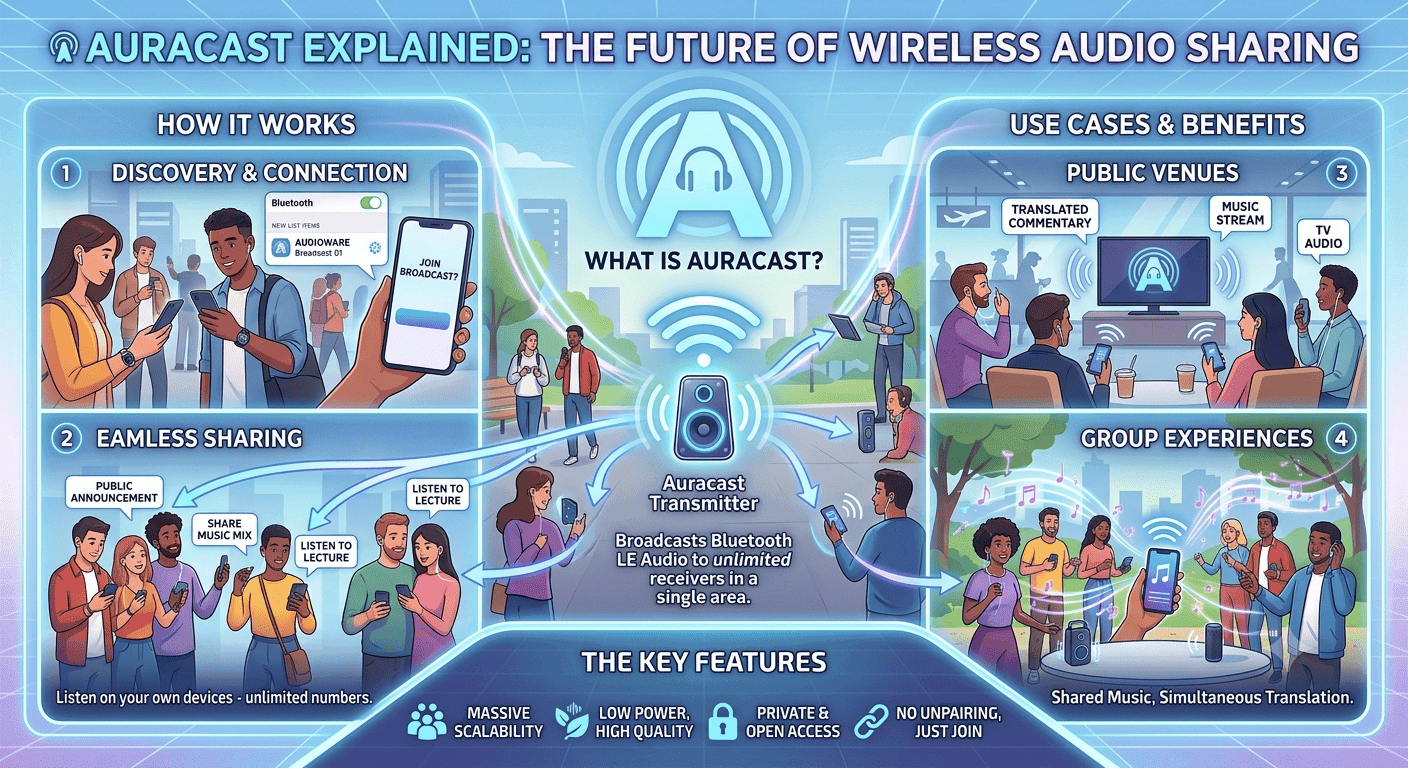
TL;DR Auracast wireless audio sharing is a Bluetooth LE Audio feature that lets one source broadcast audio to unlimited compatible receivers without pairing, and the Avantree Audikast 4 Auracast TV Transmitter is priced at ₹15,051.
Understanding Auracast Wireless Audio Sharing
Auracast wireless audio sharing turns Bluetooth into a broadcast model instead of a one-to-one link. One source can send one or more audio streams to unlimited receivers, so a room full of people can listen at the same time. That matters in public venues, at home, and anywhere you want shared audio without passing around one earbud. It also changes the experience for people who want clear hearing support in noisy spaces.
Auracast is part of the Bluetooth LE Audio standard, and the Bluetooth Special Interest Group, or SIG, defines that direction for the platform. The shift to Bluetooth LE Audio matters because it uses Bluetooth LE Audio technology rather than classic Bluetooth behavior. In plain terms, that means lower power use, better broadcast audio handling, and a cleaner way to connect compatible audio devices. You are not pairing a phone to a single headset, you are joining an audio broadcast.
Why the broadcast model matters
A broadcast is useful because it enables many people to hear the same stream at once. It also supports social experiences, since friends can share the same music or commentary without handing over a bud. When the audio source is a Galaxy phone or a compatible TV, the setup feels much closer to tuning in than connecting a private accessory. The biggest practical change is that the source device can broadcast audio to unlimited listeners.
That removes the usual pairing bottleneck and makes the experience less fragile. In a busy room, people do not need to wait for someone to disconnect first. They just tap to join the broadcast and keep listening.
What broadcast audio changes in real use
Broadcast audio is not just about convenience. It also helps when you want consistent audio quality across many receivers. With the LC3 codec, Auracast keeps speech intelligible at lower bitrates, which is exactly what you want for announcements, translation, and assistive listening. The result is cleaner sound with lower power draw than older wireless setups.
For a train platform, classroom, or airport gate, that matters immediately. A single audio source can serve many people through a public audio broadcast without the usual pairing frustration. For people with hearing loss, the same technology can send direct audio from a TV or venue system into hearing aids and compatible headphones or earbuds. That is where Auracast starts to look less like a novelty and more like a real audio standard. An Auracast compatible device can join the broadcast and receive the stream without the usual one-to-one connection.
Auracast Wireless Audio Sharing Setup and Compatibility
The hardware setup is simple only when every part of the chain supports it. The source must support broadcast audio, and the receiver must be an Auracast-ready device rather than a plain Bluetooth product. A phone with ordinary Bluetooth can still fail here if it does not support Bluetooth LE Audio and the broadcast feature. That is why compatibility matters more than brand names.
Samsung’s Galaxy S24 smartphones and Neo QLED 8K TVs are confirmed examples of compatible hardware. That gives you a useful benchmark when checking a phone, TV, or transmitter. If a model does not explicitly support Auracast, it may still pair normally, but it will not join a broadcast. In practice, that is the difference between standard Bluetooth and Bluetooth Auracast.
Device compatibility checks
The most common mistake is assuming every Bluetooth product can receive broadcast audio. It cannot. Headphones, earbuds, speakers, and hearing aids all need explicit support for Auracast, and that support is separate from ordinary wireless playback. A Mac can still be a good media machine, but the parts Mac support depends on the exact hardware and software path.
That is why the word compatible matters so much. A receiver can be excellent for everyday music and still fail to join any broadcast at all. If you are using Galaxy Buds, for example, the key question is whether the exact model supports the broadcast path you need. The same goes for TVs, phones, and assistive audio devices.
- Check whether the source supports Bluetooth LE Audio, not just Bluetooth.
- Check whether the receiver can join a broadcast without manual pairing.
- Check whether the product supports public channels, private channels, or both.
- Check whether the hardware handles broadcast audio with low latency for speech and video.
Setup and join methods
The setup usually starts with a visible broadcast channel. Users can join by scanning a QR code or tapping a link, which is much faster than digging through Bluetooth menus. That matters in public venues, where people need to hear announcements or tours right away. It also helps in homes, where guests should not have to fight with settings just to listen.
In a classroom or conference room, the join flow should be obvious and quick. A QR code on a screen or printed sign can get people into the audio broadcast in seconds. That is a much cleaner experience than repeated pairing prompts. It also makes the feature easier to use through applications that need immediate access, like translation tools or venue guides.
Public and private channels
Auracast supports both public and private broadcast channels. Public streams are open to anyone nearby, while private broadcasts use encryption. That split matters because a museum tour, a gym class, and a home TV session do not need the same access rules. The technology is flexible enough to handle all three.
Public venues benefit from open access because guests can join without friction. Private channels are better for households or controlled spaces where the audio should stay limited. That makes Auracast useful for both shared listening and more secure experiences. It also gives venue operators a cleaner way to manage access without changing the audio source.
Audio Quality, Range, and Latency
The audio quality story starts with LC3, the codec Auracast uses. LC3 delivers high-fidelity sound at lower bitrates, so speech stays clear without burning through battery life. That matters for hearing support, but it also matters for music and spoken-word content. The typical effective range is around 20 to 30 meters indoors, depending on walls, furniture, and interference.
That is enough for a classroom, lobby, gym floor, or living room. It is not a promise of perfect coverage through every wall, and that is fine. Auracast is built for room-scale listening, not for wandering across a building with no signal loss. Low latency is important when you watch a TV, follow a live translation, or listen through headphones during a workout.
If the sound lags behind the picture, the experience feels broken immediately. Auracast is designed to keep that delay low enough for real-time use in shared spaces. That is especially useful for public transport announcements, sports bars, and conference rooms. The same logic applies to assistive listening. Clear speech with low delay is easier to follow than compressed audio that arrives late. When hearing is the main concern, a few hundred milliseconds can make a big difference in comfort. That is why the broadcast model is more than a novelty feature.
Where the range actually helps?
The 20 to 30 meter indoor range is practical because it covers most rooms people use for shared audio. A school hall, a hotel lobby, or a fitness studio can all work within that envelope. You do not need a giant transmitter for every situation. You need a stable audio source, compatible receivers, and a room that is not full of signal-blocking clutter.
Auracast can also operate in standalone mode for direct broadcasting or in hybrid mode with Wi-Fi for broader coverage. That gives operators more control when they need wider reach through a venue. In everyday use, though, the simpler setup is usually enough. Most people just want the broadcast to appear, connect, and sound clean.
Bullet points for sound and coverage
- LC3 improves audio quality while keeping power use lower than classic Bluetooth.
- Indoor range is usually enough for rooms, lobbies, and gym floors.
- Low latency helps with TV audio, translation, and live announcements.
- Wi-Fi hybrid mode can extend coverage in larger installations.
Auracast in Public Venues and Everyday Use
Auracast is strongest when several people need the same audio at once. Public venues can use it for announcements, audio tours, and simultaneous translation. That is where the technology feels genuinely useful instead of just clever. A visitor can tune into the right stream without waiting for staff to hand over a separate receiver.
The same idea works in gyms, airports, museums, and cinemas. People can choose the stream that fits their needs, whether that is a workout channel, a translation feed, or a TV audio feed. That flexibility is the real advantage of broadcast audio. It gives each person a direct path to the sound they want. In practice, Auracast broadcast audio makes shared listening feel simple instead of specialized.
Accessibility and hearing support
Auracast is especially valuable for hearing support because it can send direct audio from TVs and public systems. That is better than trying to catch muffled room sound in a noisy environment. For people with hearing loss, clearer audio can make a meeting, exhibit, or announcement much easier to follow. It also gives hearing aids and compatible receivers a more natural role in daily life.
This is where assistive listening moves from specialist hardware into mainstream audio. The feature helps people hear speech more clearly without forcing everyone else into a separate workflow. In a public venue, that is a real improvement in dignity as much as convenience. It also reduces the awkwardness of asking for a special setup every time.
Social listening without passing around gear
Auracast also changes how friends share audio. You do not need to hand over an earbud just so someone else can hear a song, podcast, or commentary. Everyone can join the same stream through their own headphones or earbuds. That makes the experience cleaner and more personal.
It also works well for music listening in a living room or a group watch session. A Galaxy phone can broadcast the same stream to multiple receivers, and everyone stays on the same audio at the same time. That is a small change with a big social payoff. It keeps the sound consistent without turning one person’s device into a shared object.
- Use it for museum tours, airport announcements, and gym classes.
- Use it for TV audio when several people need the same soundtrack.
- Use it for translation streams in conferences and cinemas.
- Use it for shared music sessions without handing over earbuds.
Auracast Device Pricing and Market Growth
Pricing matters because Auracast is already moving from concept to hardware. In India, the Avantree Audikast 4 Auracast TV Transmitter is priced at ₹15,051. That gives buyers a concrete reference point for a dedicated broadcast device. It is not a casual impulse buy, but it is also not fantasy hardware anymore.
The price makes sense when you think about what it replaces. Older Bluetooth workarounds often involve repeated pairing, unstable connections, and limited listener support. A broadcast source is more useful when several people need the same audio experiences every day. That is especially true for a TV room, a classroom, or a venue setup.
What does the price mean in practice?
A transmitter at this price only makes sense if you will use the broadcast model often. If you just want one headset connected to one phone, regular Bluetooth is enough. But if you need shared audio, the value is easier to see. The cost starts to look reasonable when one source replaces multiple clumsy workarounds.
This is also where product quality matters. A cheap transmitter that drops audio or struggles with compatibility is worse than no upgrade at all. The point is not to buy the first thing with the word broadcast on the box. The point is to buy hardware that actually handles audio experiences reliably.
Market growth signals
Auracast technology is moving from early awareness to practical adoption because the hardware examples already exist. Samsung’s Galaxy S24 smartphones and Neo QLED 8K TVs show that the feature is not limited to one device category. The Avantree Audikast 4 Auracast TV Transmitter adds a dedicated option for home and venue audio. That mix of phones, TVs, and transmitters suggests a broader ecosystem is forming.
The growth signal is not just about more products. It is also about more use cases that make sense in daily life. Shared TV audio, public announcements, and assistive listening all benefit from the same broadcast model. That is why the feature is becoming easier to explain and easier to buy into.
Is Auracast Wireless Audio Sharing Worth It in 2026?
Auracast wireless audio sharing is worth it in 2026 if you need shared audio, assistive listening, or a cleaner way to serve multiple listeners at once. The strongest practical examples in this article are the Galaxy S24 smartphones, Neo QLED 8K TVs, and the Avantree Audikast 4 Auracast TV Transmitter at ₹15,051. The 20 to 30-meter indoor range and LC3 codec also make the feature useful for rooms, lobbies, classrooms, and public venues. If your use case depends on one-to-one pairing, regular Bluetooth still covers that job.
Buy it if you manage a venue, want better TV audio for a group, or need a more accessible listening setup. It also makes sense if you already own compatible hardware and want to reduce pairing friction. Skip it if your devices do not explicitly support Bluetooth LE Audio and broadcast audio, because compatibility is the deciding factor. The feature only pays off when the source and receiver both support the broadcast path.
If you are shopping now, start by checking explicit Auracast support on the exact model you own or plan to buy. Then decide whether you need public access, private access, or both. Once that is clear, the hardware choice becomes much easier. The next step is to match your use case to a compatible source, receiver, or transmitter and confirm the broadcast flow before you buy.
Frequently Asked Questions
Q. What is Auracast wireless audio sharing in simple terms?
Auracast wireless audio sharing is a Bluetooth LE Audio broadcast feature that lets one source send audio to unlimited compatible receivers. It does not work like normal one-to-one Bluetooth pairing, because listeners join a broadcast instead of connecting privately. That makes it useful for shared TV audio, public announcements, and hearing support.
Q. Which devices in this article are confirmed as compatible examples?
Samsung’s Galaxy S24 smartphones and Neo QLED 8K TVs are confirmed examples of compatible hardware. The article also names the Avantree Audikast 4 Auracast TV Transmitter, which is priced at ₹15,051 in India. Those examples show that the feature already exists across phones, TVs, and dedicated transmitters.
Q. How far can Auracast usually reach indoors?
The typical effective indoor range is around 20 to 30 meters, depending on walls, furniture, and interference. That is enough for a classroom, lobby, gym floor, or living room. It is designed for room-scale listening rather than whole-building coverage.
Q. Does Auracast support both public and private audio streams?
Yes, Auracast supports both public and private broadcast channels. Public streams are open to anyone nearby, while private broadcasts use encryption. That makes it flexible for museum tours, gym classes, and home TV sessions.
Q. Why does LC3 matter for Auracast audio quality?
LC3 matters because it keeps speech intelligible at lower bitrates while using less power than older wireless setups. That helps with announcements, translation, and assistive listening. It also supports cleaner shared audio for music and TV use.
Q. Is Auracast worth buying if I only use one headset?
If you only use one headset with one phone, regular Bluetooth is usually enough. The article’s pricing example, ₹15,051 for the Avantree Audikast 4 Auracast TV Transmitter, makes more sense when several people need the same audio. Auracast becomes valuable when shared listening or accessibility is the goal.





