
Apple iPad Mini 7
iPad 11 is great for basics on a budget, Air suits power users, and mini 7 is ideal for those wanting top speed in a compact form.

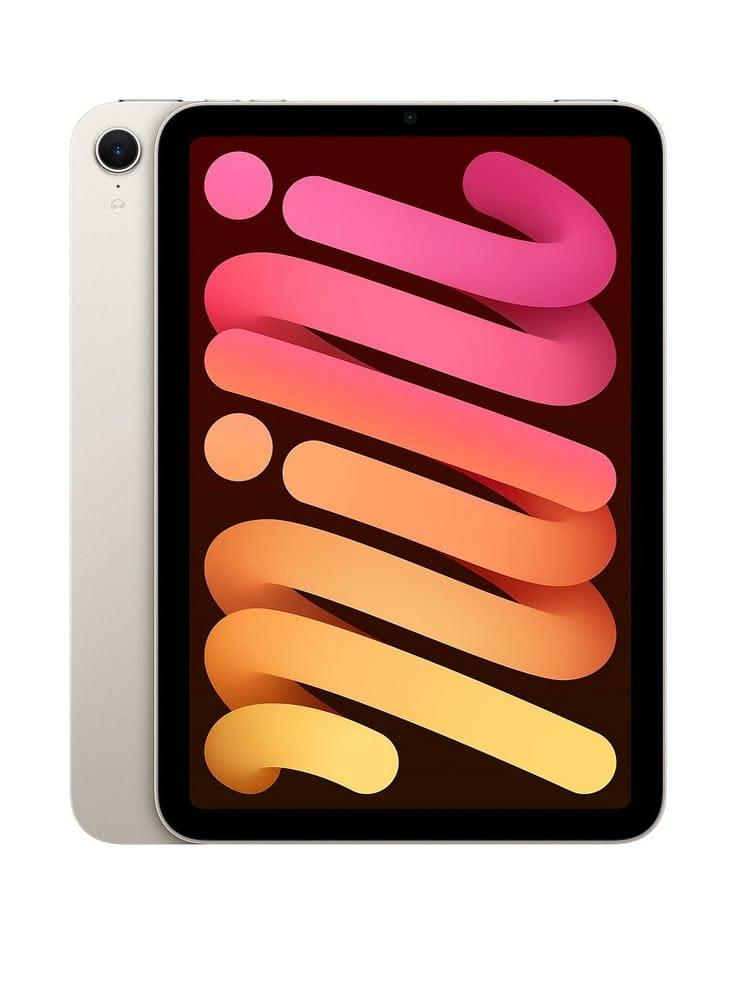
TL;DR The iPad Mini 7 brings flagship-level A17 Pro performance, a beautifully sharp 8.3-inch Liquid Retina display, Apple Pencil Pro support, and excellent real-world battery life into Apple’s most portable premium tablet. It is perfect for gaming, reading, note-taking, sketching, and travel-friendly productivity, while the iPad Air remains the better option for larger-screen multitasking and workstation-style use.
Why the iPad Mini 7 Still Stands Out in 2026?
The Apple iPad Mini 7 continues to occupy a unique space in the tablet market because it solves a problem that larger tablets often cannot: true handheld portability without compromising on speed. With the A17 Pro chip inside, Apple has effectively turned the Mini into a flagship-class performance tablet that feels far more powerful than its compact footprint suggests. Everyday actions such as app launches, split-view multitasking, document annotation, browsing, and gaming feel instant, giving it a level of responsiveness that keeps it relevant well into 2026.
Its 8.3-inch Liquid Retina display remains the star of the experience. The panel is sharp, colour-accurate, and bright enough for both indoor work and comfortable travel usage. Whether you are reading PDFs, ebooks, manga, or research notes, the screen size feels natural in hand and avoids the fatigue that often comes with holding larger tablets for long periods. For entertainment, the display’s improved colour calibration makes streaming, YouTube, and gaming feel significantly richer than what you would expect from a device this small.
The biggest reason the iPad Mini 7 stands out, however, is how flexible it feels in daily life. It works equally well as a digital notebook, gaming console, sketchbook, reading companion, or travel media device. Students can carry it effortlessly between classes, professionals can annotate files during meetings, and travellers can use it as a lightweight second screen without feeling weighed down.
Product Specifications
The specifications of the iPad Mini 7 clearly position it as a compact flagship tablet rather than a casual content-only device. Apple has paired powerful internals with enough storage headroom and Pencil support to make it genuinely useful for long-term use.
| Specification | Details |
|---|---|
| Processor | Apple A17 Pro |
| Memory | 6GB RAM |
| Storage | Starts at 128GB |
| Stylus | Supports Apple Pencil Pro and USB-C Pencil (sold separately) |
| Display | 8.3-inch Liquid Retina |
| Battery | 19.3Wh battery |
| Price | Starts at ₹49,900 in India |
For a tablet this size, starting with 128GB is a strong decision because it gives enough room for games, offline videos, Procreate files, PDFs, and long-term note libraries. The Apple Pencil Pro support also makes it significantly more future-ready than previous Mini generations.
A17 Pro Performance and Everyday Speed
The A17 Pro is the single biggest reason why the iPad Mini 7 feels premium beyond its design. It delivers the same class of performance found in Apple’s flagship phones, which means the Mini can handle demanding tasks far beyond simple browsing and streaming.
In real-world use, the tablet handles multitasking effortlessly. Split-screen note-taking with Safari and GoodNotes, heavy browser tab usage, document editing, video trimming, and even light 4K content editing all remain fluid. For students and working professionals, this means the Mini never feels like a “secondary device.” Instead, it becomes a fast and dependable daily companion.
Compared to older Mini generations, the graphics improvements are especially noticeable. Apps open faster, animations feel smoother, and high-end games run more consistently. The efficiency gains also help preserve battery life during heavier usage, making the device feel reliable for long study sessions or travel days.
Gaming, Reading, and Entertainment Experience
The iPad Mini 7 is one of the best handheld gaming tablets currently available. Its compact size naturally fits into both hands, making it feel closer to a gaming console than a traditional tablet. Titles like Genshin Impact, Resident Evil 4, Call of Duty Mobile, and high-frame-rate racing games run smoothly thanks to the A17 Pro GPU.
For reading, the Mini arguably offers the best experience in Apple’s lineup. The size is perfect for ebooks, Kindle, manga, academic PDFs, and research papers. Unlike larger iPads, it is easy to hold for hours without wrist strain, which makes it particularly useful for students and frequent readers.
Media consumption is equally strong. Netflix, YouTube, Disney+, and downloaded offline content all look excellent on the bright Liquid Retina panel. Combined with stereo speakers, it becomes one of the most convenient travel entertainment devices in Apple’s ecosystem.
Battery Life and Real-World Endurance
Battery life on the iPad Mini 7 remains excellent for its size. Apple’s official estimate of around 10 hours is realistic for mixed tasks such as browsing, video playback, note-taking, and document review.
In practical use, most users can comfortably expect 8–10 hours depending on brightness, gaming intensity, and multitasking habits. For students, this means it can survive a full day of classes and note-taking. For travellers, it easily lasts flights, train rides, and long waiting periods.
The A17 Pro’s efficiency improvements play a major role here. Even during heavier gaming sessions, battery drain feels controlled compared to many Android compact tablets.
iPad Mini 7 vs iPad 11 vs iPad Air
The right iPad depends entirely on your workflow. The base iPad 11 remains the best choice for users who want maximum value for media, online classes, and general use.
The iPad Mini 7 is the best choice when portability itself is the priority. If your tablet usage involves reading, gaming, quick notes, or frequent travel, the Mini offers the most comfortable experience.
The iPad Air, however, remains the better productivity-first option. Its larger screen is significantly better for split-screen multitasking, editing, spreadsheets, and laptop-adjacent workflows. For users who want pure speed in the smallest premium tablet form, the Mini wins easily.
Who Should Buy the iPad Mini 7
The iPad Mini 7 is best for users who specifically value compactness, speed, and versatility. Students, doctors, travellers, readers, gamers, and professionals who annotate PDFs or review documents on the move will appreciate it the most.
It also works brilliantly as a secondary Apple device alongside a MacBook. As a companion tablet for reading, notes, sidecar usage, and quick content consumption, it fits naturally into Apple’s ecosystem.
For users expecting laptop-style multitasking as their primary workflow, the Air or MacBook still makes more sense. But if portability is the defining priority, the Mini 7 becomes one of the best premium tablets available today.
Why the iPad Mini 7 Is Still Worth Buying
The iPad Mini 7 succeeds because it focuses on what makes the Mini lineup special: extreme portability without sacrificing flagship performance. The A17 Pro ensures this tablet will remain fast for years, while the display, Pencil support, and battery life make it practical for everyday workflows.
If your ideal tablet is something you can hold in one hand, game on comfortably, annotate documents anywhere, and carry effortlessly every day, the iPad Mini 7 remains one of the smartest premium tablet choices in 2026.
Frequently Asked Questions
Q. How powerful is the A17 Pro in the iPad Mini 7?
It delivers flagship-level performance similar to the iPhone 15 Pro series, making it excellent for multitasking, gaming, and creative workflows.
Q. Is the iPad Mini 7 good for gaming?
Yes, it is one of the best handheld gaming tablets thanks to the A17 Pro GPU and comfortable compact size.
Q. How long does the battery last?
In most real-world usage, it delivers around 8–10 hours depending on workload and brightness.
Q. Is it better than the iPad Air?
It is better for portability, reading, gaming, and travel. The iPad Air is better for multitasking and larger productivity workflows.
Q. Is it good for students?
Yes, especially for note-taking, PDF annotation, reading, and carrying between classes.
Q. Can it replace a laptop?
For light productivity and note workflows, yes. For heavy multitasking and desktop-style tasks, a MacBook or iPad Air is still better.
Q. Is 128GB enough?
For most users, yes. It comfortably handles apps, games, notes, PDFs, and offline content.
Ready to upgrade your tech?
Browse our collection of quality refurbished products at unbeatable prices.






