
Agentic AI Hardware: What Future Devices Need to Run AI Agents
AI agents examples show how autonomous software goes beyond chat to complete real tasks in customer service, finance, healthcare, education, and operations. Learn how AI agents improve productivity, automate workflows, and support smarter business decisions through real-world applications.

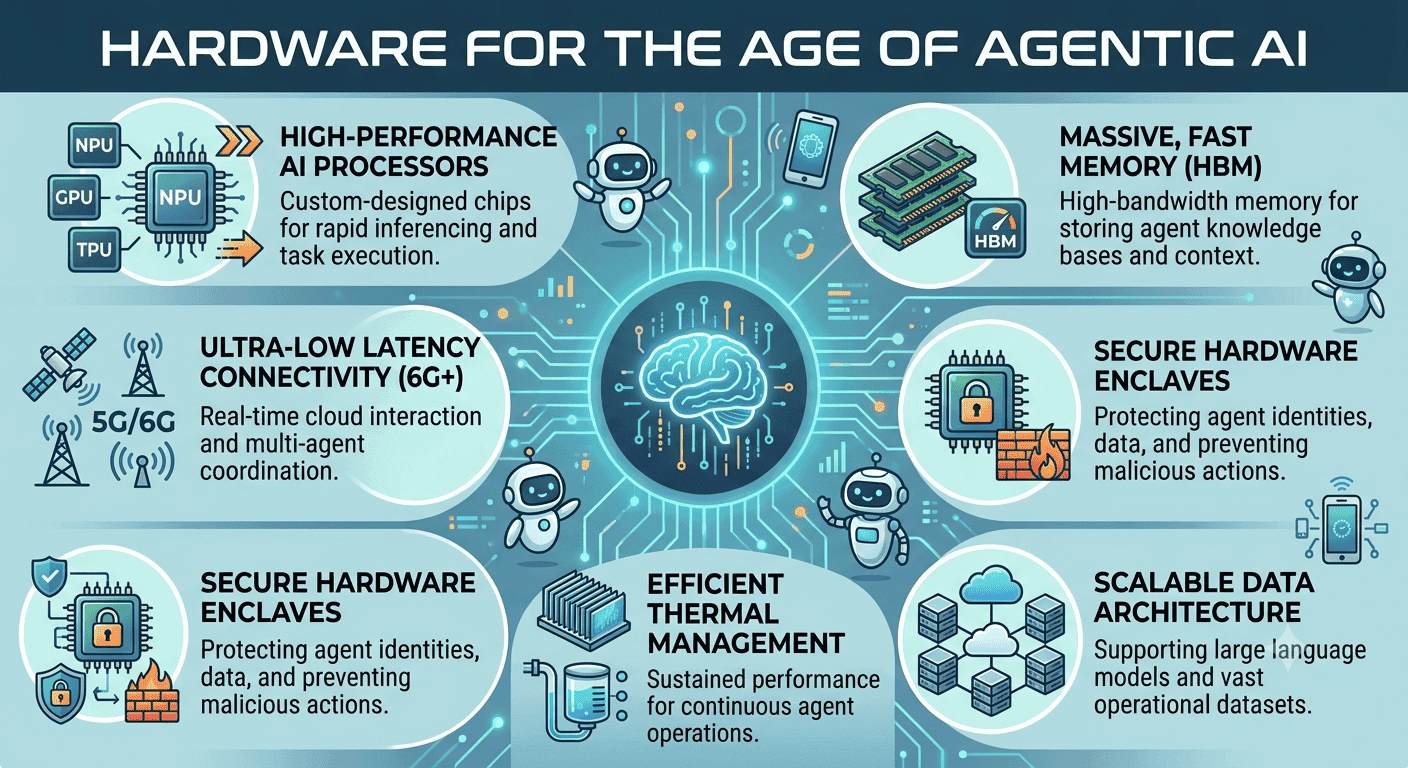
TL;DR AI agents examples show that the useful part is not the chat, it is task completion. The strongest examples are customer support, finance, learning, and catalog work, where an agent can pursue goals, use multimodal data, and collaborate with other agents without losing context.
Why AI Agents Matter Today
AI agents are software systems that use AI to pursue goals and complete tasks on behalf of users, and that definition is the key difference between an agent and a basic chatbot. A chatbot answers a prompt. An AI agent keeps working toward a goal, tracks context, and moves through multiple actions before it reports back. That shift matters because AI agents are already tied to real work, not demos.
Over 80 percent of Indian organizations are exploring the development of autonomous agents, which shows how quickly the category is moving into enterprise planning. AI agents can also automate 15 to 50 percent of business tasks by 2027, so this is not a side project for one team. The business case is strongest where data changes quickly and the next step depends on what happened earlier.
In customer service, finance, and operations, an agent can gather information, perform a specific action, and keep the process moving. That is why the topic now sits at the intersection of generative AI, agent architecture, and hardware planning. The practical value shows up when a user needs more than a single answer.
A human can ask for a summary, but an agent can collect data, compare records, and prepare a response for review. In that sense, agents are task systems, not just conversational interfaces, and LLM-based systems are often part of that workflow.
What Makes an Agent Different
A goal based agent is built to achieve a specific outcome, while a reflex agent reacts to the last input and stops there. That difference is important in language-heavy work, because the agent has to carry instructions across several steps. If the goal changes halfway through, the agent still needs enough reasoning to adapt.
The best AI agent examples also show why memory matters. When the content of a request depends on earlier messages, the agent must preserve context long enough to perform the next action. That is what separates useful automation from a brittle script, especially in LLM-driven workflows.
Why the Hardware Conversation Exists
When an agent works across apps, tabs, and documents, the environment has to stay responsive. Slow memory handling or laggy multitasking breaks the flow, especially in Slack, Excel, or a browser-based knowledge base. The issue is not raw speed alone, it is whether the system can keep the work alive across several turns.
That is also why the phrase AI powered gets used so often in this category. It usually points to software that can read text, interpret data, and make decisions without constant prompting. The label is easy to overuse, but the useful examples are the ones that actually perform the work, including LLM-based systems that support ongoing tasks.
Core Capabilities of AI Agents
AI agents become useful when the stack can support the way they actually operate, with multimodal information, autonomous decisions, collaboration, and memory. That is why generic compute talk misses the point. An agent handling text, voice, video, audio, and code at the same time needs stable responsiveness, not just a fast processor on paper.
The other major shift is autonomy. AI agents can operate autonomously, making decisions based on past data without constant human intervention. That makes them closer to model based reflex systems and goal based agents than to simple trigger-response tools.
In natural language workflows, that autonomy helps the agent respond to requests without forcing the user to restart the process. The best systems also learn from past interactions. A learning agent can adjust to the way your team writes requests, names files, or routes approvals.
In a real environment, that means the content gets more relevant over time instead of drifting into generic output. It also helps the agent handle natural language inputs more consistently across repeated tasks.
Multimodal Processing
AI agents can process multimodal information like text, voice, video, audio, and code simultaneously. That matters because real work rarely arrives in one format. A support agent may need to read a ticket, listen to a voice note, inspect a screen recording, and draft a reply from the same source.
This is where agent examples become more than a list of features. The agent has to keep the data aligned while it moves between formats, and that requires a stable environment. If the session stalls, the reasoning breaks, and the output loses value.
Autonomous Decision Making
That is useful when the next action depends on what happened earlier, not just what is on screen now. A model based reflex agent can react quickly, but a goal based agent can decide what to do next. The agent can pull in source information, compare it with current data, and perform the next step without asking the user to restart the process.
That is the real advantage of agentic AI in daily work, especially when the input arrives in natural language.
Collaborative Multi-Agent Systems
AI agents can collaborate with other agents to automate complex workflows, and that is where multi agent systems become interesting. One agent can gather data, another can validate it, and a third can draft the output. The division of labor matters when the work spans several tools.
This is also where the term based agents fits naturally. Each agent can be built around a specific goal, a specific source, or a specific task. In enterprise settings, that structure is easier to control than one oversized assistant trying to do everything.
Learning and Adaptation
AI agents can learn from past interactions to improve their performance over time. That makes them more useful in an environment where requests repeat with slight variations. A knowledge base, a ticketing queue, or an internal helpdesk all reward that kind of adaptation.
The point is not that the agent becomes human. The point is that it gets better at recognizing patterns in data and applying the right response. For teams using internal tools, that can save a lot of content cleanup later.
| Feature | Simple Reflex Agents | Goal Based AI Agents | Multi Agent Systems |
|---|---|---|---|
| Input handling | Single trigger | Goal plus context | Shared context across agents |
| Decision style | Immediate reaction | Planned actions | Coordinated actions |
| Memory use | Minimal | Moderate | High |
| Workflow scope | Simple tasks | Complex tasks | Multi-step workflows |
| Human input | Frequent | Intermittent | Lower, but supervisory |
| Best fit | Narrow automation | Task completion | Cross-tool orchestration |
| Learning over time | Limited | Stronger | Strongest when coordinated |
| Hardware pressure | Low | Moderate | Highest |
Notable AI Agents Examples in the Real World
The strongest AI agents examples are the ones that sit inside existing workflows. Customer service is the clearest starting point, because an agent can answer common questions, keep support available 24/7, and improve response times without forcing a human to handle every ticket. That matters in any queue-driven business, because the first reply often shapes the entire interaction.
The more interesting examples so far are these tools moving beyond chat. Uber built Finch, a conversational AI agent that streamlines financial data retrieval integrated directly into Slack. Delivery Hero uses AI agents to manage large product catalogs by extracting product attributes and generating titles. Those are not toy demos. They are agents built around specific business goals.
A second pattern stands out in enterprise use. In both cases, the agent is not replacing the source of truth. It is making the source easier to use.
Customer Service Automation
AI agents can automate customer service tasks by handling routine questions, routing issues, and keeping support available around the clock. That does not remove the need for human agents, but it changes the queue. The repetitive questions get absorbed first, and the human team spends more time on edge cases.
For a support team working in Zendesk or an internal helpdesk, that means fewer interruptions and faster first replies. It also means the agent can maintain a consistent tone and pull from approved content, which reduces off-script responses. In practice, that is where an AI agent example becomes operational instead of theoretical.
Finance and Data Management
Uber's Finch shows that an AI agent can sit inside Slack and retrieve financial data without making you jump between tools. Delivery Hero's agent takes a different route, handling catalog management by extracting attributes and generating titles. Both examples point to the same pattern: the agent is making the system of record easier to use.
That matters in finance because speed and accuracy both matter. An agent that retrieves or classifies information quickly gives you a cleaner starting point, especially when the request is repetitive and the source is stable.
Healthcare and Administration
AI agents can automate administrative tasks in healthcare and improve patient care by reducing the work spent on coordination. That includes appointment handling, record organization, and billing and payment workflows. The value is not abstract, because every minute saved on administration can go back to patient-facing work.
Kore.ai's healthcare examples show this can work end to end. The point is consistency, not magic. A well-defined agent follows the same process every time, which matters when records, scheduling, and communication all have to stay aligned.
Education and Learning
AI agents can provide personalized learning experiences by adapting to student needs, which makes them more useful than static courseware. In education, the agent can adjust pacing, surface the right material, and give real time feedback instead of waiting for a teacher to review every step. That is especially useful in blended classrooms and enterprise training.
If you use Google Classroom or an internal LMS, the agent can keep track of what a learner has already done and suggest the next step. The result is a clearer learning path, not just a nicer interface.
Disaster Response
AI agents can analyze data and prioritize emergency efforts in disaster response, which is one of the strongest examples of agentic AI under pressure. Here the system has to sort signals quickly, identify urgent cases, and help teams direct attention where it matters most. That kind of work depends on fast context handling and clear coordination.
If an emergency team is dealing with maps, alerts, and incoming reports, the agent must keep multiple inputs aligned without losing the thread. In that setting, the source data matters as much as the output.
Benefits and Productivity Gains from AI Agents
AI agents improve productivity by taking routine work off human hands and leaving people with the tasks that actually need judgment. That is the clearest reason businesses are paying attention. When an agent can handle repetitive actions, your team can spend more time on complex tasks.
The gains are not vague. AI agents can save teams 20+ hours a week by automating routine tasks, and they can reduce manual workloads by over 60 percent in invoice reconciliation. Those numbers matter because they translate directly into fewer handoffs, fewer mistakes, and less data cleanup.
The same logic applies to decision making, operational efficiency, personalization, and accuracy. The more repetitive the workflow, the more visible the benefit becomes. A user in sales, finance, or support does not need a grand promise. They need a tool that performs the specific job faster and with fewer errors.
Productivity Improvements
AI agents can enhance productivity by automating routine tasks and allowing human workers to focus on more complex activities. In a sales team using Salesforce or a support team using ticketing software, that can mean the agent handles the first pass while the human handles exceptions.
The point is not to remove people from the loop. It is to make their time count more. A system that can keep moving through steps without repeated prompts reduces interruptions in a normal workday, especially when the content is repetitive but still requires context.
Enhanced Decision Making
AI agents can improve decision making by analyzing data and providing insights based on real time information. That is especially useful when the right answer depends on current conditions rather than last week's report. The agent can collect the source material, compare it, and present a clear next step.
In practice, that shortens the gap between signal and action. A finance team, an operations team, or a sales manager can move from raw data to a decision faster. The key is that the agent does the gathering, while the human focuses on the final call.
Workload Reduction Statistics
The workload data is hard to ignore. Over 60 percent reduction in manual work for invoice reconciliation is a concrete sign that agents are already taking over high-friction back-office processes. Teams can also save 20+ hours a week when routine tasks are automated.
Those savings are especially valuable in operations-heavy teams. When the same process repeats every day, even a modest reduction in manual effort creates a visible difference. That is why workload reduction is one of the best ways to judge whether an agent is actually useful.
Operational Efficiency
AI agents improve operational efficiency by automating repetitive workflows, and that is where the hidden value often sits. A process that used to need three handoffs can sometimes be reduced to one review step. That does not just save time, it also lowers the number of places where errors can creep in.
The efficiency gain shows up in teams that depend on repeatable process quality. If the same workflow happens hundreds of times a week, even a small reduction in friction becomes meaningful. That is why enterprise teams are moving agents into back-office operations so quickly.
Personalization and Accuracy
AI agents can provide personalized recommendations based on customer history, which makes the output more useful than generic automation. They can also help reduce errors in routine tasks by providing timely and accurate data insights. Those two qualities matter together, because personalization without accuracy is useless.
For a service team, that means better follow-up suggestions. For a commerce team, it means recommendations that reflect prior behavior instead of random guesses. For any team using AI assistants inside business software, the real win is fewer corrections and less rework.
AI Agents Examples in Daily Operations
The category has already moved from theory into daily operations. The strongest pattern is not flashy conversation, it is task completion inside existing tools. When an agent can work inside Slack, manage catalogs, answer support requests, or support learning paths, it stops being a novelty and becomes part of the process.
These examples also show that AI agents are most valuable when they reduce friction in places people already feel pain. Finance teams want faster retrieval and fewer manual checks. Customer service teams want 24/7 coverage and faster response times. Education teams want personalized learning and real time feedback.
That is why the hardware discussion matters. Agentic AI is not just about large models, it is about keeping context, memory, and multiple actions alive long enough to finish the job. A system that handles one prompt well but struggles with long sessions will not satisfy teams that need real workflows.
What These Examples Reveal
The examples point to a common operating model. An AI agent works best when it can gather information, make a decision, and take the next step without forcing the user to restart the process. That is why multi agent systems are becoming more relevant, because one agent can specialize in retrieval while another handles synthesis or routing.
They also show why agent architecture matters. If the agent is going to live in Slack, a browser, or a document-heavy environment, the device has to stay responsive under sustained multitasking. If it cannot, the promise of autonomous systems turns into lag, context loss, and extra manual cleanup.
Where Adoption Is Heading
The strongest near-term demand will come from organizations that already have digital processes in place. Those teams can plug agents into customer service, finance, HR, and learning systems without rebuilding everything from scratch. That is the kind of enterprise setup these tools need to move from pilot projects to daily use.
For builders and operators, the lesson is straightforward. Focus on devices that can keep multiple tools open, preserve active sessions, and support long-running work without becoming unstable. Start with workflows that already repeat every day, and use agents where context matters more than one-off answers.
Image Suggestion
Use a clean layout with three lanes, support, finance, and learning, so the content stays specific.
Frequently Asked Questions
Q. What are some real-world examples of AI agents in customer service?
AI agents in customer service include systems that provide 24/7 support, answer repetitive questions, and improve response times. IBM highlights this use case directly, and Salesforce also uses agents for personalized interactions at scale. In practice, that means fewer queue delays and less pressure on human staff handling escalations.
Q. How do AI agents improve decision-making in businesses?
AI agents improve decision-making by organizing data, tracking context, and surfacing the next action faster. That matters because it shortens the gap between a signal and the next action, especially in finance, operations, and sales. If your team works in Excel, dashboards, or CRM systems, an agent can reduce the time spent gathering context.
Q. Can AI agents operate without human supervision?
AI agents can operate autonomously, but that does not mean they should run without oversight in every setting. They make decisions based on past data without constant human intervention, which is exactly what makes them useful for repetitive workflows. The practical boundary is supervision, not constant prompting.
Q. What industries benefit the most from AI agents?
Customer service, finance, healthcare, education, HR, and disaster response all benefit strongly from AI agents. These systems can handle support, administrative work, personalized learning, fraud detection, and emergency prioritization. The common thread is high-volume, repeatable work with enough context to reward automation.
Q. Do multi-agent systems work in complex workflows?
Multi-agent systems split a complex workflow across several specialized agents instead of forcing one system to do everything. One agent can gather data, another can validate it, and a third can prepare the output. If your workflow spans Slack, spreadsheets, and internal tools, that division of labor keeps the process manageable.
Q. What are the main challenges when deploying AI agents?
The main challenges are context handling, reliability, and keeping the workflow under control when the agent acts autonomously. AI agents can process multimodal data and learn from past interactions, but that also means they need stable memory and clear boundaries. The safest deployment path is to start with repeatable tasks, define review points, and expand only after accuracy stays consistent.
Choosing the Right AI Agents Examples for Your Work
Choose customer service agents if your queue is full of repetitive questions and your team needs 24/7 coverage. Choose finance agents if your staff spends too much effort moving between Slack, spreadsheets, and dashboards to find the right data. Choose learning agents if you need personalized learning paths, real time feedback, and content that adapts to the learner.
Choose multi agent systems if your workflow spans retrieval, validation, and drafting across several tools. Choose goal based agents if you need a clear outcome and a predictable chain of actions. Choose model based reflex or simple reflex agents only when the task is narrow and the environment is stable.
Skip simple automation if the work depends on changing context or multiple source inputs. Skip a single conversational layer if the job needs analysis, routing, and follow-through inside an enterprise environment. Skip agentic AI projects that cannot keep sessions, memory, and data aligned, because they will create more cleanup than value.
For most teams, the build are only useful when they sit inside a real process and handle a specific job well. The best choice is the one that improves a real workflow in Slack, Excel, a CRM, or a knowledge base without adding extra friction.
Is AI Agents Examples Worth Using for Real Work?
AI agents examples are worth using when the workflow already repeats, the data changes often, and the team needs follow-through instead of a single answer. The article shows that agents can save teams 20+ hours a week and reduce manual work by over 60 percent in invoice reconciliation, which makes the productivity case concrete. It also shows that the strongest use cases live in customer service, finance, healthcare, education, and disaster response, where context and follow-through matter more than a single response.
If you are deciding who should buy in first, start with the team that feels the most repetitive work. Customer support should look first at 24/7 coverage and faster response times. Finance should look first at retrieval, classification, and fewer manual checks in Slack or spreadsheets.
If your organization needs personalized learning, catalog management, or multi-step coordination, the examples from education and enterprise workflows point in the same direction. Pick one repeatable workflow, define the review points, and test whether the agent can keep the process moving without losing context. If it can, expand from there with the same guardrails.






