
Understanding Laptop Internals Before Buying A Laptop In 2026
A complete breakdown of laptop internals in 2026, explaining CPUs, GPUs, RAM, storage, thermal design, displays and battery systems to help buyers make informed long term purchase decisions.

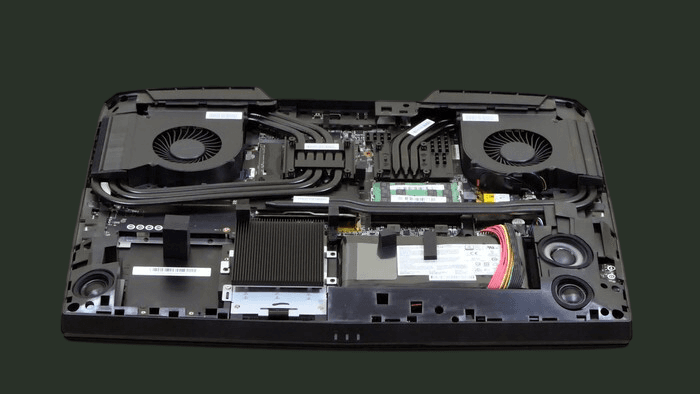
TL;DR Buying a laptop in 2026–2027 means understanding how each internal component affects real‑world performance, battery life, AI integration, connectivity, and future needs. Modern CPUs use hybrid cores with AI accelerators, efficient integrated graphics make everyday tasks smoother, and fast RAM and NVMe storage improve responsiveness. Thermal efficiency and software optimization now matter more than raw specs alone. Understanding these systems helps you choose the right balance for your use case and avoid spending extra on features you may never use.
Introduction
Buying a laptop in 2026 is not as simple as picking something with the biggest numbers on the box. Modern laptops are compact, powerful, and highly specialized machines, built around internal components that are very different from what most people used even five or ten years ago. Thin-and-light designs, all-day battery life, AI-assisted workflows, and fanless or near-silent operation are now common, but they come with trade-offs that are not obvious from a quick look at a specification sheet. To make a sensible long-term purchase, it is important to understand what is happening inside the chassis rather than relying only on marketing terms.
Over the last decade, laptop design has shifted from bulky devices with spinning hard drives, removable batteries, and chunky plastics to slim metal or dense plastic builds with tightly integrated internals optimized for AI and energy efficiency. Central processing units have moved to hybrid core layouts with dedicated AI cores, graphics processing has become more efficient, memory standards have changed, and storage has almost completely transitioned to NVMe SSDs supporting PCIe Gen 4/5. At the same time, thermal systems have become more sophisticated while also being more compact, which means performance is now closely tied to how well a laptop can move heat away from its core components. The entire internal layout has become a puzzle of power delivery, AI accelerators, heat pipes, fans, batteries, and compact logic boards.
Software expectations have also grown. Everyday tasks now include video calls, multiple browser tabs, collaborative tools, casual content creation, AI-assisted editing, and sometimes light gaming, even for average users. This means that a weak or unbalanced internal configuration can start to feel slow within a couple of years, especially if the CPU, RAM, or storage was chosen purely on price. In contrast, a laptop with well-balanced internals optimized for efficiency and AI workloads can feel smooth and reliable for many years despite not having the highest headline numbers.
In 2026, understanding laptop internals is less about becoming a hardware expert and more about learning how each major component influences real-world behavior, battery longevity, and AI workload performance. Once you know what the CPU actually does, where a GPU matters, how RAM capacity and speed affect multitasking, why storage type changes the feel of the whole machine, and how thermals, battery management, and software optimization shape comfort and longevity, you can look past confusing jargon and pick a machine that genuinely suits your work, study, or creative needs. The following sections explore each of these elements in detail so that your next laptop purchase feels like a deliberate decision rather than a hopeful guess.
Understanding The CPU In Modern Laptops
The central processing unit, or CPU, remains the core engine of every laptop. It handles instructions from applications, coordinates background tasks, and determines how responsive the system feels under load. In 2026, most mainstream laptop CPUs are built using hybrid architectures with performance, efficiency, and AI cores. This means they include performance cores designed for heavy tasks, efficiency cores for light background activity, and neural processing units (NPUs) to accelerate AI tasks. When browsing the web or typing notes, the efficiency cores handle the work to save power and keep temperatures low. When you export a video, compile code, or run a complex spreadsheet, the performance cores take over to deliver the necessary speed, while AI cores assist in accelerating supported tasks.
This design is used across different chip makers, though implemented in slightly different ways. Intel has embraced hybrid layouts in its recent generations, AMD combines high-performance cores with power-efficient designs, and Apple Silicon blends performance, efficiency, and AI within tightly integrated system-on-chip packages. For a buyer, this means that simply counting cores or checking clock speeds is no longer enough. A modern six-core chip with smart scheduling and AI accelerators can outperform an older eight-core chip in real-world workloads.
The manufacturing process also matters. CPUs manufactured on smaller nanometer processes tend to consume less power for the same performance, creating cooler and more efficient laptops. Smaller processes also support better on-chip AI acceleration, improved battery efficiency, and enhanced sustained performance. In practice, a well-designed midrange CPU from a recent generation can serve students, office workers, and many creators perfectly for years, as long as it is paired with appropriate cooling, memory, and software optimizations.
From a day-to-day perspective, a strong CPU shows itself in smooth multitasking, quick application launches, minimal lag when switching between heavy tasks, and responsiveness in AI-assisted applications. A weak or thermally constrained CPU may feel fine on day one but begin to struggle once you run multiple communication tools, browser tabs, and background applications together. When choosing a laptop, it is sensible to prioritize a recent-generation CPU with balanced cores and AI capabilities rather than chasing the largest possible core count or highest maximum frequency.
Understanding The GPU And Graphics Capability
The graphics processing unit, or GPU, is responsible for rendering images, animations and video on your screen. In basic use, it supports the operating system interface, media playback and light graphical effects. In heavier use, it drives games, 3D modelling applications, video editing timelines and creative software that depends heavily on parallel processing. In 2026, there are two main approaches to GPU design inside laptops: integrated graphics and dedicated graphics.
Integrated GPUs are built into the same chip as the CPU and share system memory. They have improved dramatically over recent years. For many users, an integrated GPU is now more than enough for high-resolution video playback, casual gaming, and even some light creative workloads. Modern integrated GPUs now support AI acceleration for tasks like video upscaling, photo enhancement, and ML-based productivity tools, which previously required dedicated GPUs. Apple Silicon, modern AMD APUs, and recent Intel integrated graphics have shown that well-optimized integrated solutions can match or exceed older entry-level dedicated GPUs while using less power and generating less heat. This is particularly valuable in thin-and-light laptops where space for cooling hardware is limited.
Dedicated GPUs, in contrast, are separate chips with their own video memory. They are designed for high-performance graphics and are crucial for serious gaming, complex 3D rendering, heavy visual effects work, and demanding creative pipelines. Manufacturers such as NVIDIA and AMD produce dedicated mobile GPUs that can transform a laptop into a powerful workstation or gaming platform. However, they also generate more heat and consume significantly more power, which shortens battery life and requires more aggressive cooling solutions. Modern dedicated GPUs now include AI-enhanced rendering, ray tracing, and video upscaling features for creators and gamers.
For an average buyer, the choice between integrated and dedicated graphics should be made based on realistic usage. If your tasks include basic productivity, streaming, online learning, and light creative exploration, a good integrated GPU will keep the laptop cooler, quieter, and more efficient. If you plan to play modern games at high settings, run heavy editing projects, or work in 3D environments, a laptop with a dedicated GPU will be essential. Importantly, an unnecessarily powerful GPU in a laptop mostly used for browsing or documents can be wasteful because it adds heat, noise, and cost without improving the day-to-day experience.
Understanding RAM And Real Multitasking
Random Access Memory, or RAM, determines how many applications and processes can remain active at once without the system slowing down. In 2026, most modern laptops ship with LPDDR5X or DDR5 memory, both of which provide higher bandwidth, lower latency, and better support for AI-assisted tasks than previous generations. This means data can move more quickly between CPU, GPU, and memory, improving responsiveness. However, capacity still matters just as much as speed.
For very light users who browse the web, send emails, and watch videos, 8 GB of RAM can still be workable, but it leaves little room for growth. 16 GB has become the practical baseline for most users, allowing multiple communication tools, many browser tabs, music streaming, and office applications to run together without frequent slowdowns. Creative professionals, developers running virtual machines, and users dealing with large datasets benefit from 32 GB or more, particularly if they expect to run demanding software and AI tools side by side.
One important trend is that RAM is often soldered directly onto the motherboard, especially in slim laptops. This improves power efficiency and reduces potential points of failure but removes the option to upgrade later. Choosing a configuration that remains sufficient for 4–5 years of use is now crucial. Memory bandwidth also plays a critical role in integrated graphics performance. High-bandwidth memory paired with AI-capable integrated graphics can deliver smoother visuals and faster real-world performance than older RAM standards, even if the GPU is the same on paper. Understanding this relationship helps buyers see why two laptops with similar marketing labels can behave very differently in actual use.
Understanding Storage Technologies And Speed Differences
Storage determines how your laptop stores the operating system, applications, and personal files. It also has a surprisingly large influence on how fast the laptop feels during everyday tasks. In 2026, mechanical hard drives have almost entirely disappeared from mainstream laptops, replaced by NVMe SSDs with PCIe Gen 4 or Gen 5 interfaces.
A fast NVMe SSD shortens boot times, makes application launches feel instant, and allows large files to load quickly. It also accelerates AI-enabled software workflows. Many modern laptops now use PCIe Gen 4 SSDs, and some high-end models are shifting to PCIe Gen 5, providing significant gains in sequential and random read/write speeds for professionals. While casual users may not notice extreme speed differences, power users benefit from faster load times, rendering, and large dataset handling.
Storage capacity remains just as important as speed. A small SSD fills up quickly with system updates, installed applications, and personal data, and a nearly full drive can slow down and wear out faster. Choosing a laptop with enough storage to comfortably hold your files and leave free space for system operations helps maintain long-term performance. In many laptops, storage remains one of the few upgradeable components, but future-proofing by checking for replaceable NVMe slots or expandable storage is now critical.
Understanding Thermal Systems And Cooling Architecture
Thermal design is one of the most overlooked aspects of laptop internals, yet it directly impacts sustained performance. Every CPU and GPU generates heat when working hard. If that heat is not moved away efficiently, the system reduces performance to protect itself, a behavior known as thermal throttling. This is why some laptops score well in short benchmarks but feel sluggish during extended tasks such as long gaming sessions, rendering, or continuous compilation.
Modern laptops use a mixture of heat pipes, vapor chambers, dual fans, and AI-assisted fan control to move heat away from the components. Thin and light machines often rely on smaller cooling systems that prioritize silence and portability. These can still throttle under heavy AI or GPU workloads, whereas larger laptops may sustain higher performance for longer at the cost of additional bulk and fan noise.
The materials used in the chassis also play a role. Metal bodies help spread heat evenly, while plastic shells may insulate the components, keeping the exterior cooler but trapping heat inside. Manufacturers sometimes tune fan profiles to maintain quiet operation at the expense of top-end performance. Reading real-world thermal reviews is now as important as checking CPU/GPU specs, since sustained performance is what affects daily user experience.
Understanding Battery Capacity, Chemistry And Efficiency
Battery life is a crucial factor for students, remote workers, and anyone who uses a laptop away from a desk. It is tempting to judge endurance solely by battery capacity, but in 2026 the story is more complex. Battery life now depends heavily on AI workload efficiency, adaptive refresh rates, CPU power management, and display technology.
Efficient processors with strong idle power management can stretch modest battery capacities into full-day usage. On the other hand, powerful CPUs paired with dedicated GPUs and high-refresh-rate displays can drain even large batteries quickly. Operating systems have improved background task management, but AI-assisted apps, constant cloud syncing, and high-brightness HDR displays still reduce runtime significantly.
Battery health over time is another important consideration. Fast charging, high temperatures, and frequent full discharges can accelerate capacity loss. Some laptops include software features that limit maximum charge or optimize charging patterns to extend battery longevity. Paying attention to these features and adopting sensible charging habits helps keep a laptop usable for longer without expensive servicing.
In practice, thin-and-light laptops with integrated graphics and efficient displays can now achieve a full working or study day on a single charge, while larger performance laptops are better treated as mobile workstations that will mostly operate plugged in. Understanding your own mobility needs helps determine how high battery life should rank among your priorities.
Understanding The Motherboard Layout And Upgrade Limitations
Beneath the visible components lies the motherboard, a densely packed circuit board that connects everything together. Its design determines power distribution, data pathways, upgrade possibilities, and ease of repair. Over the last few years, manufacturers have increasingly moved towards compact, highly integrated motherboard layouts optimized for efficiency, AI acceleration, and thermal performance.
These design choices improve reliability because there are fewer connectors that can fail and allow more space for batteries or cooling hardware. However, they also reduce flexibility. RAM is often soldered, some laptops only support a single NVMe SSD, and even Wi-Fi or AI accelerator modules may be fixed, limiting future upgrades. For users who expect their requirements to expand over time, these constraints can be frustrating.
Serviceability is another consequence of motherboard design. Some laptops still allow relatively simple disassembly, letting users or technicians replace batteries, SSDs, or wireless modules. Others require specialized tools and careful handling just to open the chassis, making repairs more complex and expensive. In 2026, understanding motherboard constraints is essential to future-proof your purchase, especially if you plan to keep the laptop for many years. Selecting sufficient RAM and storage at the time of purchase is now more important than ever.
Understanding Ports, Connectivity And Everyday Convenience
Ports and connectivity options influence how easily a laptop fits into your daily routine. While internal performance gets most of the attention, the ability to plug into displays, external drives, peripherals, and networks can make or break the experience. In 2026, USB-C with USB4 or Thunderbolt 5 support dominates, capable of carrying data, video, and power through a single connector. This enables high-speed docking, multi-monitor setups, and rapid data transfer.
Despite this, many workflows still benefit from traditional ports. HDMI ports simplify connection to projectors or legacy monitors. Full-size USB-A ports remain useful for older peripherals. SD card readers are particularly helpful for photographers and videographers. A laptop with only USB-C ports may require adapters or docks, adding cost and complexity, so planning around your routine is essential.
Wireless connectivity has also advanced. Modern laptops commonly support Wi-Fi 7, offering higher speeds, lower latency, and more reliable connections in crowded environments. Bluetooth 5.3 or newer allows smooth use of wireless headphones, mice, and keyboards with improved energy efficiency. Internal antennas are now carefully tuned for optimal performance without compromising aesthetics or form factor.
Understanding Display Controllers And Visual Performance
The display is the part of the laptop you interact with most, yet its internal complexity is easy to overlook. Beneath the panel lies a display controller that manages resolution, refresh rate, color accuracy, brightness, HDR, adaptive refresh rate, and external monitor support.
In 2026, laptop displays range from basic Full HD panels to high-refresh-rate IPS, OLED, and mini-LED screens. Higher resolutions such as 2K or 4K provide crisper visuals at the cost of greater power consumption and increased GPU demands. Refresh rate matters for gaming and motion-intensive applications, while adaptive refresh technology now balances smooth visuals and battery efficiency. Color accuracy is critical for creators working in photography, video editing, or design.
Display controllers determine how well laptops drive both internal and external monitors. Some can handle multiple high-resolution displays, while others are limited. This capability is tightly linked to GPU power, CPU bandwidth, and port specifications like USB-C/Thunderbolt 5 or HDMI 2.1. Understanding these factors helps buyers select a display setup that aligns with their work style and visual needs
Combined Impact Of Internal Components On Laptop Behaviour
It is tempting to evaluate each component in isolation, but laptops function as carefully balanced systems. A powerful CPU without adequate cooling will throttle, wasting its potential. A strong dedicated GPU paired with slow RAM and a modest CPU may underperform compared to a more balanced configuration. A high-resolution, high-refresh-rate display may feel disappointing if the battery cannot sustain it or if integrated graphics struggle to keep up.
Manufacturers focusing on synergy between components,CPU, GPU, RAM, SSD, AI cores, cooling, and display,produce laptops that feel responsive and satisfying. Balanced power delivery and thoughtful thermal design create machines that work smoothly without drawing attention to limitations. Small imbalances, like insufficient RAM or slow SSD, can cause bottlenecks even with otherwise high specs, impacting daily performance.
Thinking of a laptop as an ecosystem is helpful. Instead of asking which model has the fastest CPU or largest battery, it is better to ask how well each part supports your use case. Efficiency, thermal management, AI support, and real-world usability now matter more than peak benchmark numbers.
How To Choose The Best Laptop Based On Your Usage In 2026
With so many internal variables, choosing a laptop in 2026 should start with a clear understanding of your own needs. With so many internal variables, choosing a laptop in 2026 should start with understanding your needs.
- Students: Efficient CPU, integrated graphics, 16 GB RAM, comfortable display, long battery life. Avoid overpaying for dedicated GPUs or extreme high-refresh panels.
- Office professionals: Similar priorities, but may need extra storage or RAM for multitasking. High-speed NVMe SSDs help handle large project files.
- Creators and gamers: GPU, thermal system, and storage speed are critical. Expect shorter battery life in exchange for sustained performance. Dedicated GPU, fast NVMe storage, and robust cooling are essential.
- Hybrid users: Midrange configurations with multi-core CPUs, integrated or entry-level dedicated graphics, 16–32 GB RAM, and expandable SSDs. A good display and comfortable keyboard may matter as much as raw performance.
Across all categories, prioritize longevity. RAM is often soldered, and upgrades are limited, so buying slightly above your immediate needs extends the laptop’s useful life. Choosing models with proven thermal behavior, AI efficiency, and smart battery management helps maintain performance for years. A well-chosen laptop operates reliably and efficiently while you focus on your work, study, or creative tasks.
Why Understanding Laptop Internals Matters Before Buying in 2026?
Buying a laptop in 2026 is no longer about choosing the biggest processor number or the highest RAM figure on a spec sheet. Modern laptops are highly integrated systems where the CPU, GPU, RAM, NVMe SSD, cooling design, battery management, display controller, and connectivity all work together as one ecosystem. A well-balanced laptop with efficient thermals, AI-ready processing, fast memory, and enough storage will often feel smoother and last longer than a machine that simply chases raw benchmark numbers.
The smartest buyers now focus on real-world balance over marketing hype. Students and office users benefit most from efficient CPUs, strong integrated graphics, 16GB RAM, and long battery life. Creators, developers, and gamers should prioritise dedicated graphics, faster NVMe storage, stronger cooling, and higher RAM ceilings. Since many 2026 laptops have soldered RAM and limited upgrade paths, making the right decision at purchase time is more important than ever.
The real takeaway is simple: understanding laptop internals helps you buy for your workflow, not just for the spec sheet. When you know how thermals affect performance, how RAM impacts multitasking, why NVMe speed changes responsiveness, and where integrated graphics are already enough, you avoid overspending on unnecessary hardware while still future-proofing for 2027 and beyond. A laptop chosen with this systems-first mindset stays fast, efficient, and reliable for years.
Frequently Asked Questions
Q. What is the most important laptop component in 2026?
The most important factor is the balance between CPU, RAM, and storage. For most users, a modern efficient CPU with 16GB RAM and a fast NVMe SSD creates the biggest real-world improvement in speed and multitasking.
Q. Is integrated graphics enough for modern laptops?
Yes, for most users integrated graphics are now more than enough. Modern Intel, AMD, and Apple Silicon integrated GPUs handle productivity, streaming, casual gaming, light editing, and AI-assisted tasks very well.
Q. How much RAM should I choose for future-proofing?
16GB RAM is the practical baseline in 2026 for students, office work, and multitasking. For creators, developers, and users working with large files or virtual machines, 32GB offers much better long-term value.
Q. Why does NVMe SSD storage matter so much?
A fast NVMe SSD improves boot speed, application launches, file transfers, and overall system responsiveness. It often makes a bigger difference in daily feel than minor CPU upgrades.
Q. Do laptop cooling systems really affect performance?
Yes, cooling directly impacts sustained speed. A laptop with weak thermals may perform well in short bursts but slow down under longer workloads due to thermal throttling.
Q. Are modern laptops difficult to upgrade?
Many 2026 laptops have soldered RAM and limited internal access, especially thin-and-light models. SSD upgrades are still possible in some laptops, but upgradeability should always be checked before buying.
Q. Which is better: integrated GPU or dedicated GPU?
Integrated GPUs are ideal for everyday users, students, and office work. Dedicated GPUs are best for gaming, 3D modelling, video editing, simulations, and other graphics-heavy workloads.
Q. Does battery size matter more than processor efficiency?
Not always. A highly efficient CPU with smart power management often delivers better battery life than a larger battery paired with power-hungry components.
Q. Which ports are most important on a laptop in 2026?
USB-C with Thunderbolt or USB4 is now essential, but HDMI, USB-A, Ethernet, and SD card slots still matter depending on your workflow and accessories.
Q. How do I choose a laptop that lasts 4–5 years?
Prioritise a recent CPU generation, at least 16GB RAM, fast NVMe SSD storage, good cooling, modern connectivity, and a display that matches your workflow. Buying slightly above your current needs helps maximise longevity.
Ready to upgrade your tech?
Browse our collection of quality refurbished products at unbeatable prices.






