
Lenovo IdeaPad Duet Tab Review: Affordable 2-in-1 Tablet for Everyday Productivity
Lenovo Duet Tab: Celeron N4020, 4GB RAM, 120GB. Top selling detachable tablet for study and travel.

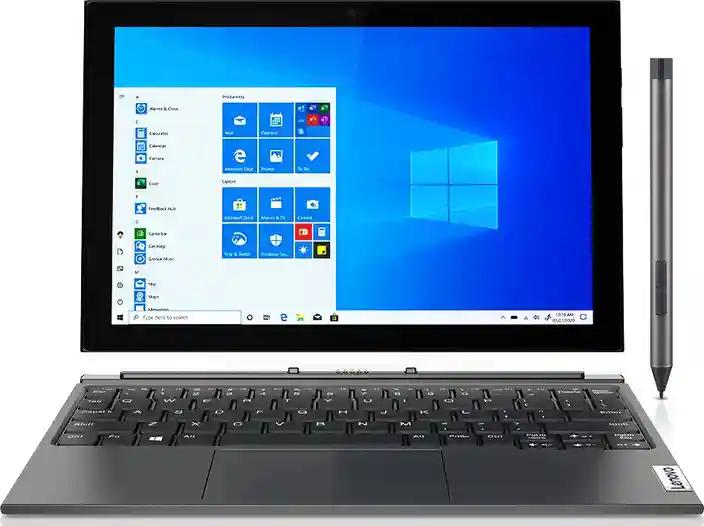
TL;DR The Lenovo IdeaPad Duet Tab continues to remain one of the best affordable 2-in-1 Chromebook devices because it combines lightweight portability, touchscreen flexibility, detachable keyboard functionality, ChromeOS simplicity, and SSD responsiveness into a compact productivity-focused form factor. Unlike bulky traditional laptops that prioritize raw computing power over mobility, the Duet Tab strongly focuses on online learning, browsing, document editing, streaming, note-taking, and cloud-based productivity workflows for students, remote workers, travelers, and casual users. Combined with its Full HD touchscreen display, Android app compatibility, fast ChromeOS boot times, and highly portable sub-1kg design, the Lenovo IdeaPad Duet Tab remains one of the smartest budget-friendly detachable Chromebook devices for lightweight everyday computing and travel-focused productivity.
Why Compact 2-In-1 Chromebook Devices Are Becoming More Popular
Modern users increasingly prioritize portability, battery efficiency, cloud-based workflows, and touchscreen flexibility because many everyday computing tasks now revolve around web browsing, online meetings, streaming, note-taking, and document editing. Compact Chromebook devices therefore continue becoming substantially more popular.
Another important factor is hybrid learning and remote work because students, freelancers, and casual users increasingly need lightweight secondary devices for travel, classrooms, libraries, and portable productivity environments.
ChromeOS devices have also become significantly more practical because Android app compatibility, cloud integration, and fast SSD responsiveness now allow Chromebook systems to handle many everyday productivity tasks comfortably.
Lenovo IdeaPad Duet Tab Specifications Overview
| Specification | Details |
|---|---|
| Processor | Intel Celeron N4020 |
| RAM | 4GB DDR4 |
| Storage | 120GB SSD |
| Display | 10.1-inch Touchscreen |
| Resolution | 1920 × 1200 |
| Refresh Rate | 60Hz |
| Operating System | ChromeOS |
| Weight | Approximately 0.92kg |
| Ports | USB-C, Pogo Pin, Audio Combo Jack |
The specifications clearly show why the Duet Tab remains highly practical because Lenovo strongly focuses on portability, touchscreen usability, and lightweight productivity instead of performance-heavy workstation hardware.
Another important factor is SSD storage because many entry-level Chromebook devices still rely on slower eMMC storage solutions.
Lightweight Design And Portability
One of the strongest advantages of the Lenovo IdeaPad Duet Tab is its highly portable form factor because the compact detachable design dramatically improves travel convenience and mobility.
The lightweight chassis especially benefits students and travelers because carrying the device throughout the day feels substantially easier compared to traditional laptops.
| Design Feature | Benefit |
|---|---|
| Detachable Keyboard | Flexible 2-in-1 usability |
| Lightweight Build | Easier portability |
| Compact Form Factor | Travel-friendly design |
| Minimalist Construction | Cleaner aesthetics |
Another important factor is usage flexibility because users can switch between tablet and laptop modes quickly depending on workload requirements.
Why Portable 2-In-1 Devices Matter More Today
Modern users frequently move between classrooms, offices, cafes, libraries, and travel environments because productivity workflows increasingly depend on mobility. Portable devices therefore provide significantly better convenience.
The Duet Tab especially benefits because its sub-1kg design dramatically improves comfort during long commuting sessions and portable productivity workflows.
Another important factor is casual usability because tablet-style interaction often feels more comfortable during streaming, reading, and note-taking workloads.
Detachable Keyboard And 2-In-1 Flexibility
The detachable keyboard remains one of the most practical features of the Duet Tab because users can instantly switch between touchscreen tablet usage and traditional typing workflows.
The keyboard especially improves productivity because document editing, assignments, note-taking, and browsing become substantially easier compared to touchscreen-only tablets.
| Keyboard Feature | Benefit |
|---|---|
| Detachable Design | Flexible usage modes |
| Pogo Pin Connectivity | Instant attachment |
| Laptop-Style Typing | Better productivity |
| Compact Layout | Improved portability |
Another important factor is versatility because 2-in-1 designs accommodate both entertainment and productivity workloads effectively.
Why Detachable Devices Improve Everyday Usability
Traditional laptops and standard tablets both involve compromises because laptops lack touchscreen flexibility while tablets often struggle with typing-intensive tasks.
The Lenovo IdeaPad Duet Tab especially benefits because the detachable design bridges the gap between laptop-style productivity and tablet-focused convenience.
Another important factor is educational usability because students frequently alternate between reading, typing, browsing, and streaming workloads throughout the day.
Full HD Touchscreen Display Experience
The 10.1-inch Full HD touchscreen panel delivers sharp visuals because the 1920 × 1200 resolution provides noticeably better clarity compared to many entry-level Chromebook displays.
The Duet Tab especially performs well during reading and streaming because the higher-resolution panel improves text sharpness and multimedia clarity substantially.
| Display Feature | Benefit |
|---|---|
| 1920 × 1200 Resolution | Sharper visuals |
| Touchscreen Support | Better interaction |
| IPS Panel Technology | Improved viewing angles |
| Compact Display Size | Easier portability |
Another important factor is touchscreen responsiveness because smooth gesture support improves navigation across ChromeOS and Android applications.
Why Higher Resolution Displays Matter In Compact Devices
Smaller screens benefit significantly from higher pixel density because sharper visuals improve readability during document editing, ebook reading, and online learning sessions.
The Duet Tab especially benefits because the sharper Full HD+ display improves comfort during extended browsing and reading workloads.
Another important factor is multimedia quality because higher-resolution displays improve YouTube streaming and OTT viewing experiences substantially.
Intel Celeron N4020 Performance
The Intel Celeron N4020 processor targets lightweight computing workloads because the chipset is optimized primarily for web browsing, streaming, document editing, and cloud-based productivity applications.
The Duet Tab especially performs smoothly during casual workloads because ChromeOS remains highly optimized for lightweight hardware environments.
| Usage Area | Performance Experience |
|---|---|
| Web Browsing | Smooth |
| Online Classes | Reliable |
| Streaming | Comfortable |
| Document Editing | Stable |
| Android Apps | Moderate |
Another important factor is efficiency because lightweight processors improve battery optimization and thermal management significantly.
Why ChromeOS Performs Well On Lightweight Hardware
ChromeOS remains substantially lighter than traditional desktop operating systems because the platform strongly prioritizes web-based workflows and optimized background processes.
The Duet Tab especially benefits because ChromeOS allows modest hardware to remain responsive during everyday productivity and educational workloads.
Another important factor is simplified maintenance because ChromeOS devices generally require less troubleshooting and background optimization compared to traditional Windows systems.
SSD Storage And System Responsiveness
The inclusion of SSD storage significantly improves the overall experience because SSDs provide substantially faster boot times and application responsiveness compared to slower eMMC storage commonly found in budget devices.
The Duet Tab especially benefits because fast startup times and quicker app loading improve daily usability considerably.
| Storage Feature | Benefit |
|---|---|
| SSD Storage | Faster responsiveness |
| Faster Boot Times | Quicker startup |
| Improved File Access | Better workflow efficiency |
| Lower Latency | Smoother usability |
Another important factor is long-term usability because SSD storage improves perceived performance substantially in lightweight computing devices.
Android App Support And ChromeOS Ecosystem
One of the biggest advantages of ChromeOS devices is Android application compatibility because users can install thousands of apps directly through the Google Play Store.
The Duet Tab especially benefits because applications such as Zoom, Netflix, Canva, Gmail, Microsoft Office, and YouTube run comfortably within ChromeOS workflows.
| ChromeOS Feature | Benefit |
|---|---|
| Google Play Store Support | Massive app ecosystem |
| Chrome Browser Integration | Better web workflows |
| Cloud Synchronization | Easier productivity |
| Automatic Updates | Improved security |
Another important factor is simplicity because ChromeOS provides a cleaner and easier learning curve for beginners and casual users.
Why ChromeOS Works Well For Students
Students increasingly rely on browser-based applications, Google Classroom, Zoom, PDFs, cloud storage, and online learning platforms rather than traditional desktop software suites.
The Lenovo IdeaPad Duet Tab especially benefits because ChromeOS strongly prioritizes these web-focused educational workflows.
Another important factor is security because ChromeOS devices generally involve lower malware risks and simplified system maintenance.
Ports And Connectivity
The Duet Tab keeps connectivity minimal but practical because compact tablet-style devices prioritize portability over extensive port selection.
The USB-C connectivity especially improves flexibility because users can connect external accessories, storage devices, hubs, and monitors through adapters when required.
| Connectivity Feature | Benefit |
|---|---|
| USB-C Port | Modern accessory support |
| Pogo Pin Connector | Detachable keyboard integration |
| Headphone Jack | Audio compatibility |
| Wi-Fi Connectivity | Reliable wireless browsing |
Another important factor is accessory flexibility because USB-C ecosystems continue expanding rapidly across laptops, tablets, and smartphones.
Real-World Usage Scenarios
The Lenovo IdeaPad Duet Tab performs best during lightweight cloud-focused workflows because the hardware and ChromeOS ecosystem strongly prioritize portable everyday usability.
The device especially suits:
| Usage Scenario | Experience |
|---|---|
| Online Learning | Excellent |
| Web Browsing | Smooth |
| Streaming | Comfortable |
| Note-Taking | Convenient |
| Travel Productivity | Highly portable |
Another important factor is battery efficiency because lightweight devices generally perform better during travel-focused workflows.
Lenovo IdeaPad Duet Tab Vs HP Chromebook 14
The HP Chromebook 14 remains one of the closest competitors because both devices target students, casual users, and lightweight productivity workflows.
However, the Duet Tab strongly differentiates itself through portability and touchscreen flexibility.
| Feature | Lenovo IdeaPad Duet Tab | HP Chromebook 14 |
|---|---|---|
| Form Factor | Detachable 2-in-1 | Traditional laptop |
| Weight | ~0.92kg | Heavier |
| Display | Touchscreen | Mostly non-touch variants |
| Portability | Excellent | Moderate |
| Keyboard Experience | Compact detachable | Full-sized traditional |
Another important factor is usage preference because buyers prioritizing typing-heavy workflows may still prefer larger Chromebook laptops.
Pros And Cons
| Pros | Cons |
|---|---|
| Extremely lightweight | Limited multitasking power |
| Full HD touchscreen | 4GB RAM limitation |
| ChromeOS simplicity | Minimal ports |
| SSD responsiveness | Not designed for heavy workloads |
| Android app support | Limited gaming performance |
The strengths especially make the Duet Tab highly suitable for educational and travel-focused productivity workflows.
Another important factor is affordability because detachable Chromebook devices remain relatively uncommon within budget pricing segments.
Why Refurbished Chromebook Devices Make Sense
Refurbished Chromebook devices continue becoming more popular because many users primarily require lightweight web-based computing instead of expensive premium laptops.
The Lenovo IdeaPad Duet Tab especially benefits refurbished buyers because ChromeOS devices generally involve lower maintenance requirements and longer software stability.
| Refurbished Benefit | Advantage |
|---|---|
| Lower Cost | Better affordability |
| Reduced Electronic Waste | Improved sustainability |
| Certified Testing | Better reliability |
| Warranty Availability | Safer purchasing |
Another important factor is practical value because lightweight Chromebook devices often remain usable for several years during basic productivity workloads.
Why The Lenovo IdeaPad Duet Tab Remains One Of The Best Affordable 2-In-1 Chromebook Devices
The most important takeaway is simple, the Lenovo IdeaPad Duet Tab succeeds because it balances portability, touchscreen flexibility, ChromeOS simplicity, SSD responsiveness, detachable productivity, and affordable pricing much more effectively than many bulky traditional laptops. Instead of aggressively targeting power users, Lenovo strongly focuses on lightweight cloud-based productivity and everyday convenience.
The combination of the compact 2-in-1 form factor, detachable keyboard, Full HD touchscreen display, ChromeOS optimization, Android app support, SSD storage, and lightweight design especially helps the Duet Tab remain highly competitive for students, travelers, casual users, and remote workers alike. These features work together to create a highly portable and practical everyday computing experience suitable for browsing, streaming, online classes, note-taking, and document editing workflows.
At the same time, buyers should understand that the Duet Tab primarily targets lightweight productivity instead of heavy multitasking, gaming, or professional creative workloads. Users requiring advanced editing software, high-end gaming, or workstation-class computing power may still require traditional laptops. However, for users seeking one of the smartest affordable Chromebook 2-in-1 devices for travel, online learning, web browsing, and cloud-based productivity, the Lenovo IdeaPad Duet Tab remains one of the best budget-friendly portable computing devices available today.
Frequently Asked Questions
Q. Is the Lenovo IdeaPad Duet Tab good for remote work?
Yes, the device performs well for lightweight remote work tasks such as email management, document editing, video conferencing, and cloud-based productivity workflows.
Q. Does the Lenovo IdeaPad Duet Tab support Android apps?
Yes, ChromeOS supports Android applications through the Google Play Store.
Q. Is the Lenovo IdeaPad Duet Tab suitable for students?
Yes, the lightweight design, detachable keyboard, touchscreen functionality, and ChromeOS ecosystem make it highly suitable for students.
Q. Can the Lenovo IdeaPad Duet Tab replace a laptop?
For casual users and students focused on browsing, assignments, and cloud-based productivity, it can replace many traditional laptop workflows.
Q. Does the Lenovo IdeaPad Duet Tab support external monitors?
Yes, users can connect external displays using compatible USB-C adapters.
Q. Is ChromeOS beginner-friendly?
Yes, ChromeOS is generally easier to maintain, simpler to learn, and more secure compared to traditional operating systems.
Q. Is the Lenovo IdeaPad Duet Tab good for streaming?
Yes, the Full HD touchscreen display and lightweight form factor make it excellent for YouTube, Netflix, and OTT streaming.
Q. Can the Lenovo IdeaPad Duet Tab handle multitasking?
The device handles light multitasking comfortably, though heavier workloads may be limited by the 4GB RAM configuration.
Q. Why is SSD storage important in Chromebook devices?
SSD storage significantly improves startup speed, responsiveness, and everyday usability compared to slower eMMC storage solutions.
Q. Who should buy the Lenovo IdeaPad Duet Tab?
Students, travelers, casual users, remote workers, and users seeking an affordable lightweight Chromebook 2-in-1 device should strongly consider the Lenovo IdeaPad Duet Tab.
Ready to upgrade your tech?
Browse our collection of quality refurbished products at unbeatable prices.






