
HP ZBook Firefly 14 Refurbished Checklist 2026: GPU, Battery, Warranty, And Condition
Planning to buy a refurbished HP ZBook Firefly 14 in 2026. Learn what to check before purchasing, including GPU performance, battery health, warranty coverage, physical condition, and testing steps to ensure long term reliability and performance.

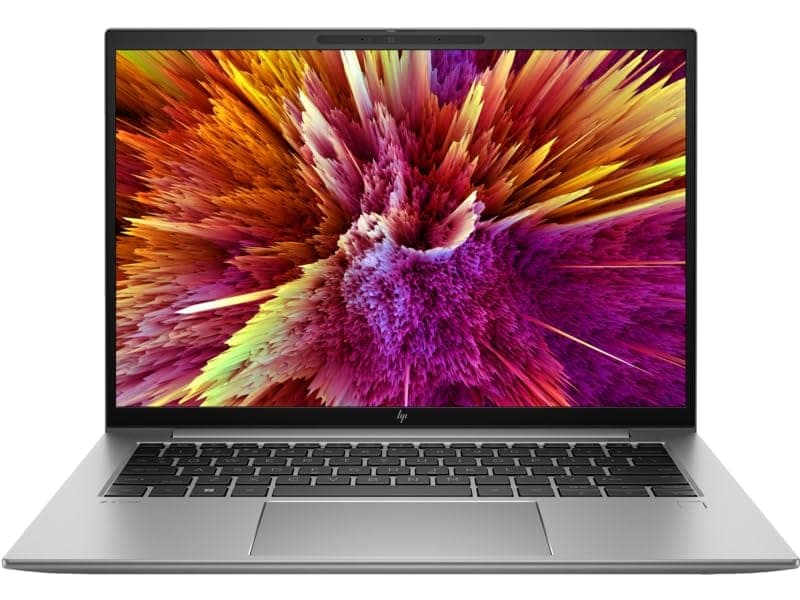
Buying a refurbished HP ZBook Firefly 14 in 2026 can be a smart way to get a compact, business-class mobile workstation at a lower cost. These laptops were designed for professionals who need portability with reliable performance, and a well refurbished unit often performs like new. However, refurbished models vary widely in quality, testing, and warranty, so buyers must inspect specific hardware and software aspects before committing. This checklist walks you through everything to verify: GPU capability, battery health, warranty and return policy, physical and functional condition, and practical testing steps to confirm the device meets your needs.
This guide is written to be practical and hands on. Expect clear sections on what to examine, how to test components, what acceptable thresholds look like, and what red flags to avoid. The goal is to give you confidence in buying a refurbished HP ZBook Firefly 14 by covering the parts that matter most for longevity and real world performance.
Quick Overview Of The HP ZBook Firefly 14
The HP ZBook Firefly 14 is a lightweight mobile workstation positioned for designers, engineers, consultants, and professionals who need certified performance in a compact package. Typical configurations include low to mid power Intel Core processors, integrated Intel or discrete NVIDIA GPUs in some SKUs, 14 inch displays, and professional features like Thunderbolt connectivity and enterprise security options. The model was built with portability in mind, so thermal headroom is limited compared with larger mobile workstations. When buying refurbished, verify that the specific configuration you are offered matches your intended use case, especially if you rely on GPU acceleration for CAD, rendering, or AI-assisted tasks.
Why Buy Refurbished And What To Expect
Refurbished HP ZBook Firefly 14 units can provide substantial savings compared with new mobile workstations. Refurbished units often go through inspection cycles where faulty components are repaired or replaced. Certified refurbishers and manufacturer refurbished programs typically include hardware testing, parts replacement, and a limited warranty. Independent sellers may offer lower prices, but their testing standards vary.
When you buy refurbished, expect one of three quality levels: manufacturer refurbished, certified refurbisher, and seller refurbished. Manufacturer refurbished is the safest option because HP or an authorized partner usually performs comprehensive testing and offers a known warranty. Certified refurbishers follow rigorous protocols and often provide a decent warranty. Seller refurbished units can be hit or miss and require much more scrutiny from the buyer.
GPU And Graphics Subsystem
Why GPU Matters For A ZBook Firefly 14
Even when the ZBook Firefly 14 ships with integrated graphics, some SKUs include a discrete GPU such as an NVIDIA Quadro or a low wattage RTX variant. The GPU matters for CAD, 3D modeling, GPU accelerated effects, video playback, and hardware acceleration in creative applications. Verify GPU model and driver status because a crippled GPU or outdated driver can seriously limit performance.
What To Check
- Confirm the exact GPU model. Look for model numbers in the listing and verify in the BIOS or operating system after powering on.
- Check VRAM amount. For discrete GPUs, 4GB or more is ideal for light CAD work. Integrated GPUs have system RAM shared bandwidth considerations.
- Verify GPU driver installation and date. Install the latest vendor drivers or confirm the refurbisher already updated drivers.
- Run a quick GPU stress test or benchmark to confirm stability. Use a short run of a lightweight benchmark or a GPU compute test to spot artifacts, crashes, or throttling.
Practical Tests
Run a GPU stress test such as FurMark or a short GFXBench or Blender viewport test. Watch for artifacting, sudden reboots, or thermal shutdowns. Note the sustained clock rates and whether the GPU drops frequencies quickly, which indicates thermal or power limitations.
Battery Health And Power System
Why Battery Health Is Critical
Battery condition is one of the most variable aspects of refurbished laptops. A worn battery reduces mobility and may cause sudden shutdowns under load. For a mobile workstation, reliable battery life matters for productivity when you are away from a charger.
What To Check
- Battery health metrics. Use platform utilities or third party tools to check cycle count, full charge capacity, and design capacity. A battery that retains 80 percent or more of original capacity and has a reasonable cycle count is acceptable.
- Charging behavior. Confirm the device charges reliably and reaches full capacity. Check that the charging port and adapter are in good condition.
- Power brick authenticity and wattage. Ensure the included adapter provides the correct wattage for the CPU and GPU configuration. Undersized chargers lead to throttling.
- AC-only issues. Some refurbished units may work only when plugged in if the battery is deeply degraded. This is a red flag unless the seller discloses it.
Practical Tests
Fully charge the battery, then run a battery drain test under a mixed workload and measure the discharge rate. Note the estimated runtime and compare to expected values for that model. Also unplug and plug back to ensure power transitions smoothly.
Warranty, Returns, And Seller Reputation
Why Warranty And Returns Matter
A refurbished purchase without a solid warranty is risky. Warranty and return policies reflect the refurbisher’s confidence in their testing. A minimum 90 day warranty is common for seller refurbished units, while manufacturer refurbished units often include a 12 month warranty.
What To Check
- Type and length of warranty. Manufacturer certified is best, followed by certified refurbisher. Verify what parts the warranty covers and if labor is included.
- Return policy. Confirm the return window and whether return shipping is free. A clear 14 to 30 day return window is desirable.
- Warranty transferability. Some refurbisher warranties can be transferred if you resell the device.
- Reputation and reviews. Research the seller’s track record for replacements, refunds, and service responsiveness.
Practical Steps
Save all transaction emails and warranty documents. If buying through a marketplace, read recent reviews that specifically mention refurbished hardware and post sale support.
Physical Condition And Cosmetic Inspection
What To Inspect Physically
Refurbished condition varies. Cosmetic wear is acceptable when disclosed, but structural damage or loose hinges is not. Physical inspection should include case, screen bezel, hinge stability, ports, keyboard and trackpad function, and bottom panel integrity.
Checklist
- Case and lid for dents, deep scratches, or signs of impact.
- Hinge tightness and uniform opening angle. Hinge play or wobble suggests internal stress.
- Keyboard keys for responsiveness and even backlight if present. Sticky keys are a red flag.
- Trackpad responsiveness and button function.
- Screen bezel gaps and evidence of prior panel replacement.
- Port condition, including USB, HDMI, Thunderbolt, charging port, and SD card reader. Bent connectors or loose ports are serious issues.
- Bottom cover and screws present and not stripped. Missing screws indicate prior nonstandard repairs.
Practical Tests
Open and close the lid several times. Type a long paragraph to confirm key travel and responsiveness. Plug and unplug multiple peripherals to test port fit and electrical contact. Inspect the screen at multiple angles for cracks or pressure marks.
Display, Panel Health, And Calibration
What To Look For
The display is the most visible part of the laptop and often the most expensive to repair. Check for dead pixels, backlight bleeding, color uniformity, brightness range, and any signs of burn in on OLED models.
Practical Tests
- Run pixel tests using solid color backgrounds to find stuck or dead pixels.
- Check for uniform brightness at 100 percent and 50 percent levels.
- Inspect for screen flex or pressure marks when applying light pressure to the bezel.
- Confirm the native resolution and scaling are correct and that the panel model matches listing specs.
If color accuracy matters, run a simple calibration tool or look for obvious color shifts. For creative use, prefer screens with higher sRGB or Adobe RGB coverage verified by seller documentation.
Thermal Performance And Fan Health
Why Thermal Behavior Matters
Compact mobile workstations have limited cooling. Over time, dust, degraded thermal paste, or poorly reassembled systems can reduce cooling efficiency. Thermal throttling reduces CPU and GPU sustained performance and indicates a potential refurbishment shortcoming.
Tests To Run
Run a CPU stress test such as Cinebench R23 or a mixed CPU/GPU workload for 10 to 20 minutes while monitoring temperatures and clock speeds. Observe fan noise and ramp behavior. Short thermal spikes are normal, but if the system throttles severely within minutes or shuts down, that is a red flag.
Inspect fan vents for dust. If the seller cleaned internals and replaced thermal paste, they should disclose that. Ask whether fans and heatsinks were inspected during refurbishment.
Storage, Memory, And Upgradeability
What To Verify
- Confirm SSD health and model. Use SMART tools to check wear levels and remaining life. A healthy NVMe SSD is one of the most important components for day to day responsiveness.
- Verify RAM capacity and whether modules are soldered or user replaceable. ZBook Firefly 14 models vary in RAM configuration and upgrade path.
- Check for available M.2 slots or SO-DIMM slots if you anticipate upgrades.
Practical Tests
Run disk speed tests to confirm advertised NVMe read and write speeds. Open large files and observe responsiveness. If the SSD shows high wear or errors in SMART, request replacement or a better unit.
BIOS, Firmware, And Software Verification
Why Firmware Matters
Outdated BIOS or firmware can cause instability. Refurbishers should update BIOS, firmware, and device drivers to ensure compatibility and security. Verify the BIOS vendor, version, and that Secure Boot and TPM are intact if you need enterprise security features.
What To Check
- BIOS version and release notes.
- Firmware updates applied for SSD, Intel Management Engine, and GPU.
- Clean OS installation and activation state if Windows is included. Ensure no OEM accounts are left logged in.
- Check for unwanted bloatware or unknown user accounts.
Ports, Peripherals, And Connectivity
Connectivity Checklist
- Validate WiFi and Bluetooth connectivity with real world file transfers.
- Test webcam, microphone, and speakers for clarity and volume.
- Confirm Thunderbolt or USB C port functionality for charging and external displays.
- Test wired Ethernet if present or via an adapter.
- Try an external monitor via HDMI or DisplayPort to confirm multi display support.
Connectivity issues are often easy to miss during a superficial inspection, so spend time testing real peripherals.
Accessories, Manuals, And Packaging
What To Expect
A quality refurbished unit should include at least the power adapter and basic documentation. Manufacturer refurbished units may include new packaging and full accessories. Seller refurbished units sometimes omit chargers or include aftermarket bricks. Verify adapter wattage, remote management dongles, and any docking station compatibility.
If documentation and recovery media are not provided, ask for a fresh Windows installation link or recovery image.
Practical Acceptance Tests Before Finalizing Purchase
Below is a practical acceptance checklist you can use during unboxing or initial testing. Run these tests within the return window.
- Power on and log in. Confirm battery shows charge and health metrics.
- Run a disk check and confirm SSD SMART status.
- Run a CPU stress test for 10 minutes while monitoring temperatures and clocks.
- Run a GPU or graphics workload and check for artifacting.
- Test WiFi, Bluetooth, webcam, microphone, and speakers with a short call or recording.
- Connect external monitor and check resolution and refresh rate.
- Type for several minutes to test keyboard latency and key feel.
- Record any cosmetic issues with photographs and timestamp them.
If any of these tests fail, contact the seller immediately and request repair, replacement, or a refund per their return policy.
Red Flags That Should Cause You To Walk Away
- No clear warranty or return policy.
- Battery that will not hold charge or units that only run on AC.
- Missing screws, cracked chassis, or exposed internals indicating rough repairs.
- Repeated GPU or display artifacting during stress tests.
- SSD SMART errors or very high wear indicators.
- Sellers who refuse to provide test results or photos on request.
- BIOS passwords or accounts left logged in without seller disclosure.
Any of these issues reduce long term reliability and increase total cost of ownership.
Where To Buy And Negotiation Tips
Prefer manufacturer refurbished or certified refurbishers where possible. For independent sellers, request documented test results, battery cycle counts, and SMART reports. Use the return window and payment methods that provide buyer protection. Negotiate price when a unit shows minor cosmetic wear, or ask for an extended warranty inclusion if the seller offers it.
If possible, test the machine locally before purchase or insist on a 14 to 30 day return policy. For high value purchases, a short on site inspection by a trusted technician can be worth the cost.
Conclusion
A well refurbished HP ZBook Firefly 14 can be a compact and reliable mobile workstation for professionals in 2026. The key to a successful purchase is methodical inspection and testing. Focus on GPU functionality if your workflows rely on graphics acceleration. Verify battery health and charging behavior to ensure mobility. Confirm warranty and return policies to protect your purchase. Inspect the display, ports, thermal behavior, storage health, BIOS state, and accessories thoroughly.
Use the practical tests outlined above and keep documented proof of the device condition. When refurbishers provide clear testing documentation and a solid warranty, you can confidently buy a refurbished ZBook Firefly 14 that delivers excellent value and dependable performance.
Frequently Asked Questions
1. Is the HP ZBook Firefly 14 good as a refurbished laptop in 2026
Yes, when professionally refurbished and tested, the ZBook Firefly 14 remains a reliable lightweight workstation suitable for business, CAD, and productivity tasks.
2. What GPU options should I expect in a refurbished ZBook Firefly 14
Most units include Intel integrated graphics while some configurations feature NVIDIA professional GPUs designed for light creative or CAD workloads.
3. How much battery health is acceptable when buying refurbished
A battery retaining around 80 percent or more of its original capacity is generally considered acceptable for refurbished business laptops.
4. Does a refurbished HP ZBook Firefly 14 come with warranty
Many certified refurbished units include 3 to 12 months warranty depending on the seller, which is important for long term reliability.
5. What is the biggest thing to check before buying refurbished
Always verify hardware testing, display condition, storage health, and seller reputation before making a purchase to avoid hidden issues.
Ready to upgrade your tech?
Browse our collection of quality refurbished products at unbeatable prices.






