
HP ZBook Firefly 14 G9 For Engineers In 2026: SolidWorks, MATLAB, And Simulation Loads
Explore the HP ZBook Firefly 14 G9 for engineering in 2026. Learn how it handles SolidWorks modelling, MATLAB computation, and simulation workloads with the right configuration.

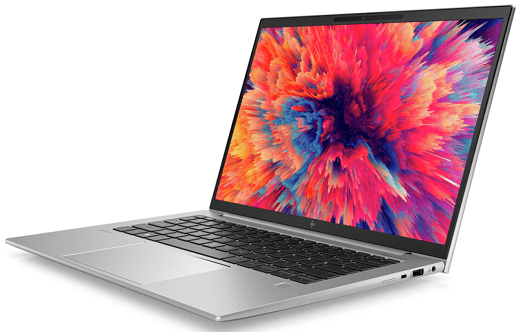
Engineering education and professional practice in 2026 demand more from computing devices than ever before. Mechanical models are more detailed. Electrical simulations process larger datasets. Control systems rely on real time computations. Finite element analysis runs longer and with higher resolution meshes. Engineers no longer use laptops only for documentation. They rely on them as primary computational workstations.
The HP ZBook Firefly 14 G9 positions itself as a thin and light mobile workstation designed to balance portability with professional grade performance. With 12th Gen Intel processors, optional NVIDIA professional graphics, fast NVMe storage, and enterprise durability, it aims to deliver reliable computing for engineers who need performance without carrying a bulky desktop replacement.
This detailed guide explores how the Firefly G9 performs with SolidWorks, MATLAB, and simulation software, and whether it remains a practical engineering companion in 2026.
Processor Architecture And Engineering Performance
The Firefly G9 typically features 12th Gen Intel Core processors with hybrid architecture. This design combines performance cores for heavy tasks and efficiency cores for background processes.
For engineering workloads, this architecture offers:
- Strong single core boost speeds for modelling
- Improved multi core performance for simulations
- Efficient power management during lighter tasks
- Better multitasking capability
SolidWorks and many CAD tools rely heavily on single core performance for sketching and model regeneration. The high turbo frequencies of the 12th Gen processors help reduce lag when rotating assemblies or modifying parametric dimensions.
MATLAB and simulation tools can benefit from multiple cores when parallel processing is enabled. The hybrid architecture allows the Firefly G9 to distribute workloads intelligently, improving responsiveness even during extended computational sessions.
SolidWorks Performance In Real Engineering Use
SolidWorks remains one of the most widely used CAD platforms in mechanical engineering. Performance in SolidWorks depends on CPU speed, GPU stability, RAM capacity, and storage speed.
Viewport And Assembly Handling
The Firefly G9, especially in configurations with NVIDIA T500 professional graphics, delivers smooth viewport navigation for small to medium assemblies.
Key strengths include:
- Stable rotation and zooming of 3D models
- Reduced lag during part edits
- Consistent shading and real time rendering
- Certified driver compatibility in professional GPU variants
For academic projects and moderate industrial assemblies, performance remains reliable. Very large assemblies with thousands of components may challenge a thin and light workstation, but optimisation techniques can mitigate performance strain.
Rendering And Visualisation
While the Firefly G9 is not a dedicated rendering workstation, it handles moderate rendering tasks effectively. Real time previews, exploded views, and standard visualisation tasks remain fluid.
Engineers focused primarily on design rather than large scale photorealistic rendering will find its performance sufficient.
MATLAB And Computational Engineering
MATLAB is heavily CPU and memory dependent. Engineers use it for matrix computations, algorithm testing, signal processing, control systems design, and data analysis.
CPU Intensive Computations
The high clock speeds of the 12th Gen processors help accelerate:
- Matrix operations
- Numerical simulations
- Control system modelling
- Optimisation algorithms
For moderate datasets, MATLAB runs smoothly without noticeable bottlenecks.
Parallel Processing And Toolboxes
When using Parallel Computing Toolbox, additional cores can improve computation time. The Firefly G9 handles multi thread workloads competently, though it is not comparable to high wattage desktop CPUs.
RAM capacity plays a critical role. Engineers working with large datasets should prioritise at least 32GB of RAM for smoother performance.
Simulation Software And Thermal Stability
Simulation tools such as ANSYS, COMSOL, and other finite element packages place heavy demands on CPU, RAM, and thermal management.
Thin and light laptops can face thermal constraints under sustained loads. However, the Firefly G9 includes enterprise grade cooling solutions designed for professional workloads.
Sustained CPU Load Handling
Under continuous simulation workloads, the laptop maintains stable performance provided ventilation is adequate.
Best practices include:
- Using the laptop on hard surfaces
- Ensuring vents remain unobstructed
- Periodic internal cleaning
Thermal throttling is minimal during moderate simulation tasks, though extended high intensity simulations may push limits compared to larger workstation models.
GPU Role In Engineering Workflows
The Firefly G9 may include integrated Intel Iris Xe graphics or the NVIDIA T500 professional GPU.
The dedicated GPU variant provides:
- Better viewport performance in CAD
- Improved OpenGL stability
- Certified driver compatibility
- Smoother handling of moderate 3D workloads
For engineers who focus on heavy modelling or light GPU accelerated tasks, the T500 variant is recommended.
Integrated graphics are sufficient for 2D drafting, light modelling, and general academic workloads.
RAM Configuration And Upgrade Planning
Memory capacity directly influences engineering performance.
Recommended configurations include:
- 16GB minimum for entry level engineering use
- 32GB ideal for CAD and simulation workloads
- Higher capacity for data heavy computation
Some G9 models use soldered LPDDR5 memory, limiting upgrade flexibility. Engineers planning long term use should verify RAM capacity before purchase.
NVMe Storage And Project File Management
Large engineering files benefit from high speed NVMe SSD storage.
Advantages include:
- Faster project loading
- Reduced save times
- Quick system boot
- Efficient handling of simulation output files
A 1TB NVMe SSD is advisable for engineering students and professionals managing multiple projects and software installations.
Multi Monitor Productivity For Engineers
Engineering tasks often require more than one display. Engineers may view simulation results on one screen and modify models on another.
The Firefly G9 supports:
- Dual 4K displays via Thunderbolt
- Additional display via HDMI
- Docking station integration
This multi monitor capability enhances productivity significantly.
Portability For Campus And Field Work
One of the Firefly G9’s strongest advantages is portability. Weighing around 1.4 kilograms, it is easy to carry between classrooms, labs, and offices.
Benefits include:
- Lightweight chassis
- Durable enterprise construction
- Reliable battery life for light workloads
For heavy simulation tasks, battery consumption increases, but for documentation, coding, and lighter modelling, it lasts through extended sessions.
Refurbished Option For Engineering Students In India
In 2026, many engineering students opt for refurbished workstation laptops to balance cost and performance.
A refurbished Firefly G9 offers:
- Enterprise build quality
- Professional grade hardware
- Lower upfront cost
- Strong value retention
Before purchasing refurbished, verify GPU configuration, battery health, SSD condition, and warranty coverage.
Limitations To Consider
While capable, the Firefly G9 is not designed as a high wattage desktop replacement workstation.
Limitations include:
- Limited thermal headroom compared to larger ZBook models
- Possible soldered RAM in some configurations
- Moderate GPU power compared to higher tier professional GPUs
Engineers running extremely heavy industrial simulations may require larger workstation series models.
Who Should Choose The Firefly G9
The Firefly G9 is ideal for:
- Mechanical engineering students
- Electrical and electronics students
- Civil engineers handling moderate models
- Researchers using MATLAB
- Professionals needing portable CAD capability
It balances mobility and computational power effectively for most engineering scenarios.
Long-Term Engineering Viability
With Thunderbolt 4, NVMe storage, modern processor architecture, and enterprise durability, the Firefly G9 remains relevant beyond 2026.
Its combination of portability, professional graphics options, and solid CPU performance makes it a dependable choice for engineers who prioritise flexibility without sacrificing capability.
Conclusion
The HP ZBook Firefly 14 G9 proves that a thin and light mobile workstation can handle serious engineering workloads in 2026. From SolidWorks modelling to MATLAB computation and moderate simulation loads, it delivers reliable performance when configured appropriately.
While it may not replace high end desktop workstations for extremely intensive industrial simulations, it offers an impressive balance of portability, stability, and professional capability. For engineering students and professionals seeking mobility without compromising essential performance, the Firefly G9 remains a practical and dependable solution.
Frequently Asked Questions
1. Is the HP ZBook Firefly 14 G9 powerful enough for SolidWorks in 2026?
Yes. With 12th Gen Intel processors and the optional NVIDIA T500 GPU, it handles small to medium assemblies smoothly. It is suitable for students and professionals working on moderate CAD projects.
2. How much RAM is recommended for engineering software on the Firefly G9?
16GB is the minimum for basic CAD and MATLAB use. 32GB is strongly recommended for simulation tasks and larger engineering projects to ensure smoother performance.
3. Can the Firefly G9 handle heavy simulation workloads?
It performs well for moderate simulations and academic level finite element analysis. Extremely heavy industrial simulations may require higher wattage workstation models.
4. Is the NVIDIA T500 GPU necessary for engineers?
For 2D drafting and light modelling, integrated graphics are sufficient. For smoother 3D CAD performance and professional driver stability, the NVIDIA T500 configuration is preferable.
5. Is a refurbished Firefly G9 a good option for engineering students?
Yes, provided it has sufficient RAM, a healthy SSD, good battery condition, and warranty coverage. It offers workstation grade durability at a more affordable cost compared to new models.
Ready to upgrade your tech?
Browse our collection of quality refurbished products at unbeatable prices.






