
HP ZBook 15 G3 Ports in 2026: Thunderbolt, HDMI, USB-A, SD, and Docking
This guide explains the HP ZBook 15 G3’s port selection in 2026 and how Thunderbolt, HDMI, USB-A, SD, and docking support enhance productivity for engineers, creatives and professionals.

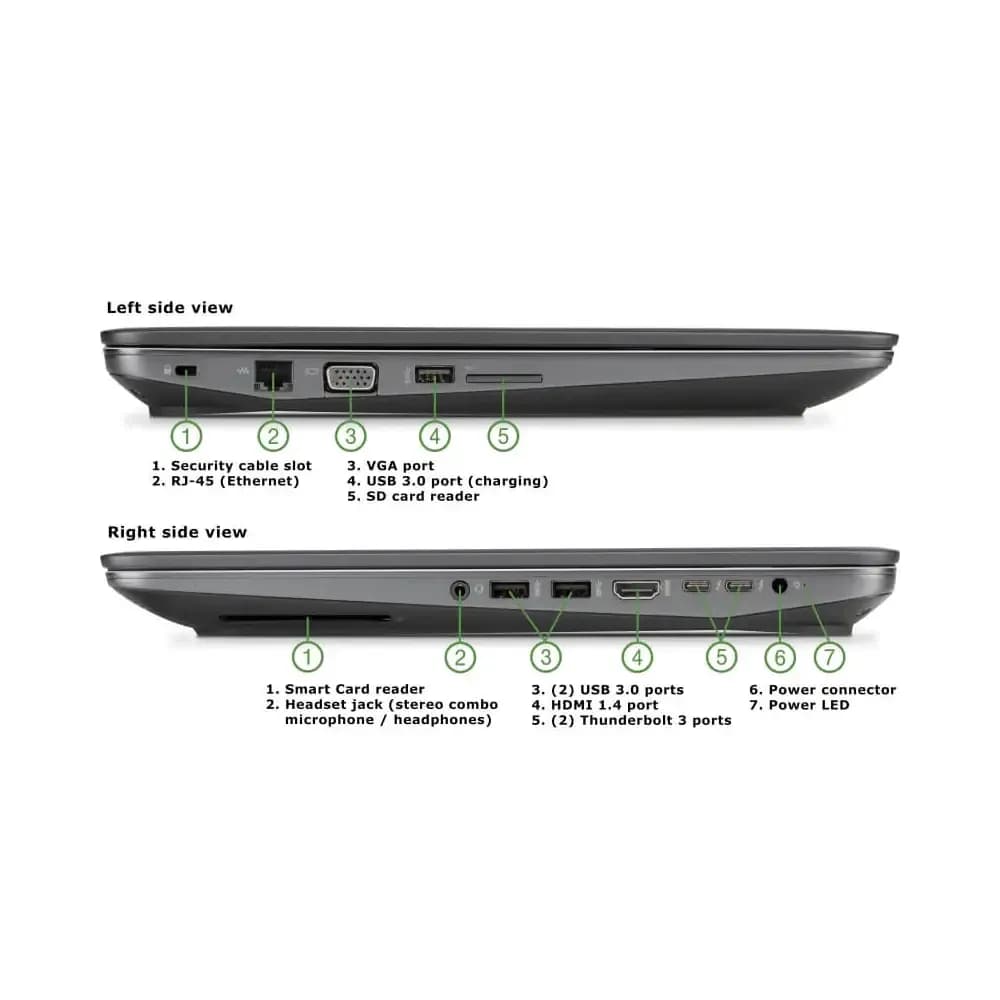
TL;DR The HP ZBook 15 G3 remains one of the smartest refurbished workstation laptops in 2026 because its port ecosystem still solves real professional problems better than many new ultrabooks. With dual Thunderbolt 3 ports, three USB-A ports, HDMI, VGA, Ethernet, SD card access, and excellent docking compatibility, it supports engineering labs, finance desks, CAD workstations, creators, and multi-monitor office setups without forcing users into costly dongle-heavy workflows. For Indian professionals who still rely on both modern and legacy peripherals, this remains one of the most rational connectivity-first workstation buys.
Why Connectivity Still Defines Real Workstation Productivity in 2026
In 2026, workstation productivity is no longer measured only by CPU cores, GPU tiers, or benchmark numbers. For engineers, analysts, architects, researchers, finance teams, and creators, connectivity directly affects workflow speed. Every extra adapter, unstable dongle, or missing port introduces friction into a professional setup. This is exactly why the HP ZBook 15 G3 still feels surprisingly modern despite its age.
Unlike current ultrabooks that aggressively prioritise thinness over practical expansion, the ZBook 15 G3 was designed around enterprise desk realism. HP built it for environments where users connect projectors, Ethernet, storage drives, SD cards, USB tools, wired peripherals, and docking stations in the same workday. That design philosophy has aged exceptionally well because many Indian work environments in 2026 still rely on a mix of legacy and modern accessories.
The smarter buying lens is simple: this laptop does not just save money on the purchase price, it also reduces adapter ecosystem costs. For refurbished buyers, this creates a cleaner desk, lower failure risk, and a far more dependable professional ownership experience than newer ultrabooks with limited ports.
Complete Port Layout: A True Workstation for Real Desks
The HP ZBook 15 G3 still stands out because it offers one of the most complete physical port ecosystems in the refurbished workstation market. The variety alone makes it highly future-practical for Indian offices, engineering colleges, coaching institutes, and research labs.
| Port Type | Quantity | Best Use Case |
|---|---|---|
| Thunderbolt 3 (USB-C) | 2 | Docks, SSDs, monitors |
| USB-A 3.0 | 3 | Drives, peripherals, tools |
| HDMI 1.4 | 1 | Monitors, TVs, projectors |
| VGA | 1 | Legacy projectors and labs |
| RJ-45 Ethernet | 1 | Stable wired networking |
| SD Card Reader | 1 | Camera and field data |
| Audio Combo Jack | 1 | Calls and headsets |
This layout allows users to simultaneously connect Ethernet, external storage, wired peripherals, display outputs, and removable media without even touching a hub. For multi-device workflows, this remains a major productivity advantage in 2026.
What makes it even better is port distribution intelligence. Because connectors are spread sensibly across the chassis, cable management feels cleaner and desk setups remain less chaotic than systems that cluster every port on one side.
Dual Thunderbolt 3 Still Keeps It Competitive in Modern Workflows
The dual Thunderbolt 3 ports remain one of the biggest reasons the ZBook 15 G3 still feels capable in 2026. Even though Thunderbolt 4 and USB4 now exist, Thunderbolt 3’s 40Gbps bandwidth remains more than enough for most professional workloads.
For engineers and analysts, this means fast NVMe SSD enclosures can still be used for simulation datasets, CAD libraries, Power BI exports, backups, and large project archives without bottlenecks. For creators, it allows direct editing from external SSDs, quick media transfer, and strong dock-based expansion.
The docking workflow is where the real 2026 value emerges. A single Thunderbolt cable can instantly convert the laptop into a full workstation desk with:
- dual or triple displays
- Ethernet
- storage arrays
- wired keyboards and mice
- audio devices
- charging and desk cleanup
This keeps the ZBook highly competitive in hybrid office environments where users move between desk and travel setups daily.
HDMI, VGA, and Why It Still Excels in Mixed Infrastructure Environments
One of the most underrated reasons the ZBook 15 G3 remains relevant is its mixed-era display compatibility. The HDMI port still handles monitors, TVs, conference room displays, and projectors with zero adapter dependency. For corporate offices, CAD labs, classrooms, and coworking setups, this alone saves time every day.
The VGA port is where this machine becomes uniquely practical in India. Many universities, industrial labs, older meeting rooms, training centres, and factory control systems still use VGA projectors and legacy displays. Modern ultrabooks ignore this reality, forcing adapters that often fail at the worst moment. The ZBook solves it natively.
For triple-monitor productivity, users can comfortably combine HDMI, Thunderbolt dock outputs, and VGA. This makes the machine excellent for:
- CAD design
- simulation dashboards
- financial terminals
- documentation and research
- coaching presentations
This is exactly why it still feels stronger than many thin modern laptops for actual desk work.
USB-A, SD Card, and Ethernet: The Ports Modern Laptops Keep Removing Too Early
The three USB-A ports remain incredibly valuable because real work environments still depend on them. Mouse receivers, flash drives, lab instruments, security keys, legacy enterprise tools, printers, and external hard drives continue to rely heavily on USB-A. Having three onboard ports in 2026 is still a genuine quality-of-life advantage.
The SD card reader adds major workflow value for creators, field engineers, drone operators, researchers, and embedded systems teams. Camera imports, field logs, removable datasets, and DSLR workflows become much faster when the reader is built into the chassis.
Ethernet may be the most important removed port in modern laptops. In offices, NAS environments, simulation labs, and secure workstations, wired networking still delivers lower latency and higher stability than Wi-Fi. The ZBook’s RJ-45 port makes it a natural fit for enterprise desks even in 2026.
Why the ZBook 15 G3 Still Remains One of the Smartest Connectivity-First Refurbished Workstation Buys
The strongest final takeaway is simple: the HP ZBook 15 G3 still remains one of the smartest refurbished workstation laptops because it was designed for workflow continuity before thinness became the industry obsession.
Its biggest strength in 2026 is not just the number of ports, but the quality of problems it solves: Thunderbolt docks, HDMI projectors, USB-A lab tools, SD imports, Ethernet NAS access, and VGA classroom compatibility all remain real scenarios across Indian professional environments.
For engineers, professors, analysts, CAD users, finance teams, SME offices, and creators who need multi-monitor productivity with both modern and legacy systems, the ZBook 15 G3 still remains one of the most rational refurbished workstation investments heading into 2027.
Frequently Asked Questions
Q. Does the HP ZBook 15 G3 still support modern docking stations in 2026?
Yes, the dual Thunderbolt 3 ports still work excellently with modern compatible docks for multi-monitor setups, Ethernet, storage, and desk peripherals.
Q. Is VGA still useful in 2026?
Yes, especially in universities, industrial labs, coaching centres, and older office meeting rooms that still use VGA-based projectors and displays.
Q. Can the ZBook 15 G3 handle triple-monitor setups?
Yes, it can comfortably support triple displays using a combination of HDMI, Thunderbolt dock outputs, and VGA.
Q. Why are USB-A ports still important?
Because real professional workflows still rely on flash drives, mouse receivers, security dongles, hard drives, and lab equipment that continue to use USB-A.
Q. Is it better than modern ultrabooks for office connectivity?
For connectivity-focused workflows, absolutely yes. It eliminates the need for multiple hubs and supports both legacy and modern peripherals natively.
Ready to upgrade your tech?
Browse our collection of quality refurbished products at unbeatable prices.






