
HP 255 G10
This laptop has a very little audience considering its cost-to-value proposition. There are many better laptops people can buy in that price range.

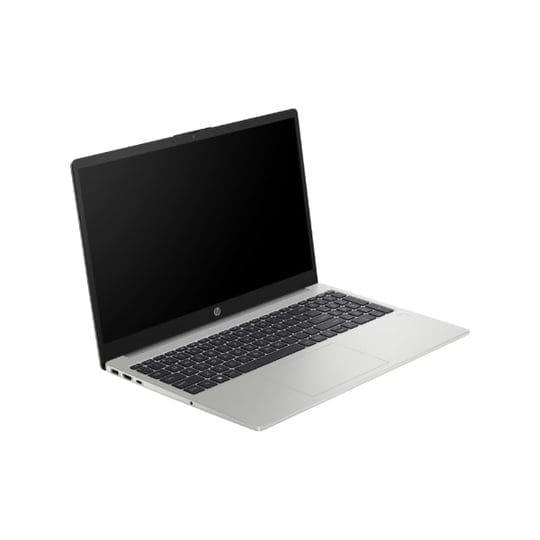
TL;DR The HP 255 G10 with AMD Ryzen 3 7320U is a strictly basic-use budget laptop in India’s 2026 market, best suited for online classes, MS Office, browser work, and backup-device usage. While the low price and Ryzen branding make it look attractive, the real buying decision depends on longevity expectations. With 8GB RAM now being only the minimum baseline and the Ryzen 3 7320U positioned as an entry-level efficiency chip, this laptop makes sense only for light users with a tight budget, not for buyers expecting 3–5 years of smooth multitasking growth.
Why the HP 255 G10 Needs a Very Different Buying Mindset in 2026
The HP 255 G10 is the kind of laptop that looks compelling at first glance because it checks the right budget-box keywords: Ryzen 3 processor, 512GB SSD, Full HD display, and a recognizable brand. In India’s sub-₹30,000 laptop market, these headline specifications often create the impression of a “safe buy.” The real issue, however, is not whether it works well today for basic tasks, but whether it continues to feel usable as your workload naturally expands over the next few years. This is exactly where buyers need a different mindset in 2026.
The Ryzen 3 7320U is part of AMD’s efficiency-first Mendocino lineup, built for affordable low-power laptops rather than sustained performance machines. For browsing, online classes, Office work, YouTube, PDF reading, and basic multitasking, it performs reliably enough. The problem begins when users expect it to stretch into heavier browser workflows, multiple Chrome tabs, beginner coding tools, analytics dashboards, or long-term Windows 11 background load. In 2026, software overhead has increased significantly, and what feels “smooth enough” today can begin to feel restrictive much faster than buyers anticipate.
This is why the HP 255 G10 should be approached as a short-to-medium horizon laptop. It is best for buyers with clearly defined light-use needs rather than users buying with aspirational future workloads in mind. That distinction is what separates a smart budget buy from a false economy.
Specifications and What They Actually Mean in Daily Use
On paper, the HP 255 G10 offers a very familiar budget configuration, but the meaning of these specs in 2026 is critical. The Ryzen 3 7320U’s 4-core, 8-thread architecture remains capable for standard office productivity and browser tasks, but it is not a performance-first CPU. It is optimized for lower power draw, entry-level responsiveness, and basic daily workflows rather than demanding multitasking.
The 8GB RAM configuration is the most important decision point. In 2026, 8GB should no longer be seen as “future-ready.” It is the practical minimum for Windows 11, Office apps, Teams or Meet calls, and a few browser tabs. Once usage expands into research-heavy tabs, AI tools, Canva, beginner IDEs, or heavier Excel sheets, the system can begin to feel memory-constrained. This is especially important because many Ryzen 3 7320U laptops use soldered LPDDR5 memory, which may not be upgradeable later.
| Specification | Details |
|---|---|
| Processor | AMD Ryzen 3 7320U |
| RAM | 8GB |
| Storage | 512GB SSD |
| Graphics | Integrated Radeon 610M |
| Display | 15.6-inch IPS |
| Battery | 41Wh |
| Weight | 1.5 kg |
| Price in India | ~₹29,000 |
| Best for | Office, classes, browsing |
The practical takeaway is simple: these are baseline-safe specs for light computing, but they do not create much performance headroom for workload growth.
Real-World Performance: Classes, Office, Browsing, and Beginner Coding
In real-world daily use, the HP 255 G10 performs best in highly predictable productivity workflows. Students attending online classes, users working in Word and PowerPoint, parents needing a home laptop, and users focused on browser-based tasks will generally find the machine adequate. Boot times remain fast thanks to the SSD, and the Ryzen 3 processor is stable enough for YouTube, OTT streaming, email, and everyday office work.
Where it starts showing limitations is workload density. Multiple Chrome tabs, Canva, Excel formulas, browser-based LMS portals, and video calls running together can create memory pressure on 8GB systems. The laptop does not become unusable, but the fluidity that buyers expect from a “new laptop” can drop sooner than expected. This is especially important for students who may begin with classes but later move into light coding, Python notebooks, or project tools.
For beginner coding, it is acceptable for VS Code basics, HTML/CSS, Python scripts, and lightweight SQL practice. However, Docker, Android Studio, multiple emulators, or browser-heavy MERN development workflows are not ideal on this hardware. The right way to frame this laptop is as a “basic academic starter device,” not a long-term technical learning machine.
Gaming, Battery, and the Long-Term Ownership Trade-Offs
The integrated Radeon 610M graphics can handle very light gaming, but buyers need realistic expectations. Competitive titles like Valorant, CS2, and older esports games can run at low settings with acceptable frame rates. This makes it usable for casual gaming breaks, but it is clearly not designed for sustained gaming workloads or modern AAA titles. Newer games after 2023 often require significantly lower settings and still struggle to remain consistently playable.
Battery life is another compromise point. The 41Wh battery is smaller than what many 2026 laptops now offer, which means the Ryzen 3’s efficiency advantages do not fully translate into class-leading runtime. In real-world usage, buyers can expect around 5–7 hours depending on brightness, streaming usage, and browser intensity. For students attending long college days or professionals working remotely, this can quickly become limiting.
The larger ownership concern is lifecycle relevance. Over a 3–5 year period, Windows updates, browser overhead, and heavier app ecosystems naturally increase baseline resource usage. This is why the HP 255 G10 makes sense only when buyers accept that it is a 2–3 year smooth basic-use machine rather than a longer-term growth laptop.
Who Should Buy the HP 255 G10 in India in 2026
The HP 255 G10 is best for buyers with a highly specific budget-first usage profile. Students attending online classes, users focused on Office and browser tasks, parents needing a family-use laptop, and buyers wanting a reliable secondary device can all justify this purchase. For these users, the SSD, IPS panel, and Ryzen efficiency are enough to deliver a comfortable basic experience.
It is also a strong fit for backup-device usage. Professionals who already own a stronger desktop or main laptop may find the HP 255 G10 useful as a travel or secondary productivity machine for email, presentations, and browser access.
Where it does not make sense is for buyers planning coding-heavy learning, long-term professional growth, design work, or multitasking-heavy workflows. In those cases, spending slightly more on a Ryzen 5 or 16GB RAM machine dramatically improves long-term value. That extra upfront cost often saves an earlier replacement cycle.
Why the HP 255 G10 Is Only a Smart Buy for the Right User
The strongest final takeaway is simple: the HP 255 G10 is not a bad laptop, but it is a very context-sensitive one. For light users with a strict budget, it delivers dependable basic computing, a comfortable IPS display, fast SSD storage, and enough performance for classes, office work, and browser tasks. In that context, it remains a rational budget buy.
Where buyers go wrong is expecting long-term workload scalability from an entry-level Ryzen 3 plus 8GB RAM machine in 2026. Software demands are rising too quickly for this to remain a safe 4–5 year performance buy unless usage stays extremely light. That is why the smartest decision framework is simple: buy it only if your workflow is already clearly basic and unlikely to expand significantly.
For students, families, and secondary-device users with a hard budget ceiling around ₹30,000, the HP 255 G10 remains usable. For everyone else, spending a little more today can create significantly better ownership value tomorrow.
Frequently Asked Questions
Q. Is the HP 255 G10 good for students in 2026?
Yes, it is good for students whose workload is limited to online classes, assignments, browsing, PDFs, and MS Office. However, students planning coding, analytics, or design-heavy learning should consider a Ryzen 5 or 16GB alternative.
Q. Is 8GB RAM enough for this laptop in 2026?
It is the minimum safe baseline for Windows 11 and light multitasking. For long-term smoothness, 16GB is now the recommended standard, especially if RAM is not upgradeable later.
Q. Can the HP 255 G10 handle coding?
Yes, it can manage beginner coding such as Python, HTML/CSS, and VS Code basics, but heavier IDEs, Android Studio, or multi-container development workflows may feel slow.
Q. Is the HP 255 G10 good for gaming?
It is suitable only for basic esports and older games at low settings. Modern AAA gaming is not a realistic use case for this laptop.
Q. Should I buy the HP 255 G10 in 2026?
Buy it only if your budget is tight and your workload is clearly limited to browsing, Office, classes, and streaming. For any long-term performance expectations, a slightly higher budget will offer much better value.
Ready to upgrade your tech?
Browse our collection of quality refurbished products at unbeatable prices.






